
Products compared

Canon
Canon PIXMA TR7120 Wireless Multi-Function Home Printer
The white U.S. Canon PIXMA TR7120 is SKU 7178C002. Canon lists print, copy and scan, a 35-sheet ADF, a 100-sheet plain-paper cassette and automatic two-sided printing.
Model PIXMA TR7120 (SKU 7178C002)
Amazon ASIN B0FMB4JBJ8
Canon
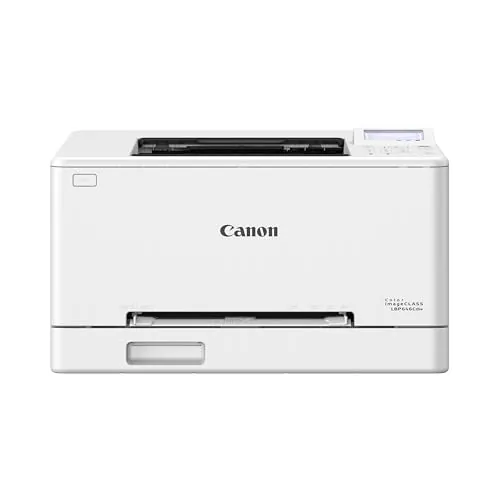
Canon Color imageCLASS LBP646Cdw Wireless Duplex Laser Printer
The white U.S. Canon Color imageCLASS LBP646Cdw is SKU 6929C008. Canon lists its function as Print, with a 250-sheet cassette plus one-sheet manual feed; the product title identifies it as a duplex laser printer.
Model Color imageCLASS LBP646Cdw (SKU 6929C008)
Amazon ASIN B0FMBVCX6S
Differences that matter
Sources for Paper refill and one-off media
Sources for Physical clearance at the desk
Sources for Ink/toner and setup connections
Decide whether you need a scanner in the printer
This pair is not a like-for-like all-in-one comparison. Canon's PIXMA TR7120 is listed for print, copy and scan, with a flatbed and a 35-sheet ADF. Canon lists the Color imageCLASS LBP646Cdw as a color laser printer with the function Print. If someone in the household scans forms or copies paperwork at the printer, that difference matters more than the two models sharing the Canon name.
The TR7120's ADF is listed for 35 sheets of plain paper or five legal-size sheets. Canon also lists a flatbed, so you have a separate scan path for originals that should not go through a feeder. The LBP646Cdw page does not document scan or copy hardware; plan on a separate device for those tasks if choosing it.
Read duplex as a print feature unless scanning is explicitly confirmed
Canon lists two-sided printing for the TR7120 and two-sided copying in its support specifications. The LBP646Cdw product title includes the word Duplex, but the exact product page lists its function as Print. A printer can print both sides without scanning both sides of an original, so do not use a duplex label as evidence of a two-sided ADF scanner.
If you need one-pass capture of both sides of a stack, the opened exact-model Canon pages do not confirm that capability for either model. The TR7120 does have a documented ADF scan path; check its manual for the exact supported duplex-scan method before relying on it.
Measure paper access and desktop clearance
The PIXMA TR7120 cassette is listed for 100 sheets of plain paper. Canon gives its closed dimensions as 14.8 × 14 × 8.2 inches (L × W × H) and its paper-installed size as 14.8 × 20.2 × 9.5 inches. Use the larger setup figure when checking a shelf where paper access or a paper path could be blocked.
The LBP646Cdw has a 250-sheet cassette and one-sheet manual feed, so its paper routine can suit a larger everyday stack plus occasional supported media. Canon lists unit dimensions of 16.8 W × 16.5 D × 10.5 H inches. This is a unit measurement, not a guarantee of the clearance needed to open trays or service the machine; sketch the desk and operating space before buying.
Check consumables and the network connection
The TR7120 box listing names PG-295 black and CL-286 color cartridges, and Canon describes its two-tank hybrid ink system. LBP646Cdw's box listing names starter Canon Genuine Toner 075 CMY and black, and the product page names the 075/075 H toner family. This is a supply-family check, not a value comparison: yields differ by supply and test basis, and actual use and current supply prices were not evaluated.
Canon lists Hi-Speed USB and dual-band Wi-Fi for the TR7120. The LBP646Cdw adds Ethernet and Wi-Fi Direct alongside USB 2.0 and Wi-Fi. If the printer will live near a wired network jack, confirm which port you intend to use; if it will use USB, check cable and host requirements from the exact setup guide.
Product details
Canon PIXMA TR7120 Wireless Multi-Function Home Printer
- Functions and document feeder
- Print/copy/scan; flatbed plus 35-sheet ADF (35 plain sheets or 5 legal sheets) Source
- Paper and duplex printing
- 100 sheets of plain paper in the cassette; two-sided printing supported Source
- Placement dimensions
- 14.8 × 14 × 8.2 in closed; 14.8 × 20.2 × 9.5 in with paper installed (Canon order: L × W × H) Source
- Included/compatible ink
- Box lists PG-295 black and CL-286 color cartridges; Canon identifies a two-tank hybrid ink system Source
Canon Color imageCLASS LBP646Cdw Wireless Duplex Laser Printer
- Listed function
- Print; Canon's page does not list copy, scanning or fax functions Source
- Paper feeds
- 250-sheet standard cassette plus a one-sheet manual-feed slot; listed range 3 × 5 to 8.5 × 14 in Source
- Placement dimensions
- 16.8 W × 16.5 D × 10.5 H in (unit dimensions listed by Canon) Source
- Toner and connections
- Canon Genuine Toner 075/075 H CMYK; USB 2.0, Gigabit Ethernet, Wi-Fi and Wi-Fi Direct Source
Before you buy
Community discussions
A TR7120 owner checks one-off sticker paper
Canon PIXMA TR7120 Wireless Multi-Function Home Printer
A TR7120 owner reported that sticker stock they had previously used stopped feeding after they opened a fresh pack.
What to check
Check the listed media types and feed path for any label or sticker stock you use, then try a sample from your actual pack.
Common questions
Can the LBP646Cdw scan or make copies?
Canon lists its function as Print, and the exact product page does not document scanning or copying. The PIXMA TR7120 is the model in this pair for which Canon lists print, copy and scan.Canon PIXMA TR7120 Wireless Multi-Function Home Printer (US product page)Canon Color imageCLASS LBP646Cdw Wireless Duplex Laser Printer (US product page)
How many pages can the TR7120 ADF take?
Canon Support lists a 35-sheet ADF for plain paper and five sheets for legal-size paper. It also lists both a flatbed and the ADF as scan inputs.Canon Support for PIXMA TR7120 (US specifications)
Does duplex printing mean either printer can scan two-sided originals automatically?
No. Duplex printing is an output feature. The TR7120 has documented scan hardware, but Canon's sources do not confirm automatic two-sided scanning through its ADF. The LBP646Cdw source lists print only and does not document any scanner.Canon PIXMA TR7120 Wireless Multi-Function Home Printer (US product page)Canon Support for PIXMA TR7120 (US specifications)Canon Color imageCLASS LBP646Cdw Wireless Duplex Laser Printer (US product page)
Which one fits a desk with a specific shelf depth?
Use the published dimensions as a starting check, then include tray and paper clearance. Canon gives the TR7120 closed and paper-installed dimensions; for LBP646Cdw it lists unit dimensions. The stated values describe different measurement states, so measure the actual setup and required access space.Canon PIXMA TR7120 Wireless Multi-Function Home Printer (US product page)Canon Color imageCLASS LBP646Cdw Wireless Duplex Laser Printer (US product page)
Sources and scope
This is a manufacturer-specification workflow comparison, not a hands-on or controlled test. Canon documents TR7120 scanning/copying and an ADF, while the LBP646Cdw page lists Print only; exact LBP646Cdw duplex-scan capability is not claimed. The TR7120's available source does not establish automatic duplex scanning through the ADF. Published dimensions reflect different states (TR7120 closed and with paper installed versus LBP646Cdw unit), so clearance advice requires the buyer to measure their installation. No cost-per-page, current price, output-quality or reliability winner is inferred.
Related comparisons

Canon PIXMA TR7120 vs TR8620a: Ink, Paper Feeds and Scanning
Both printers can automatically print on both sides and use an ADF, but neither automatically scans both sides of an original through that feeder. TR7120 holds up to 35 Letter sheets in its ADF; TR8620a holds 20 and adds fax, five individual ink tanks, a 100-sheet rear feed and Ethernet. Match the exact cartridge family and the paper or scan task you do most.
Read comparison
Canon PIXMA TR7120 vs TS6520: ADF, Ink, Duplex & Space Compared
The Canon PIXMA TR7120 adds a 35-sheet letter / 5-sheet legal automatic document feeder (ADF); the TS6520 scans from its flatbed only. Both use PG-295 black and CL-286 color ink, list a 100-sheet plain-paper cassette, and print automatically on both sides. Compare the feeder's real workflow value with the height and access your space allows.
Read comparison