
Products compared
Logitech
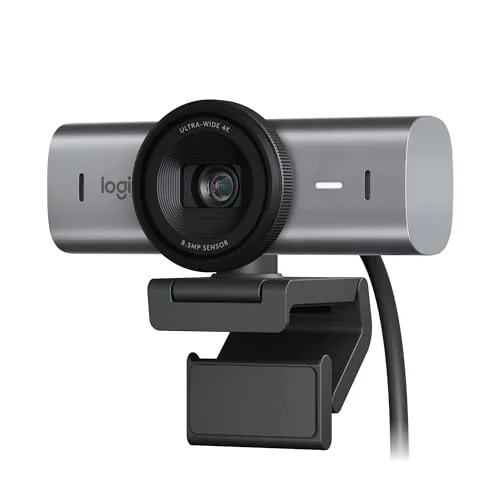
Logitech MX Brio Ultra HD 4K Webcam, Graphite
The Graphite MX Brio. Logitech lists 4K at 30 fps or 1080p at 60 fps, Show Mode for pointing the camera down at desk work, and image controls through Logi Options+ or G HUB. Logitech Support identifies a detachable USB-C-to-C USB 3.0 cable and a magnetic mount with a 1/4-inch thread.
Model 960-001545
Amazon ASIN B0BFJ4CRKD
Logitech
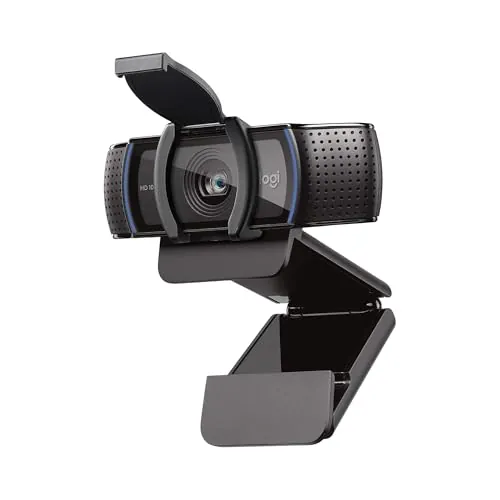
Logitech C920e Business Webcam, Black
The black C920e Mic Enabled part. Logitech lists 1080p/30 or 720p/30, a fixed 78° diagonal field of view and a 5-foot attached USB-A cable. The page describes Logi Tune zoom and color controls; its attachable shutter covers the camera lens. Do not infer the microphone’s active state from that shutter.
Model 960-001401
Amazon ASIN B09DVGV7BH
Differences that matter
What matters most to you?
Choose a priority to see what it changes.
Sources for Manufacturer-listed capture modes
Sources for Framing and control
Sources for Cable, port and mounting
Start with the mode your app can use
For the exact Graphite MX Brio 960-001545, Logitech lists 4K at 30 fps or 1080p at 60 fps. It also describes software framing and image controls. The C920e 960-001401 page lists 1080p/30 or 720p/30, a fixed 78° diagonal view and 1x digital zoom. Those are camera specifications, not proof that every call app, host or dock exposes them.
Write down the target app, computer and desired resolution/frame rate before choosing. If 4K/30 or 1080p/60 will not be used, the C920e's listed 1080p/30 ceiling may be enough; if you need a desk-facing view for notes, Logitech documents Show Mode on MX Brio.
Check the port and how the camera will sit
MX Brio's support guide lists a detachable USB-C-to-C USB 3.0 cable, magnetic mount with removable adapter and 1/4-inch thread. C920e's exact part page lists an attached 5-foot USB-A cable and adjustable universal clip. The C920e page also documents a 1/4-inch tripod thread. Confirm the actual computer port, any adapter or dock's data/video support, cable reach and monitor geometry before buying; a USB-C-shaped connector by itself does not guarantee a particular call mode.
For desk sharing, Logitech describes MX Brio Show Mode as tilting the webcam down toward notes or sketches. If the camera will stay at eye level with a fixed frame, C920e's documented angle may meet the need without those extra framing controls.
Treat camera privacy and microphone state separately
MX Brio has a built-in rotating shutter that blocks the camera; C920e uses an attachable shade that covers the lens. Neither cited description says the shutter mutes audio. Logitech identifies two beamforming noise-reducing microphones on MX Brio and two omnidirectional microphones on C920e, but this guide does not compare their sound in a room or call.
For C920e part 960-001401, Logitech's product-information material labels it Mic Enabled and distinguishes part 960-001384 as Mic Disabled. A separate general C920e activation article says the microphone is disabled by default but does not identify a part number. Because the statements have different specificity, check the selected input and setting on the actual 960-001401 in Logi Tune before a call; do not treat the lens shade as a mute control.
Product details
Logitech MX Brio Ultra HD 4K Webcam, Graphite
- Listed capture modes
- UHD 4K at 30 fps or 1080p at 60 fps; check that the host and app expose the mode you intend to use. Source
- Desk framing and software
- Show Mode tilts the camera down toward notes or sketches; Logitech describes crop, field-of-view, zoom and image controls in Logi Options+ or G HUB. Source
- Cable and mount
- The support guide lists a detachable USB-C-to-C cable with USB 3.0 standard and a magnetic mount with a 1/4-inch thread; check your host's USB-C data/video path and the exact box contents. Source
Logitech C920e Business Webcam, Black
- Listed capture and view
- 1080p/30 or 720p/30, fixed 78° diagonal field of view, and 1x digital zoom on the exact 960-001401 page. Source
- USB cable and package
- The exact part page lists a 5-foot attached USB-A cable and an attachable privacy shutter; allow for its fixed cable route at the desk. Source
- Microphone configuration caveat
- Logitech's product-information page labels 960-001401 Mic Enabled and distinguishes 960-001384 Mic Disabled; a generic C920e help page separately describes enabling a disabled default without naming the part number. Verify the actual unit in Logi Tune. Source
Before you buy
Community discussions
Using MX Brio settings on a managed laptop
Logitech MX Brio Ultra HD 4K Webcam, Graphite
An MX Brio owner could use the camera on a work laptop and wanted to know which settings they could change without installing Options+.
What to check
If your workplace limits which apps you can install, check what controls you can use with the software already available to you.
Checking C920e framing settings in OBS
Logitech C920e Business Webcam, Black
A Logitech C920e owner wanted to know whether their framing would stay the same after closing and reopening OBS.
What to check
If you use the same framing every day, check what happens when you restart the app you plan to use.
Common questions
Will the MX Brio run at 4K in every meeting app?
No. Logitech lists 4K/30 and 1080p/60 camera modes, but the host, connection path and application decide which mode is available in a particular call. These listed modes are not a promise about a specific meeting setup.MX Brio UHD 4K Webcam, Graphite, part 960-001545Getting Started - MX BRIO
Does the C920e's attachable shutter mute its microphone?
Logitech describes the attachable shade as covering or exposing the camera lens. It does not document the shade as a microphone mute. Logitech's exact part information calls 960-001401 Mic Enabled, while generic C920e help describes a disabled default without a part number; check the actual microphone setting in Logi Tune.C920e Business Webcam, part 960-001401Specifications - C920e Business WebcamHow do I activate the microphones on my webcam?
Which one is easier to mount on a monitor or tripod?
Both manufacturers document clip-based monitor mounting and a 1/4-inch tripod option. MX Brio's support guide describes its magnetic mount and removable adapter; C920e's exact page lists a universal mounting clip. Check the monitor's shape and the included adapter in the exact box before relying on a particular setup.Getting Started - MX BRIOC920e Business Webcam, part 960-001401
Sources and scope
This is a feature and setup comparison based on Logitech's published U.S. product pages and official support materials. No meeting-app, image-quality or microphone performance was tested. App, host, cable and USB-port capabilities can limit the capture mode available in a real call. The C920e product is the black 960-001401 part, not the distinct 960-001384 mic-disabled part. Logitech materials describe 960-001401 as mic-enabled, while a general C920e microphone help article says the microphone is disabled by default without identifying a part number; verify the actual device setting in Logi Tune. A camera shutter covers the lens and is not a microphone mute. Neither product's software, certification or supported mode should be generalized to every operating system or conference application.
Related comparisons

Elgato Facecam 4K vs Logitech MX Brio: Frame Rates, Focus and Desk Use
Elgato Facecam 4K can output 4K60, but only as MJPG over USB 3.0; USB 2.0 tops out at 1080p60. Logitech MX Brio's published maximum is 4K30 or 1080p60 and requires USB-C with USB 3.0 support. The Elgato uses fixed focus and has no built-in mic; MX Brio adds autofocus, dual mics and a rotating privacy shutter.
Read comparison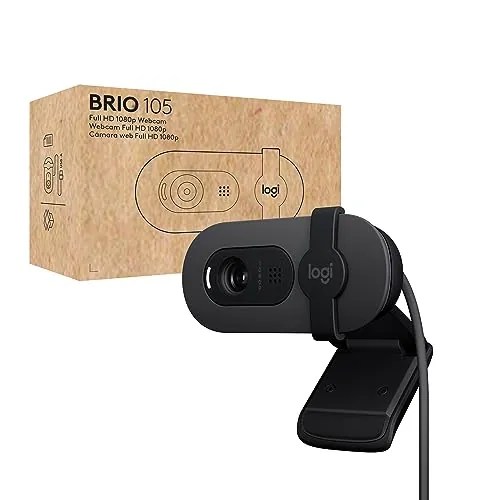
Logitech Brio 105 960-001579 vs MX Brio 960-001545: 1080p Calls or 4K Capture?
The Graphite Logitech Brio 105 (960-001579) tops out at 1080p/30, has fixed focus and an attached USB-A cable. The Graphite MX Brio (960-001545) lists 4K/30 and 1080p/60 modes, a USB-C 3.0 connection, advanced Logitech software controls and a tilt-down Show Mode. These are published capabilities, not an image-quality test: check your video app, computer port and software policy before choosing the higher-spec camera.
Read comparison