
Products compared
ProtoArc
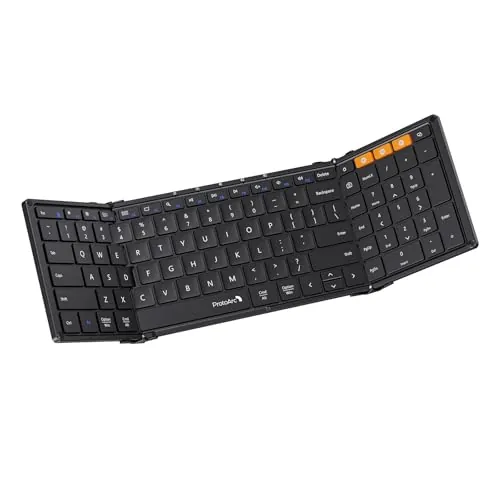
ProtoArc XK01 Full-Size Tri-Fold Bluetooth Keyboard (Black)
Standard black XK01 with a three-section folding body, number pad, Bluetooth Low Energy and rechargeable battery. ProtoArc lists a USB-C recharging cable in the package and gives folded dimensions of 8.48 × 4.71 × 0.82 inches.
Model XK01
Amazon ASIN B09TW35H1Z
Logitech
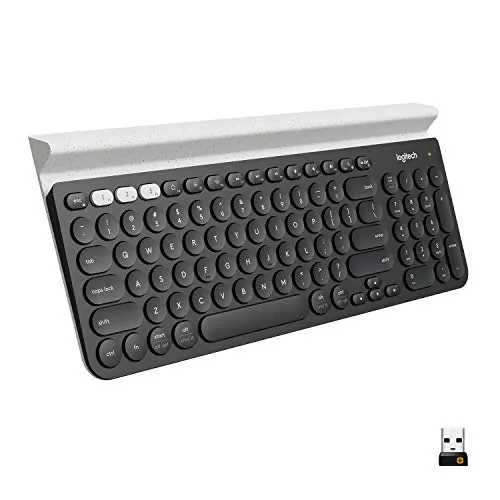
Logitech K780 Multi-Device Wireless Keyboard (Dark Grey/Speckled White)
U.S. Dark Grey/Speckled White K780 configuration with a fixed body, integrated rubber phone/tablet cradle, number pad and Easy-Switch support for up to three devices.
Model 920-008025
Amazon ASIN B01LZTBKBG
Differences that matter
What matters most to you?
Choose a priority to see what it changes.
Sources for Packing shape and desk setup
Sources for Phone or tablet placement
Sources for Charging and replacement items
Sources for Shared layout and switching capacity
Which keyboard suits your routine?
The core tradeoff is storage shape versus an always-attached place for another screen. The black ProtoArc XK01 folds into three sections, and ProtoArc publishes its folded footprint. The Logitech K780 stays as a fixed keyboard, with a rubber cradle built into the top edge. A frequent traveler can compare the XK01 dimensions to a bag compartment; a desk user can ask whether the K780 cradle is useful enough to keep permanently beside the computer.
Do not read the cradle description as a confirmed fit for every phone or cased tablet. Logitech names devices up to a 12-inch iPad but does not list the case thickness or guarantee individual device fit. The cited XK01 sources do not establish an equivalent integrated cradle, so plan device support separately if you need it.
Check host connections before packing
Both makers describe switching among three devices, so the channel count alone does not separate them. XK01's official specifications list Bluetooth Low Energy and its FAQ explains choosing a channel and entering pairing mode. The page's package list names a keyboard, USB-C charging cable and guide; it does not list a Bluetooth USB receiver.
K780's current U.S. product page lists Bluetooth and the Unifying USB receiver. Its setup guide describes the included receiver as pre-paired and stored under the battery door. If a work computer must connect through USB, check that the current exact package includes the receiver and that your host can use the supported route. Logitech's guide contains older software and operating-system instructions; check current Logitech support for your computer rather than treating those dated versions as current requirements.
Plan the power routine and exact package
XK01 has a rechargeable battery and ProtoArc lists a USB-C cable in the package. Its FAQ adds an important constraint: charge through USB-A-to-USB-C, not by assuming a USB-C-to-USB-C cable will work. If your travel kit is USB-C-only, resolve that cable and power-source question before you depend on the keyboard while away.
K780 uses two replaceable AAA batteries, according to Logitech's support instructions. The current product page does not confirm whether this exact retail package includes batteries. Confirm the 920-008025 variant and inspect the current box contents, especially if receiving the Unifying adapter or cells on arrival is part of your plan.
Product details
ProtoArc XK01 Full-Size Tri-Fold Bluetooth Keyboard (Black)
- Folded size
- 8.48 × 4.71 × 0.82 inches, according to ProtoArc's product specification. Source
- Pairing
- Bluetooth Low Energy with up to three device channels; ProtoArc's FAQ describes holding the selected channel button to enter pairing mode. Source
- Power and listed box contents
- Rechargeable Li-Po battery; the listed package contents include the keyboard, a USB-C charging cable and user guide. ProtoArc's FAQ says charging uses a USB-A-to-USB-C cable. Source
Logitech K780 Multi-Device Wireless Keyboard (Dark Grey/Speckled White)
- Device cradle
- Logitech describes an integrated rubber cradle for phones and tablets up to a 12-inch iPad; fit with a particular device or case is not guaranteed. Source
- Pairing choices
- The current U.S. product page lists Bluetooth and the Unifying USB receiver; Logitech's setup guide says the included receiver is pre-paired and stored under the battery door. Up to three devices can be connected. Source
- Power service
- Logitech's support instructions specify replacing two AAA batteries; the current product page does not establish whether batteries are included in the exact retail box. Source
Before you buy
Community discussions
Choosing a receiver for a replacement keyboard
Logitech K780 Multi-Device Wireless Keyboard (Dark Grey/Speckled White)
A K780 owner looking for a replacement says they would prefer a keyboard using the Bolt receiver already used by their mouse, while remaining open to other wireless receiver options. The post does not test the K780 with Bolt.
What to check
Check whether each host needs a USB receiver or can use Bluetooth, then verify the exact keyboard's listed connection options. The post is one buyer's receiver preference, not evidence that either keyboard supports the other's receiver.
Using a Galaxy Tab Ultra in the built-in cradle
Logitech K780 Multi-Device Wireless Keyboard (Dark Grey/Speckled White)
A Galaxy Tab Ultra owner says they use the K780's built-in stand but are concerned about the hard plastic edge contacting the glass. They ask about a separate riser; they do not report screen damage.
What to check
The K780 is a fixed keyboard with a cradle, while the XK01 folds. Check the fit of your tablet and case in the cradle and the desk space available for a separate stand before choosing; the post does not establish screen protection or damage.
Common questions
Do I lose a device channel by choosing the folding XK01?
No channel-count tradeoff is documented: ProtoArc lists three Bluetooth device channels for XK01, and Logitech lists switching among up to three devices for K780. The difference is that the K780 also documents a Unifying USB-receiver route, while XK01's cited sources describe Bluetooth Low Energy.XK01 - Portable Full-Size Tri-Fold KeyboardK780 Multi-Device Wireless Keyboard, U.S. product pageLogitech K780 Wireless Multi-Device Keyboard setup guide
Can I use any USB-C cable to charge XK01?
Do not assume so. ProtoArc's FAQ says to use a USB-A-to-USB-C cable and a suitable power source, even though the keyboard itself has a Type-C charging port.FAQ - XK01
Will my tablet and case fit on the K780?
Logitech describes the cradle as accommodating devices up to a 12-inch iPad, but the source does not guarantee fit for a particular model, thickness or case. Check the physical device-and-case measurements against the cradle before buying.K780 Multi-Device Wireless Keyboard, U.S. product page
Sources and scope
This guide covers the standard black XK01 identified by listing data product 7511 / ASIN B09TW35H1Z and the U.S. Logitech K780 920-008025 Dark Grey/Speckled White identified by product 7530 / ASIN B01LZTBKBG. The manufacturer pages describe model features, but do not certify a retailer ASIN-to-part-number mapping for XK01. ProtoArc lists Bluetooth Low Energy and a USB-C charging cable; its FAQ specifies USB-A-to-USB-C charging. Logitech's current U.S. product page describes the K780 and Unifying receiver route, while its setup guide explains that a pre-paired receiver is supplied. Neither cradle description guarantees fit for every device thickness or case. This is a source-based setup comparison, not a typing, comfort, connection-reliability, battery-life or durability test.
Related comparisons

Logitech MX Keys S vs K780: Desk Footprint, Receiver and Phone Cradle
This U.S. comparison covers the Graphite Logitech MX Keys S (920-011558) and Speckled White Logitech K780 (920-008025). MX Keys S is 430.20 mm wide and 131.63 mm deep, uses Bluetooth or a Logi Bolt USB receiver, and its rechargeable battery can charge over USB-C while you continue typing. K780 is 380 mm wide and 153 mm deep, uses Bluetooth or Logitech's Unifying receiver, and its built-in cradle holds phones through a 12-inch iPad class; Logitech lists a maximum device thickness of 11.3 mm. K780 uses two replaceable AAA cells and has no backlight. The practical choice is whether your desk and phone/tablet routine benefit more from an integrated cradle or from illumination and rechargeable upkeep—not a typing-quality verdict.
Read comparison
Logitech K585 vs K780: Two-Device or Three-Device Keyboard?
Both Logitech keyboards combine a number pad with a built-in device cradle and can connect wirelessly. The K585 supports two paired devices total; the K780 supports up to three. Check how many hosts you need to keep paired, which connection each host supports, and whether your phone or tablet fits the cradle before choosing.
Read comparison