
Products compared
Razer
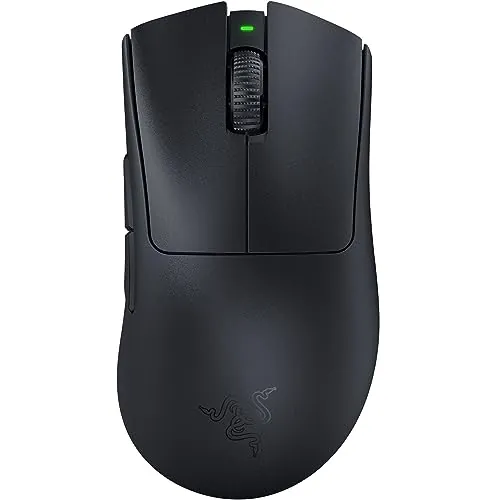
Razer DeathAdder V3 Pro Wireless Gaming Mouse, Black
Razer documents a right-handed ergonomic form, a raised arch and a ring-finger ledge. The manufacturer's US page describes 1,000 Hz as the default and up to 8,000 Hz with a HyperPolling Wireless Dongle sold separately. Razer's general manual includes a dongle in its package list, so confirm the exact Amazon seller's contents if 8 kHz matters.
Model DeathAdder V3 Pro · Black
Amazon ASIN B0B6XZLNHQ
Logitech G
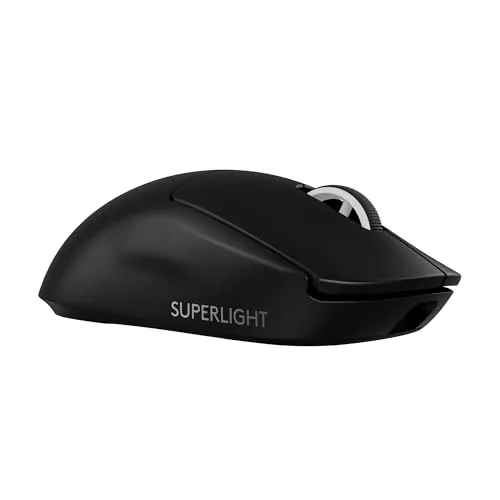
Logitech G PRO X SUPERLIGHT 2 LIGHTSPEED Wireless Gaming Mouse, Black
The US Logitech page identifies the assigned 910-006628 selection as Black. Logitech lists 60 g and 125 × 63.5 × 40 mm, and its specification and setup guide list the LIGHTSPEED receiver and extension adapter in the box. The mouse and receiver need supported firmware plus G HUB settings for the documented 8 kHz mode; the preinstalled versions are not established here.
Model 910-006628 · Black
Amazon ASIN B09NBWL8J5
Differences that matter
What matters most to you?
Choose a priority to see what it changes.
Sources for Shell shape and hand fit
Sources for Receiver included versus optional upgrade
Start with the shape you can actually assess
Razer describes the DeathAdder V3 Pro as a right-handed ergonomic mouse and calls out a raised arch and ring-finger ledge. Those are useful shape cues if you prefer a contoured shell. They do not establish that it will feel comfortable to you.
For the PRO X SUPERLIGHT 2, Logitech publishes 125 × 63.5 × 40 mm and 60 g. Compare those measurements with a mouse already on your desk if you have a size reference. Logitech's checked specifications do not classify the shell as suitable for a particular hand orientation, so do not infer one from the dimensions alone.
Separate the mouse from the 8 kHz accessory and firmware
Razer identifies 1,000 Hz as the DeathAdder V3 Pro's default polling rate and says the up-to-8,000-Hz path needs the HyperPolling Wireless Dongle and current firmware. Its US product page labels the dongle sold separately. A general Razer manual lists a dongle in the package contents, but does not identify the assigned Amazon retail kit, so verify the exact seller's box before treating that accessory as included.
Logitech lists up to 8,000 Hz for the PRO X SUPERLIGHT 2 and lists a receiver plus extension adapter in the box. Its G HUB release notes name mouse firmware 32.3.26 and receiver firmware 7.2.11 as adding 8 kHz support. Those notes are a version-specific ceiling, not proof that every unit ships with those versions. Use G HUB to inspect and configure the device if 8 kHz is part of your purchase requirement.
Check the cable route and onboard controls
Both manuals show a USB-C mouse connection for charging/data and wired use. Razer's guide says the bottom button powers the mouse and cycles DPI stages; Logitech's setup guide labels the power switch and USB charging/data port. If you switch to a cable during play or charge at your desk, check that the port location and cable route suit your setup.
The two configuration paths are different: Razer documents Synapse for remapping and customizing settings; Logitech directs users to G HUB for settings such as DPI and report rate. Decide whether you are willing to install the relevant software before treating remapping or a high report rate as part of the experience.
Product details
Razer DeathAdder V3 Pro Wireless Gaming Mouse, Black
- Documented shell shape
- Right-handed ergonomic form with a raised arch and ring-finger ledge; these descriptions do not establish personal comfort or fit. Source
- Default and upgrade polling path
- Razer's US page lists 1,000 Hz as default and says up to 8,000 Hz requires the separately sold HyperPolling Wireless Dongle and current firmware. Source
- Wired and charging connection
- USB Type-C mouse port; the user guide documents wired use and charging through its USB-A to USB-C cable. Source
Logitech G PRO X SUPERLIGHT 2 LIGHTSPEED Wireless Gaming Mouse, Black
- Listed dimensions and weight
- 125 × 63.5 × 40 mm and 60 g, per Logitech's model specification. Source
- Receiver and box contents
- Logitech lists a USB LIGHTSPEED receiver and receiver extension adapter in the box; the setup guide shows the receiver installed in the extension adapter. Source
- 8 kHz software and firmware condition
- Logitech's release notes list mouse firmware 32.3.26 and receiver firmware 7.2.11 as adding 8 kHz report-rate support; the page does not state the firmware on a retail unit. Source
Before you buy
Community discussions
A Superlight 2 owner still looking for a comfortable shape
Logitech G PRO X SUPERLIGHT 2 LIGHTSPEED Wireless Gaming Mouse, Black
The owner says they like the SUPERLIGHT 2 overall but that its shape has not felt quite right. They describe a relaxed claw or claw/palm hybrid grip and ask what alternatives to try. This is one person’s fit question, not a verdict on either mouse.
What to check
Compare the documented shape cues with a mouse you already use, or try each shape in person if possible. Published dimensions and one owner’s grip do not predict how either will feel in your hand.
Common questions
Does the DeathAdder V3 Pro include the HyperPolling dongle?
The package evidence conflicts. Razer's US product page says the HyperPolling Wireless Dongle is sold separately, while its general DeathAdder V3 Pro guide lists a dongle in the contents. The guide does not identify the exact Amazon ASIN package, so ask the seller to confirm what is included if you need 8 kHz.Razer DeathAdder V3 Pro — Razer US product pageRazer DeathAdder V3 Pro — Razer User Guide
Can both mice be set to 8 kHz polling?
Razer says the DeathAdder V3 Pro can reach up to 8,000 Hz with the HyperPolling Wireless Dongle and current firmware. Logitech lists up to 8,000 Hz for the PRO X SUPERLIGHT 2, and its release notes identify mouse and receiver firmware versions that add 8 kHz support. Check the actual accessory and firmware state; the specifications are not a measured gameplay comparison.Razer DeathAdder V3 Pro — Razer US product pageLogitech G HUB release notes — Logitech SupportSpecification — G PRO X SUPERLIGHT 2 LIGHTSPEED Gaming Mouse — Logitech Support
Which shape is more comfortable?
There is no supported universal answer. Razer describes a right-handed ergonomic DeathAdder shape with a raised arch and ring-finger ledge. Logitech publishes the SUPERLIGHT 2's dimensions and weight, but the reviewed documents do not establish personal hand fit. Try both shapes if comfort is decisive.Razer DeathAdder V3 Pro — Razer US product pageSpecification — G PRO X SUPERLIGHT 2 LIGHTSPEED Gaming Mouse — Logitech Support
Does the Logitech box include its wireless receiver?
Logitech's model specification lists a USB LIGHTSPEED receiver and receiver extension adapter in the box, and its setup guide shows the receiver installed in that adapter. Verify that the listing is the assigned 910-006628 Black model rather than a different product or bundle.Specification — G PRO X SUPERLIGHT 2 LIGHTSPEED Gaming Mouse — Logitech SupportPRO X SUPERLIGHT 2 Setup Guide — LogitechPRO X SUPERLIGHT 2 Black 910-006628 — Logitech G US product page
Sources and scope
Manufacturer descriptions and listed dimensions cannot predict hand comfort. Razer's US product page says its HyperPolling dongle is sold separately, but its general manual lists one in the box; neither document ties that package list to the selected Amazon listing. Logitech's G HUB release notes identify specific firmware versions that add 8 kHz support, but do not establish the firmware already installed on a particular retail unit. No controlled head-to-head latency, tracking, battery or gameplay testing is used.
- Razer DeathAdder V3 Pro — Razer US product page
- Razer DeathAdder V3 Pro — Razer User Guide
- Razer DeathAdder V3 Pro Black Classic Base 1000 Hz — Razer Europe product page
- PRO X SUPERLIGHT 2 Black 910-006628 — Logitech G US product page
- Specification — G PRO X SUPERLIGHT 2 LIGHTSPEED Gaming Mouse — Logitech Support
- PRO X SUPERLIGHT 2 Setup Guide — Logitech
- Logitech G HUB release notes — Logitech Support
Related comparisons
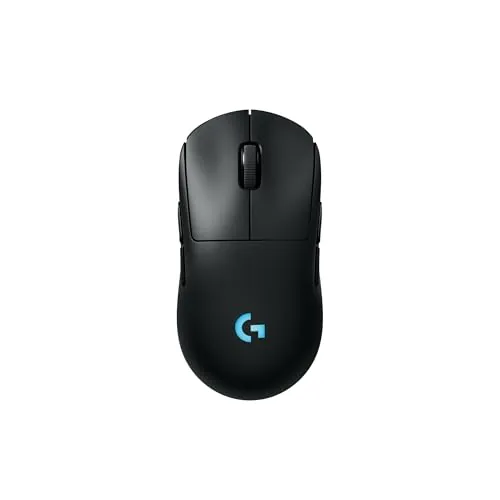
Logitech G PRO 2 LIGHTSPEED vs PRO X SUPERLIGHT 2
The PRO 2 is the clearer fit when you want documented replaceable left- and right-side button options: its exact 910-007246 sheet lists 4–8 buttons. Logitech lists five buttons for the black PRO X SUPERLIGHT 2, but that count alone does not establish their placement or whether its side buttons can be changed. The listed weights are 80 g and 60 g; that is a specification difference, not a comfort or gaming result.
Read comparison
Logitech G502 HERO vs PRO X SUPERLIGHT 2: More Controls or Wireless Simplicity?
This comparison covers the black, wired Logitech G502 HERO (910-005469) and the standard black Logitech G PRO X SUPERLIGHT 2 (910-006628), not the DEX or 2c. G502 HERO puts more programmable actions, wheel controls and optional tuning weights on a wired mouse. SUPERLIGHT 2 uses a LIGHTSPEED receiver, charges over USB-C, and has five mapped physical inputs with a manufacturer-listed 60 g design. Make a quick inventory of the actions you need and decide whether you want a cable at the mouse or a rechargeable wireless setup; no source here establishes a gaming, comfort or aiming winner.
Read comparison