
Products compared
Razer
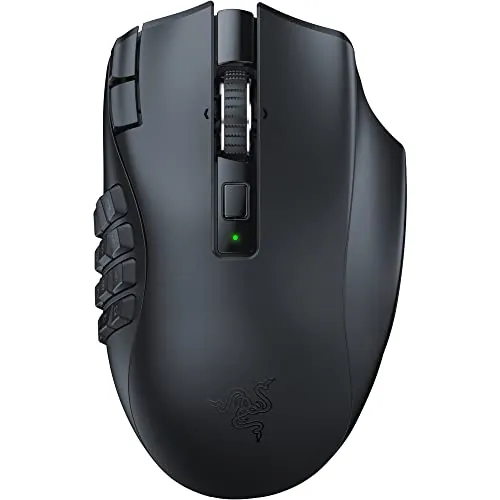
Razer Naga V2 HyperSpeed Wireless MMO Gaming Mouse
Black US model; fixed 12-button thumb grid; single-AA power and 2.4 GHz or Bluetooth connection documented by Razer.
Model RZ01-03600100-R3U1
Amazon ASIN B0BGJT87N2
Corsair
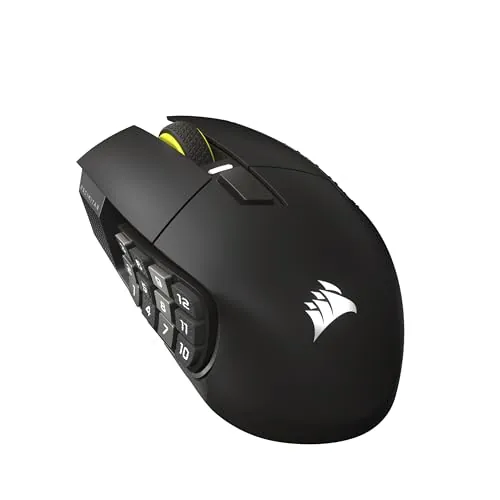
Corsair Scimitar Elite Wireless SE MMO Gaming Mouse
US Scimitar Elite Wireless SE SKU; 16 programmable buttons, repositionable 12-button Key Slider, onboard profiles and cable charging documented by Corsair.
Model CH-9314014-WW
Amazon ASIN B0F6NGCDFN
Differences that matter
Sources for Side-button placement and configuration
Sources for Profiles and software routine
Sources for What to check before the first session
Start with the side controls you will actually reach
For frequent MMO actions, both makers document a 12-button side arrangement. Razer's Naga V2 HyperSpeed page calls it a thumb grid and sends remapping and macros to Synapse 3. Corsair lists 16 programmable buttons overall and describes its 12-button Key Slider as repositionable; its SE setup guide shows the lock and adjustment steps using the supplied Allen key.
That gives you a practical pre-buy check: make a short list of the commands you need, then inspect whether the fixed Razer grid or Corsair's adjustable panel puts those controls where your thumb can reach them. Adjustment is a feature, not a proof of personal comfort. Razer materials conflict on its total button/control count; this guide avoids those aggregate numbers and uses only the distinct 12-button-grid statement.
Choose your configuration routine
Razer says Synapse 3 is needed to configure button mappings and macros for the Naga V2 HyperSpeed. Corsair's Scimitar SE page points to iCUE for button remapping and macros, while the quick-start guide describes three onboard profile slots for DPI, button assignments and lighting, with a physical profile button on the mouse.
If you depend on a particular host or software policy, check that the required app can be installed before ordering. Corsair documents saving its customized settings back to onboard memory; the reviewed sources do not establish that every setting or feature carries over to every host.
Pick the power and receiver routine that suits your desk
Razer's announcement names the Naga V2 HyperSpeed specifically and says it uses one AA battery; Razer's product materials list HyperSpeed 2.4 GHz and Bluetooth. Corsair's SE guide documents USB charging/data, a 2.4 GHz receiver and Bluetooth pairing, and identifies the USB-C-to-USB-A cable and receiver among the mouse parts.
So the daily upkeep choice is simple: keep a replacement AA available for the Razer, or make USB charging convenient for the Corsair. Check the ports on your computer and whether you prefer receiver-based 2.4 GHz or Bluetooth. Razer and Corsair publish battery estimates under different wireless modes and conditions, so they do not provide a fair runtime comparison.
Verify the exact offer before checkout
Use the model identifiers as a final check: RZ01-03600100-R3U1 for the Naga V2 HyperSpeed and CH-9314014-WW for the Scimitar Elite Wireless SE. The latter is the SE version covered by Corsair's exact-SKU page and SE guide; do not substitute a similarly named Scimitar model.
There is a finish-label mismatch for Corsair: the selected listing says Black, but Corsair's exact SKU page calls CH-9314014-WW Gun Metal. Since the finish does not change the control or power decision here, confirm the seller's selected finish if it matters to you.
Product details
Razer Naga V2 HyperSpeed Wireless MMO Gaming Mouse
- Side controls
- Razer documents a 12-button thumb grid; its US page says button mappings and macros are configured with Synapse 3. Source
- Wireless and power
- HyperSpeed 2.4 GHz or Bluetooth; Razer's model-specific announcement specifies one AA battery. Source
- Receiver storage
- Razer's US product FAQ says the USB wireless dongle is stored beneath the top cover. Source
Corsair Scimitar Elite Wireless SE MMO Gaming Mouse
- Side controls
- Corsair documents 16 programmable buttons and a repositionable 12-button Key Slider; adjust its position with the included Allen key. Source
- Profiles and software
- Three onboard profile slots can store DPI settings, button assignments and lighting effects; customize them in iCUE. Source
- Wireless and charging
- The SE guide documents a 2.4 GHz USB receiver, Bluetooth pairing and charging/data over USB using the included USB-C-to-USB-A cable. Source
Before you buy
Community discussions
One owner's 12-button reach check
Razer Naga V2 HyperSpeed Wireless MMO Gaming Mouse
One owner with 18 cm hands said they could reach all 12 buttons on the Naga V2 HyperSpeed and could reposition the Scimitar Wireless SE panel to reach its full grid.
What to check
With your normal grip, check the fixed Naga grid and adjust the Scimitar panel until your thumb can reach the buttons you use most.
Common questions
Can I move the side buttons on either mouse?
Corsair's Scimitar Elite Wireless SE guide describes unlocking and repositioning its 12-button Key Slider with the included Allen key. Razer's Naga V2 HyperSpeed sources document a 12-button thumb grid but not a movable panel. The documentation does not predict which will feel better for your hand.Corsair Scimitar Elite Wireless SE manual and quick start guideRazer Naga V2 HyperSpeed US product page and FAQ
Do both models have a 12-button side panel?
Razer separately identifies a 12-button thumb grid. Corsair documents a repositionable 12-button Key Slider and 16 programmable buttons overall. Razer's public materials conflict on aggregate button/control totals, so this guide compares only its documented thumb-grid count.Razer Naga V2 HyperSpeed US product page and FAQCorsair Scimitar Elite Wireless SE exact US SKU page
How do the wireless power routines differ?
Razer specifies one AA battery and documents HyperSpeed 2.4 GHz or Bluetooth. Corsair's SE guide documents charging by USB cable and setup using its 2.4 GHz receiver or Bluetooth. Their published runtime estimates use different modes and conditions, so they do not settle which lasts longer in your use.Razer announcement: Naga V2 HyperSpeed model detailsRazer Naga V2 HyperSpeed US product page and FAQCorsair Scimitar Elite Wireless SE manual and quick start guide
Which exact Corsair variant is this comparison about?
The selected listing is product 21932, ASIN B0F6NGCDFN, model CH-9314014-WW. Corsair's exact US SKU page labels CH-9314014-WW Gun Metal, while listing text says Black. Verify the exact offer's finish before buying if color is important.Corsair Scimitar Elite Wireless SE exact US SKU page
Sources and scope
This is a feature and setup comparison based on manufacturer documentation, not hands-on testing. Razer materials disagree on aggregate button/control totals, so this guide uses only its separately documented 12-button thumb grid. Corsair's exact US SKU page names the CH-9314014-WW finish Gun Metal while listing data/listing text calls it Black; color is not used as a deciding feature, and shoppers should confirm the finish on the exact offer. Runtime estimates use different modes and conditions and are not compared.
Related comparisons
Razer Naga V2 HyperSpeed vs Naga V3 Pro: Side Buttons, Power and Setup
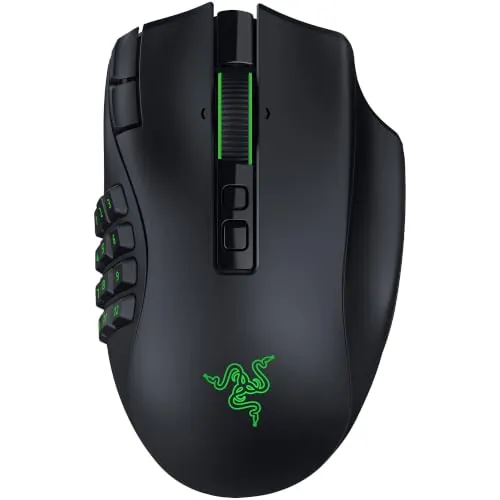
The Naga V2 HyperSpeed has a documented 12-button thumb grid and runs on one AA battery, with 2.4 GHz and Bluetooth wireless modes. The Naga V3 Pro lets you swap among 12-, 6-, and 2-button side plates and adds wired USB-C plus optional wireless-charging accessories. Map your regular commands and desk connections before choosing; these are feature differences, not a performance ranking.
Read comparisonRazer Naga V3 Pro vs CORSAIR Scimitar Elite Wireless SE: Side-Button Layouts and Setup
These two wireless MMO mice take different approaches to side controls. CORSAIR keeps one 12-button Key Slider and lets you reposition it through 8 mm of travel with the included hex key. Razer includes magnetic 12-, 6-, and 2-button plates that change the side layout without tools. Software is another concrete distinction: CORSAIR documents up to three onboard profiles and an exact-model Virtual Stream Deck workflow; Razer documents up to five onboard profiles. Check your preferred thumb layout, PC setup, and exact part/finish before buying. Neither comparison of manufacturer feature lists establishes a comfort or gaming-performance winner.
Read comparison