
Products compared
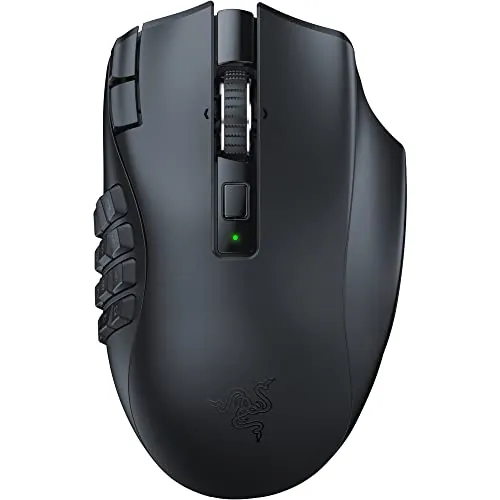
Razer
Razer Naga V2 HyperSpeed (Black)
Black US model; listing data part number RZ01-03600100-R3U1
Model RZ01-03600100-R3U1
Amazon ASIN B0BGJT87N2
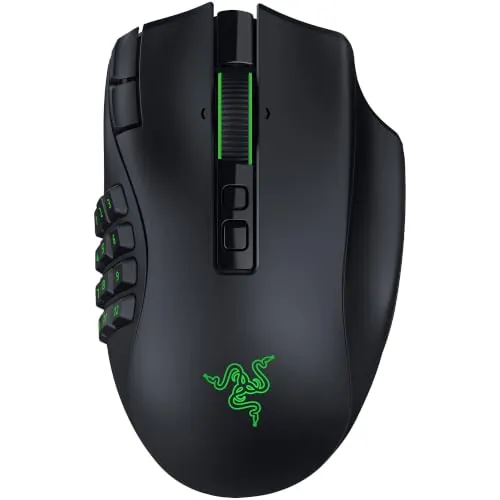
Razer
Razer Naga V3 Pro (Black)
Black US model; listing data part number RZ01-05660100-R3U1
Model RZ01-05660100-R3U1
Amazon ASIN B0H4SBT4SH
Differences that matter
What matters most to you?
Choose a priority to see what it changes.
Sources for Thumb-side control layout
Sources for Connection paths
Sources for Parts and seller package
Start with the commands under your thumb
List the game or work commands you use often before looking at the mice. Razer documents a 12-button thumb grid on Naga V2 HyperSpeed. Naga V3 Pro is built around magnetic side plates with 12, 6, or 2 thumb buttons, so its physical layout can be changed between games or tasks. If you want one many-button layout, the V2 grid may already fit; if you switch between dense MMO bindings and a simpler layout, V3 gives you a documented physical choice.
The layout count does not say which mappings feel easiest or how quickly you will learn them. Try to map each common command to an actual button arrangement, then check Razer's Synapse setup requirements if you rely on macros or profiles. V2 button remapping/macros use Synapse 3; V3's advanced profile and macro options use Synapse. The exact storage and software-free behavior you need should be confirmed before you depend on it.
Choose the power routine you will maintain
Naga V2 HyperSpeed uses one AA battery. It keeps the mouse's power routine separate from a USB charging cable, but you need a suitable replacement battery when the installed one runs down. Razer also documents 2.4 GHz dongle and Bluetooth wireless modes, and the dongle stores under the mouse's top cover when not in use.
Naga V3 Pro has USB-C wired use and charging, and Razer documents wireless charging through compatible accessories. The HyperFlux V2 system and Mouse Dock Pro are sold separately on Razer's product page. This is a different upkeep workflow, not evidence that either model lasts longer in a particular setup; we leave battery-hour comparisons out because usage and test conditions differ.
Check the ports and the exact package before checkout
For either mouse, check that you can use the connection you plan to rely on: V2 is documented with 2.4 GHz wireless and Bluetooth; V3 support documentation also lists wired USB-C. The V2 dongle stores inside the mouse, which can help keep it with the device when packed away, but it is still a separate receiver that must be available to use that wireless mode.
Razer describes V3 with all three side-plate layouts, while its optional wireless-charging accessories are separate products. Marketplace sellers may offer new, open-box, refurbished, or bundled stock, so read the exact offer's package and condition notes. Confirm the mouse model, dongle, any battery or cable, and the V3 plates; do not infer box contents from an image or a product-family page if the seller's listing is ambiguous.
Product details
Razer Naga V2 HyperSpeed (Black)
Before you buy
Community discussions
One reviewer says they could reach the Naga V2’s full thumb grid
Razer Naga V2 HyperSpeed (Black)
A Naga V2 HyperSpeed owner with hands about 18 cm long said they could reach all 12 side buttons with their grip.
What to check
With your own grip, try the buttons you plan to bind most often. Pay particular attention to the far corners of the grid.
Common questions
Does the Naga V2 HyperSpeed have a rechargeable internal battery?
Razer describes the Naga V2 HyperSpeed as powered by one AA battery and says its batteries need replacing. The reviewed Razer materials do not document USB-C charging for this model.Naga V2 HyperSpeed product announcement | Razer NewsroomRazer Naga V2 HyperSpeed | Razer US product page
Can I charge the Naga V3 Pro without a cable?
Yes, Razer says wireless charging is supported with the HyperFlux V2 or Mouse Dock Pro. Its current product page marks compatible charging accessories as sold separately, so confirm any bundle inclusions before buying.Razer Naga V3 Pro | Razer US product pageNaga V3 Pro RZ01-0566x Support and FAQs | Razer Support
Are all three Naga V3 Pro side plates included?
Razer describes the 12-, 6-, and 2-button magnetic side-plate layouts for this model. For a marketplace listing, especially used or refurbished, confirm the seller's exact package contents and condition rather than relying on the product-family description alone.Razer Naga V3 Pro | Razer US product pageNaga V3 Pro RZ01-0566x Support and FAQs | Razer Support
Which one is faster or more accurate?
This guide does not rank speed, latency, tracking, comfort, or reliability. It compares only documented controls, connection paths, and power/charging workflows; no matched hands-on test was conducted.Razer Naga V2 HyperSpeed | Razer US product pageRazer Naga V3 Pro | Razer US product page
Sources and scope
This is a source-based feature and setup comparison, not a hands-on test. The current V2 US page confirms its 12-button thumb grid, wireless modes, dongle storage, and Synapse requirement; Razer's product announcement establishes its single-AA power format. Current V3 product/support pages document three side-plate layouts and 2.4 GHz, Bluetooth, USB-C wired, and charging paths. Exact seller carton contents should still be checked. No claim is made about comparative performance, battery runtime, reliability, comfort, or macro persistence beyond Razer's stated setup requirements. No price is included.
Related comparisons
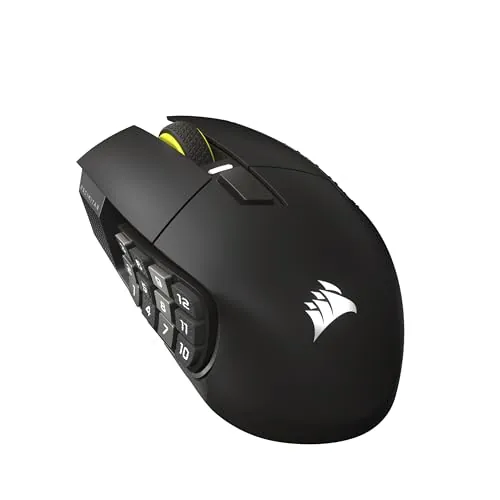
Razer Naga V3 Pro vs CORSAIR Scimitar Elite Wireless SE: Side-Button Layouts and Setup
These two wireless MMO mice take different approaches to side controls. CORSAIR keeps one 12-button Key Slider and lets you reposition it through 8 mm of travel with the included hex key. Razer includes magnetic 12-, 6-, and 2-button plates that change the side layout without tools. Software is another concrete distinction: CORSAIR documents up to three onboard profiles and an exact-model Virtual Stream Deck workflow; Razer documents up to five onboard profiles. Check your preferred thumb layout, PC setup, and exact part/finish before buying. Neither comparison of manufacturer feature lists establishes a comfort or gaming-performance winner.
Read comparisonRazer Naga V2 HyperSpeed vs Corsair Scimitar Elite Wireless SE: Side Buttons, Setup and Power
Both are wireless MMO mice with a documented 12-button side layout, so the useful difference is how that panel fits your thumb and how you configure it. Razer documents a fixed thumb grid, Synapse 3 setup and a replaceable AA battery. Corsair's Scimitar Elite Wireless SE has a repositionable 12-button Key Slider, 16 programmable buttons, three onboard profiles and cable charging. Choose by the controls you can reach and whether you prefer replacing a battery or recharging; maker documents do not establish a comfort, speed, runtime or reliability winner.
Read comparison