
Products compared
CORSAIR
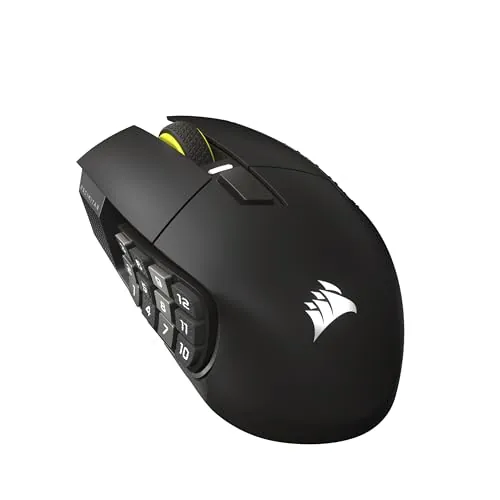
CORSAIR Scimitar Elite Wireless SE MMO Gaming Mouse
The US listing information identifies this ASIN to the Scimitar Elite Wireless SE. CORSAIR lists a repositionable 12-button Key Slider and iCUE customization. Its US manufacturer page displays this part under a Gun Metal product heading; verify the finish shown on the exact retailer offer.
Model CH-9314014-WW
Amazon ASIN B0F6NGCDFN
Razer
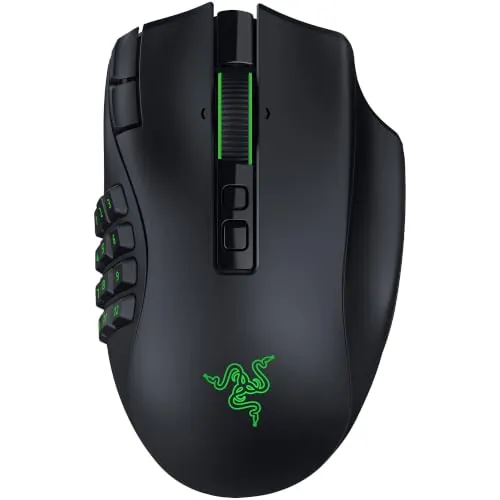
Razer Naga V3 Pro Wireless MMO Gaming Mouse
The US listing information identifies this ASIN to the Naga V3 Pro standard mouse model. Razer separately lists charging-system and dock bundles on its US page, so check the selected Amazon offer's exact part and included items.
Model RZ01-05660100-R3U1
Amazon ASIN B0H4SBT4SH
Differences that matter
What matters most to you?
Choose a priority to see what it changes.
Sources for Side-panel adjustment versus changing button count
Sources for Button mapping and saved profiles
Sources for Connection, charging, and optional accessories
Choose between sliding one thumb grid and swapping its button count
The Scimitar Elite Wireless SE keeps a 12-button side cluster. CORSAIR says its Key Slider moves 8 mm total; its FAQ describes using the included 2.5 mm hex key to loosen the underside screw, slide the panel, and tighten it again. That is useful if you want the same mapped grid but need to adjust its position. It is a small adjustment range, not a different button layout.
The Naga V3 Pro takes the modular route: Razer documents magnetic 12-, 6-, and 2-button plates that swap without tools. If you want a different physical side-button count between an MMO and a game where you want fewer side controls, this model is the clearer fit on the documented feature list. Before buying, write down which buttons you need on the side and whether you prefer repositioning a fixed cluster or replacing the plate. Neither source proves that a particular grid will feel right in your hand.
Count saved setups and check the software workflow you will use
CORSAIR lists up to three onboard profiles for the Scimitar and says a configured profile can work without iCUE installed. Its exact-model guide also describes Virtual Stream Deck integration through Stream Deck 7.0 on Windows and Mac; it says connecting the Scimitar Elite Wireless SE unlocks that feature. This may matter if you already organize shortcuts in that application, but it is a software setup dependency to check before you buy.
Razer lists up to five onboard profiles for the Naga V3 Pro, containing layouts, macros, and DPI settings, and its US product page links the model to Synapse customization. If you expect to carry more than three configured profiles, Razer's published count is higher. The count is not a measure of how convenient either app is; check the current software and host support for the computers where you will configure and use the mouse.
Match the wireless mode and included items to your desk
CORSAIR lists SLIPSTREAM 2.4 GHz wireless and Bluetooth, with a physical switch for wireless, Bluetooth, and off. The page says a USB-C-to-USB-A charging cable is included and the underside stores the USB receiver. Razer lists HyperSpeed Wireless, Bluetooth, and USB Type-C wired play while charging. Razer's US page presents the Naga V3 Pro standard option separately from bundles with a charging system or dock, and the announcement calls those charging products sold separately.
For either product, check the host you plan to use, the available USB port or Bluetooth pairing, and the exact offer's included-items list. If choosing the Naga, do not count a wireless charging pad or dock as included unless the selected bundle explicitly says so. If choosing the Scimitar, confirm the offer's color and package contents against part CH-9314014-WW: the listing title says Black while CORSAIR's US page uses a Gun Metal heading for that part.
Product details
CORSAIR Scimitar Elite Wireless SE MMO Gaming Mouse
- Side controls
- 16 programmable buttons overall; the adjustable Key Slider carries one 12-button side cluster and moves 8 mm total Source
- Onboard profiles
- Up to three profiles; CORSAIR says configured profiles work without iCUE installed Source
- Connection and charging
- SLIPSTREAM 2.4 GHz wireless and Bluetooth; included USB-C to USB-A charging cable Source
Razer Naga V3 Pro Wireless MMO Gaming Mouse
- Side controls
- Three magnetic side plates with 12-, 6-, or 2-button layouts; Razer says they swap without tools Source
- Onboard profiles
- Up to five onboard profiles for custom layouts, macros, and DPI settings Source
- Connection and charging
- HyperSpeed Wireless, Bluetooth, and USB Type-C wired play while charging; listed wireless charging systems are sold separately Source
Before you buy
Community discussions
Checking how thumb buttons interact with keyboard modifiers
CORSAIR Scimitar Elite Wireless SE MMO Gaming Mouse
A Scimitar Elite Wireless SE owner wanted the same thumb button to do something different when holding a key on their keyboard.
What to check
Write down a few shortcuts you use most. Check whether the game and the mouse software support those inputs before counting the available shortcuts.
Choosing buttons you can find by touch
Razer Naga V3 Pro Wireless MMO Gaming Mouse
A Naga V3 Pro owner who used a claw grip found the new volume buttons harder to reach than the controls on their old mouse.
What to check
Look at where those controls sit and where your fingers rest. If you can try it in person, check whether you can reach them without changing your grip.
Common questions
Can the Corsair Scimitar Elite Wireless SE switch between 6 and 12 side buttons?
The cited CORSAIR page describes one repositionable 12-button Key Slider, not interchangeable side plates with different button counts. Its 8 mm travel changes where that 12-button cluster sits. Razer documents separate 12-, 6-, and 2-button magnetic plates for the Naga V3 Pro.SCIMITAR ELITE WIRELESS SE MMO Gaming Mouse – Gun Metal, CORSAIR USThe MMO King Levels Up: Razer Unveils the Naga V3 Pro, Razer Newsroom
Do I need a tool to adjust the side buttons?
For the Scimitar, CORSAIR describes loosening a screw on the underside with the included 2.5 mm hex key, sliding the 12-button cluster within its 8 mm travel, and tightening it again. Razer says the Naga's magnetic plates swap without tools. Check which kind of change you actually expect to make.SCIMITAR ELITE WIRELESS SE MMO Gaming Mouse – Gun Metal, CORSAIR USThe MMO King Levels Up: Razer Unveils the Naga V3 Pro, Razer Newsroom
Which one has more onboard profile slots?
Razer lists up to five onboard profiles for the Naga V3 Pro. CORSAIR lists up to three for the Scimitar Elite Wireless SE and says configured profiles can be used without iCUE installed. Count your own game or work setups and check your software requirements; profile capacity does not compare setup ease or performance.The MMO King Levels Up: Razer Unveils the Naga V3 Pro, Razer NewsroomSCIMITAR ELITE WIRELESS SE MMO Gaming Mouse – Gun Metal, CORSAIR US
Is the Naga V3 Pro sold with its wireless charging dock?
Razer's US page lists the standard Naga V3 Pro as an option and shows charging-system and dock bundles as separate selections. The manufacturer also says HyperFlux V2 and Mouse Dock Pro are sold separately. Check the exact Amazon offer's title and included-items section rather than assuming a dock is in the box.Razer Naga V3 Pro, Razer USThe MMO King Levels Up: Razer Unveils the Naga V3 Pro, Razer Newsroom
Why do the Corsair color descriptions differ?
The current listing data title labels product 21932/ASIN B0F6NGCDFN Black. CORSAIR's US product page for part CH-9314014-WW displays a Gun Metal heading and finish choices. Confirm the finish shown for the specific retailer offer before ordering; the comparison relies on the part/model identity and does not treat the color as resolved.SCIMITAR ELITE WIRELESS SE MMO Gaming Mouse – Gun Metal, CORSAIR US
Sources and scope
The guide compares the current listing data identities CORSAIR Scimitar Elite Wireless SE CH-9314014-WW (product 21932, ASIN B0F6NGCDFN) and Razer Naga V3 Pro RZ01-05660100-R3U1 (product 6843, ASIN B0H4SBT4SH), in that canonical order. The listing data calls the CORSAIR finish Black while its matching US manufacturer page uses a Gun Metal heading; confirm the selected finish on the exact retailer offer. Razer lists the standard Naga and separate charging-system/dock bundles; confirm exact Amazon box contents. This is a manufacturer-feature comparison, not hands-on testing. It does not establish comfort, sensor accuracy, click latency, connection stability, battery runtime, durability, or gaming-performance superiority.
Related comparisons
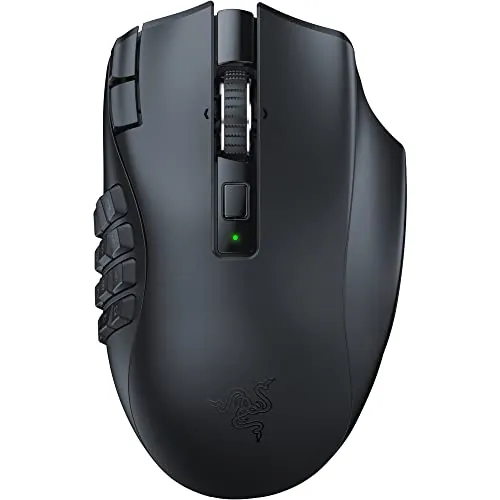
Razer Naga V2 HyperSpeed vs Naga V3 Pro: Side Buttons, Power and Setup
The Naga V2 HyperSpeed has a documented 12-button thumb grid and runs on one AA battery, with 2.4 GHz and Bluetooth wireless modes. The Naga V3 Pro lets you swap among 12-, 6-, and 2-button side plates and adds wired USB-C plus optional wireless-charging accessories. Map your regular commands and desk connections before choosing; these are feature differences, not a performance ranking.
Read comparisonRazer Naga V2 HyperSpeed vs Corsair Scimitar Elite Wireless SE: Side Buttons, Setup and Power
Both are wireless MMO mice with a documented 12-button side layout, so the useful difference is how that panel fits your thumb and how you configure it. Razer documents a fixed thumb grid, Synapse 3 setup and a replaceable AA battery. Corsair's Scimitar Elite Wireless SE has a repositionable 12-button Key Slider, 16 programmable buttons, three onboard profiles and cable charging. Choose by the controls you can reach and whether you prefer replacing a battery or recharging; maker documents do not establish a comfort, speed, runtime or reliability winner.
Read comparison