
Products compared
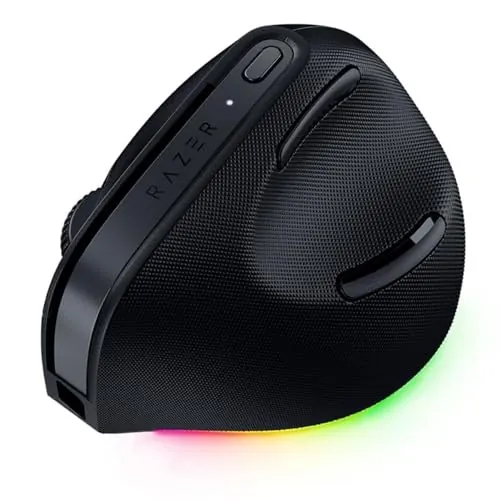
Razer
Razer Pro Click V2 Vertical Edition
Exact U.S. listing is the black Pro Click V2 Vertical Edition, model RZ01-05250100-R3U1. It is distinct from the non-vertical Pro Click V2.
Model RZ01-05250100-R3U1
Amazon ASIN B0DVD5RTZ5

Logitech
Logitech MX Vertical Wireless Mouse — Graphite
current listing details is the graphite MX Vertical, model 910-005447.
Model 910-005447
Amazon ASIN B07FNJB8TT
Differences that matter
What matters most to you?
Choose a priority to see what it changes.
Sources for Published vertical angle
Sources for Switching across computers and devices
Sources for Receiver, cable, and charging arrangement
Start with the shape you want to try
These are two exact vertical mice with different published angles: 71.7° for the Razer Pro Click V2 Vertical Edition and 57° for Logitech MX Vertical. Those figures help describe the shape; they do not predict comfort. Logitech additionally gives a large-to-medium hand-size guide. Razer’s cited U.S. page does not state a hand-size range, so do not infer one from its angle or product photos.
Use the guidance as a first filter, then measure the desk opening and try the mouse if personal fit matters. A maker’s fit description is not a guarantee for every hand.
Map your actual device-switching workflow
Razer advertises five-way multi-device connectivity and a dedicated toggle button. Logitech’s technical sheet lists three Easy-Switch indicators and receiver/Bluetooth options. These descriptions are not a like-for-like statement about host slots by transport. Before purchase, identify each host and the connection you expect to use, then confirm the exact pairing and slot behavior in the relevant model support guide.
For Razer shortcuts, the manufacturer says basic use does not need Synapse; AI Prompt Master and app-specific customization use Synapse 4. Choose those functions only if you expect to configure and use them.
Check ports, receiver, and charging cable
Logitech’s support page lists the Unifying USB receiver and USB-A-to-USB-C cable in the box, plus Bluetooth Low Energy and wired use through the charging cable. Razer’s exact-model support material lists a HyperSpeed dongle and USB-A-to-USB-C cable, as well as Bluetooth and USB-C wired use. Check whether your host offers the ports or Bluetooth connection you plan to use, and recheck the current exact Amazon bundle contents before ordering.
Neither guide compares charge life under the same conditions, so this page does not call a battery-life winner.
A practical pre-buy check
1. Mark the desk space available for the mouse and decide which angle you want to try. 2. Compare your hand with Logitech's stated size guide if considering MX Vertical; Razer does not provide a hand-size range on its U.S. product page. 3. List each host and available USB/Bluetooth connection. 4. Decide whether you will use customizable shortcuts and verify that the required software is available for your host. 5. Confirm the exact model number and in-box receiver/cable on the seller page.
Stop short of treating an angle, hand-size statement, or feature list as a promise of comfort, health benefit, or measured performance.
Product details
Razer Pro Click V2 Vertical Edition
- Published grip angle
- 71.7° according to the U.S. product page. This is a shape specification, not a comfort outcome. Source
- Device switching
- Razer advertises five-way multi-device connectivity and a dedicated device-toggle button. The cited page does not break down equivalent host slots by transport. Source
- Software and shortcut setup
- Razer says Synapse is not required for basic use; its page documents holding the DPI button to activate AI Prompt Master and using Synapse 4 for shortcut customization. Source
Logitech MX Vertical Wireless Mouse — Graphite
- Published grip angle and hand-size guidance
- 57°; Logitech describes MX Vertical as a fit for large-to-medium hands. Use this as manufacturer guidance, not a personal fit guarantee. Source
- Connection and device indicators
- Logitech lists 2.4 GHz through its Unifying USB receiver, Bluetooth Low Energy 4.2, wired use through its charging cable, and three Easy-Switch LEDs. Source
- Box and charging
- The technical specifications list a Unifying USB receiver and USB-A-to-USB-C charging cable in the box; the mouse has a USB-C charging port. Source
Before you buy
Community discussions
Check mouse placement around a split keyboard
Razer Pro Click V2 Vertical Edition
A split-keyboard user lists the Razer Pro Click V2 Vertical among mice they have tried and prefers keeping the mouse to the keyboard’s right rather than between the halves.
What to check
Set the keyboard halves where you usually type, then measure the mouse space beside them and check how far you reach.
Common questions
Does the Razer’s steeper listed angle mean it will be more comfortable?
No. Razer lists 71.7° and Logitech lists 57°, but the measurements do not establish which shape will feel comfortable for you. Try the exact mouse if personal fit is important.Razer Pro Click V2 Vertical Edition Productivity Mouse — U.S. product pageLogitech MX Vertical Ergonomic Wireless Mouse — U.S. product page
Which one has a published hand-size recommendation?
Logitech describes MX Vertical as a fit for large-to-medium hands. Razer's U.S. product page lists its vertical shape and angle but does not provide a hand-size range. Logitech's guidance is not an individual fit guarantee.Logitech MX Vertical Ergonomic Wireless Mouse — U.S. product pageRazer Pro Click V2 Vertical Edition Productivity Mouse — U.S. product page
Can both connect to more than one computer?
Razer advertises five-way multi-device connectivity with a dedicated toggle. Logitech lists three Easy-Switch indicators and supports receiver or Bluetooth connections. Check the exact slot/transport behavior for your device mix because the descriptions do not define equivalent connection counts.Razer Pro Click V2 Vertical Edition Productivity Mouse — U.S. product pageMX Vertical Technical Specifications — Logitech Support
Sources and scope
This guide compares manufacturer-published shape and setup information, not hands-on use or a controlled test. A listed angle or maker hand-size guide does not establish an individual fit, comfort, pain relief, or health result. Razer advertises five-way device connectivity and a dedicated toggle, while Logitech documents three Easy-Switch indicators; those descriptions do not establish equivalent host-slot behavior. Confirm current package contents, operating-system support, and any required software for the exact seller listing before buying.
Related comparisons
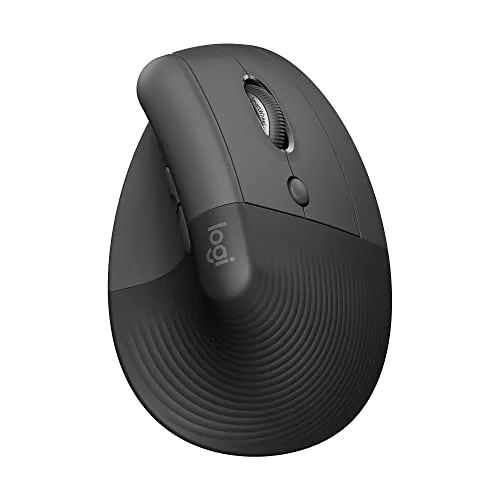
Logitech Lift vs MX Vertical: Hand Fit, Receiver and Charging
These are both right-handed Logitech vertical mice, but Logitech positions them for different hand-size ranges. Lift uses one AA battery and a Logi Bolt receiver; MX Vertical recharges over USB-C, can stay connected by cable while charging, and uses a Unifying receiver. Bluetooth is available on both.
Read comparisonRazer Pro Click V2 Vertical Edition vs Logitech Lift: Fit, Connections and Power
The Razer Pro Click V2 Vertical Edition is a right-handed vertical mouse with USB-C wired, 2.4 GHz and Bluetooth modes; Logitech Lift Graphite is also a right-handed vertical mouse, with Logitech guidance for small-to-medium hands and Bolt or Bluetooth LE. Compare the shapes with a mouse you already handle comfortably, then check device switching, receiver needs and software support. Neither maker's specifications establish a comfort or health outcome.
Read comparison