
Products compared
SteelSeries
SteelSeries Apex 3 Gaming Keyboard - Black
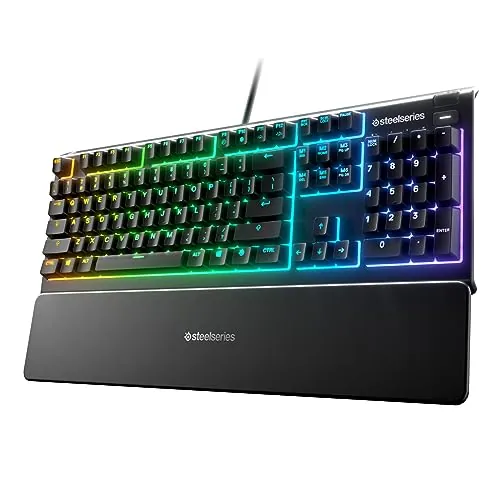
This guide compares the black U.S. Apex 3 model 64812. SteelSeries' U.S. page exposes a black, English, Full Size selection. Its official guide illustrates a number pad and documents a USB keyboard plug, media roller/button, profile switching, lighting controls and on-the-fly macros. The guide says SteelSeries Engine is required for on-the-fly macro recording; it is a legacy guide, so check current software support.
Model 64812
Amazon ASIN B07ZGDPT4M
SteelSeries
SteelSeries Apex Pro TKL Gen 3 Gaming Keyboard - Black
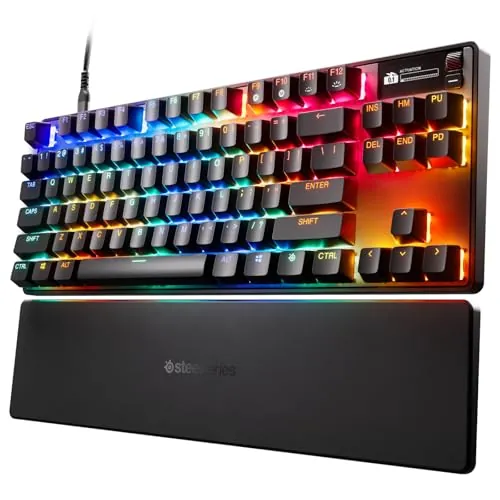
This guide compares the black, U.S. English, wired Apex Pro TKL Gen 3 model 64740. SteelSeries' current product and support pages document adjustable actuation for the TKL's eligible keys, Rapid Trigger, Rapid Tap, OLED settings and SteelSeries GG software controls. The maker lists Windows 10+ and Mac OS 11+; it notes that not all software features are supported on Mac.
Model 64740
Amazon ASIN B0DGZLHN8G
Differences that matter
What matters most to you?
Choose a priority to see what it changes.
Sources for Key actuation and game-specific settings
Sources for On-keyboard controls and macro workflow
Sources for Wired setup and operating system
Start with the layout you need
If you enter numbers often, start by confirming the Apex 3 is the Full Size option: SteelSeries' U.S. page exposes a separate TKL size, and the official Apex 3 guide illustration shows the number pad. SteelSeries identifies the Apex Pro Gen 3 configuration in this guide as TKL. Check the exact retailer variant before choosing by the family name alone.
This is a layout-fit distinction. The reviewed sources do not compare typing comfort, gaming performance or how much desk space either keyboard will occupy on your specific setup.
Decide whether you will configure actuation
SteelSeries says the Pro TKL Gen 3 adjusts actuation from 0.1 to 4.0 mm; its support page says 61 keys are adjustable through GG. The product page also describes Rapid Trigger and Rapid Tap. These features are a reason to consider the Pro only if you intend to use that configuration; maker feature copy is not a head-to-head speed result.
The reviewed Apex 3 manual explains profile cycling and on-the-fly macros but does not resolve whether Apex 3 has adjustable actuation. This guide leaves that comparison open rather than turning missing documentation into a claim that it lacks the feature.
Check the control and software routine
The Apex 3 guide shows media controls, a profile-switch key, illumination shortcuts and a macro-recording key. It explicitly requires SteelSeries Engine for on-the-fly macro recording. Because the guide's listed OS range is old, confirm current software availability before relying on that feature.
For the Pro TKL Gen 3, the manufacturer describes changing settings from its OLED display and using QuickSet; support says GG controls actuation and other switch-dependent features. The product page lists Windows 10+ and Mac OS 11+, with a warning that not every software feature is supported on Mac. Confirm your needed workflow on your OS before buying.
Product details
SteelSeries Apex 3 Gaming Keyboard - Black
- U.S. layout option
- SteelSeries' U.S. product page has a black, English, Full Size selection; the linked Apex 3 guide illustration shows a dedicated number pad Source
- On-keyboard controls
- The Apex 3 guide labels a multimedia volume roller and button, profile-switching key, macro-recording key and illumination controls Source
- Macro setup condition
- The official guide says SteelSeries Engine is required for on-the-fly macro recording; confirm the current software and OS requirements because this is a legacy guide Source
SteelSeries Apex Pro TKL Gen 3 Gaming Keyboard - Black
- Exact U.S. configuration
- SteelSeries product page identifies Apex Pro TKL Gen 3 - US and the selected black, wired, English, TKL configuration Source
- Adjustable actuation
- SteelSeries lists 0.1–4.0 mm actuation; its TKL support article says 61 keys can be adjusted through SteelSeries GG Source
- Settings and software
- The product page documents OLED setting changes and QuickSet; SteelSeries support specifies GG for actuation, with a Mac OS 11+ listing that cautions not all software features are supported Source
Before you buy
Community discussions
A casual player asks which TKL Gen 3 controls matter
SteelSeries Apex Pro TKL Gen 3 Gaming Keyboard - Black
A buyer asked whether the Apex Pro TKL Gen 3 made sense for casual play. A wired-model owner said they used the on-keyboard actuation settings. Their keyboard had a UK layout.
What to check
If adjustable actuation or OLED controls are part of your decision, name the controls you would use and compare them with the Apex 3's documented controls. The post does not establish a benefit for casual play or compare the two Apex models.
A renewed TKL Gen 3 owner wants a different wrist-rest angle
SteelSeries Apex Pro TKL Gen 3 Gaming Keyboard - Black
Someone who bought a renewed Apex Pro TKL Gen 3 said that they would prefer the wrist rest to sit a little higher.
What to check
Measure your desk with the keyboard and wrist rest in place and decide whether you want to keep the number pad.
Common questions
Does the Apex 3 have a number pad?
SteelSeries' U.S. Apex 3 page has a Full Size selection, and its official Apex 3 guide illustration shows a number pad. The product route also exposes a TKL size option, so make sure the seller listing selects Full Size if you need the number pad.Apex 3 US - selected black, English, Full Size optionApex 3 Manual and Product Information Guide (official PDF)
Can the Apex Pro TKL Gen 3 actuation be adjusted?
SteelSeries lists an actuation range of 0.1–4.0 mm and says 61 keys on the Pro TKL can be adjusted through SteelSeries GG. These are manufacturer feature descriptions, not evidence of faster real-world performance.Apex Pro TKL Gen 3 - US, black, wired, English, TKL selectionWhich Keys Can Be Adjusted? Apex Pro Gen 3/TKL/TKL Wireless
Does the Apex 3 lack adjustable actuation?
The Apex 3 guide reviewed here documents profile and macro controls but does not answer whether its actuation is adjustable. Do not infer absence from that omission; check current model-specific SteelSeries documentation if this is decisive.Apex 3 Manual and Product Information Guide (official PDF)
Will every Pro TKL Gen 3 software feature work on a Mac?
SteelSeries lists Mac OS 11 and above but explicitly notes that not all software features are supported. Check the current GG feature support for the exact controls you plan to use.Apex Pro TKL Gen 3 - US, black, wired, English, TKL selection
Sources and scope
This is a manufacturer-documentation comparison of the U.S. black Apex 3 model 64812 and Apex Pro TKL Gen 3 model 64740. SteelSeries currently exposes different size options on the Apex 3 product route, so check that the selected retailer listing is Full Size if you need its number pad. The Apex 3 guide is an official family manual and does not identify model 64812; it supports only the pictured Apex 3 layout and documented controls. SteelSeries documents actuation settings for the Pro TKL Gen 3, but the reviewed sources do not establish whether Apex 3 has or lacks adjustable actuation. The Apex 3 manual contains legacy software/OS requirements; confirm current support before relying on macro software. SteelSeries lists Mac OS 11+ for the Pro page and warns that not all software features are supported on Mac. No hands-on test, speed, typing-feel, noise, comfort, durability or gaming-performance comparison was performed.
Related comparisons
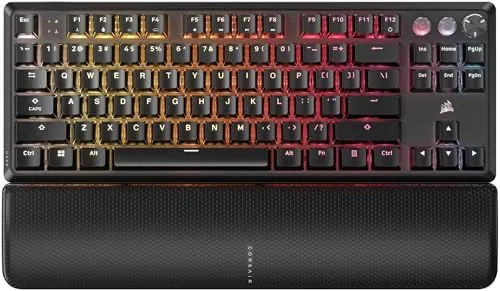
Corsair K70 PRO TKL vs SteelSeries Apex Pro TKL Gen 3: Which Key Controls Fit Your Game?
Both are wired tenkeyless magnetic keyboards with 61 adjustable keys. The Corsair K70 PRO TKL adds A/D FlashTap priority settings and up to five manually saved device-memory profiles. SteelSeries' Apex Pro TKL Gen 3 adds Rapid Tap, Protection Mode, an OLED adjustment menu and game-linked QuickSet. These are different control workflows, not evidence of a speed or accuracy winner.
Read comparison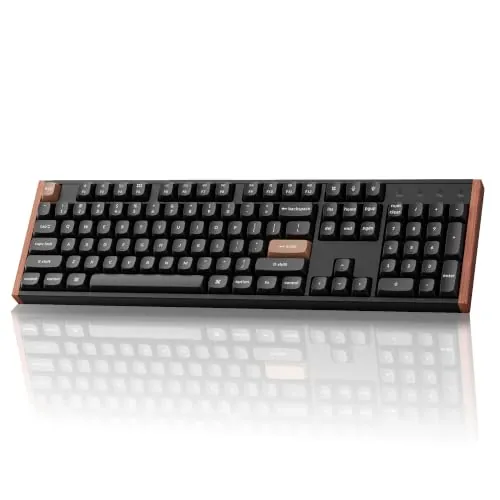
Keychron K10 HE vs SteelSeries Apex Pro TKL Gen 3: Full-Size or TKL?
This comparison covers the black Keychron K10 HE (model K10H-F1) and the black wired SteelSeries Apex Pro TKL Gen 3 (model 64740). The K10 HE is full-size and supports Bluetooth pairing for up to three devices, 2.4 GHz, and wired USB-C modes. The Apex is tenkeyless and wired; its manual documents actuation changes from the OLED menu or hotkeys, with per-key settings in SteelSeries GG. Keychron's current page describes adjustable actuation for two switch versions, but does not confirm which version is included with K10H-F1. Check the exact listing before comparing actuation ranges. These are layout, connection, and setup differences, not typing or gaming results.
Read comparison