
Products compared

SteelSeries
SteelSeries Arctis Nova 5 Wireless (Black)
Black U.S. wireless headset; standard Nova 5 model, not Nova 5P or Xbox-compatible Nova 5X.
Model 61670
Amazon ASIN B0D2YBQQ1P

HyperX
HyperX Cloud III Wired Gaming Headset (Black)
Black U.S. wired headset; HyperX part number 727A8AA.
Model 727A8AA
Amazon ASIN B0C3BSZ56D
Differences that matter
What matters most to you?
Choose a priority to see what it changes.
Sources for Microphone storage and controls
Sources for What comes in the box
Match the connection to your exact console
Start with the port you will actually use. The standard Arctis Nova 5 pairs with its USB-C dongle or Bluetooth. SteelSeries' included guide shows the dongle with its USB-C-to-USB-A adapter for PC or PlayStation; its current support page lists Nova 5 with both USB-C dongle and Bluetooth paths on Switch. In handheld mode, connect the dongle to a compatible USB-C port; docked, use a compatible dock USB port and the adapter if needed.
The Xbox distinction is decisive: the assigned Nova 5 is the standard model, not Nova 5X, and SteelSeries says only Nova 5X supports Xbox. Cloud III Wired is listed for Xbox, with HyperX specifying the controller's 3.5 mm headset jack. If you need wireless Xbox audio, neither the assigned standard Nova 5 nor a wired Cloud III meets that exact requirement.
Pick the routine you want between devices
Nova 5 QuickSwitch is a source change, not a mixer: SteelSeries says the 2.4 GHz and Bluetooth connections are never active together. That fits a buyer who wants to switch from a gaming dongle path to a paired phone or tablet. If simultaneous game and phone audio is essential, these sources do not establish that Nova 5 provides it.
Cloud III takes the simpler wired route. HyperX lists 3.5 mm and USB connectors and includes a USB dongle and USB-A adapter. Choose the connector based on the host and its supported audio path; the product's broad platform list does not mean all software features work identically on each platform.
Check the microphone and included hardware before ordering
Both headsets put mute and volume controls on the earcup. Their storage differs: Nova 5's boom retracts into the headset and must be fully extended for use; Cloud III's microphone detaches. That is a physical-handling distinction, not a microphone-quality result.
The maker's box lists show a USB-C wireless dongle, USB-A adapter cable, and charging cable for Nova 5; HyperX lists a USB dongle, USB-C-to-USB-A adapter, detachable mic, and quick-start guide for Cloud III. Confirm the product code and your host's ports on the exact listing before checkout, particularly if choosing among the similar Nova 5, 5P, and 5X names.
Product details
SteelSeries Arctis Nova 5 Wireless (Black)
- Wireless paths
- 2.4 GHz USB-C wireless dongle and Bluetooth 5.3; QuickSwitch changes between them, with one active connection at a time. Source
- Included setup hardware
- USB-C wireless dongle, USB-C-to-USB-A adapter cable, and charging cable. Source
- Documented console fit
- Standard Nova 5 supports PlayStation and Nintendo Switch through supported USB wireless setup; Xbox compatibility belongs to the separate Nova 5X model. Source
- Microphone and controls
- Retractable microphone, mic-mute button, volume wheel, power button, and QuickSwitch button. Source
HyperX Cloud III Wired Gaming Headset (Black)
- Wired connections
- 3.5 mm headset jack, USB-C, and USB-A using the included USB-C-to-USB-A adapter. Source
- Included setup hardware
- Detachable microphone, USB dongle, and USB-C-to-USB-A adapter, in addition to the headset and quick-start guide. Source
- Xbox connection path
- HyperX specifies the Xbox controller's 3.5 mm headset jack for this wired headset. Source
- Microphone and controls
- Detachable microphone, earcup volume and mute controls, and an LED mute indicator. Source
Before you buy
Community discussions
Deciding what you need from a wireless replacement
HyperX Cloud III Wired Gaming Headset (Black)
A Cloud III Wired owner who liked the headset wanted to move to wireless for gaming. They placed more weight on microphone quality than on having Bluetooth.
What to check
Check which wireless mode your exact console or PC supports, then test team chat there. That can matter more than having Bluetooth if you play from one device.
Trying mute and volume with the headset on
HyperX Cloud III Wired Gaming Headset (Black)
A Cloud III Wired reviewer who tried the USB connection after switching from an older headset liked reaching mute and volume at the earcup instead of on the cable.
What to check
Try reaching the controls without looking. Compare leaving the Cloud III microphone attached with retracting the Nova 5 microphone when you do not need it.
Common questions
Can Arctis Nova 5 play game audio and Bluetooth audio at the same time?
No. SteelSeries says QuickSwitch changes between 2.4 GHz and Bluetooth, with only one connection active while the other remains on standby.How does Quick Switch on Nova 5 work?
Does the standard Nova 5 work wirelessly with Xbox?
No. SteelSeries says only Nova 5X is Xbox-compatible; the standard Nova 5 and Nova 5P will not work on Xbox, even with a Nova 5X dongle.Nova 5 Connection Issues Troubleshooting
How do these headsets connect to an Xbox?
The assigned Cloud III Wired can connect to the Xbox controller's 3.5 mm headset jack, according to HyperX. The assigned standard Nova 5 is not Xbox-compatible; Nova 5X is a separate model.Cloud III Wired Gaming Headset — U.S. black product page, SKU 727A8AANova 5 Connection Issues Troubleshooting
Can I use the Nova 5 microphone over Bluetooth on Nintendo Switch?
SteelSeries says Bluetooth audio works on Switch but microphone input over Bluetooth is not supported. Microphone support depends on the headset connection method, console and game/chat feature.How to connect SteelSeries wireless headsets to Nintendo Switch or Switch 2
Sources and scope
This guide compares manufacturer-documented connections, host setup and microphone handling for the assigned U.S. black variants. It does not establish sound quality, microphone quality, comfort, latency, battery runtime, durability or reliability superiority. Console and software features can vary by connection path. The standard Nova 5 is not the Xbox-compatible Nova 5X.
- Arctis Nova 5 Wireless — U.S. product page
- Arctis Nova 5 Product Information Guide
- How does Quick Switch on Nova 5 work?
- Nova 5 Connection Issues Troubleshooting
- How to connect SteelSeries wireless headsets to Nintendo Switch or Switch 2
- Cloud III Wired Gaming Headset — U.S. black product page, SKU 727A8AA
Related comparisons
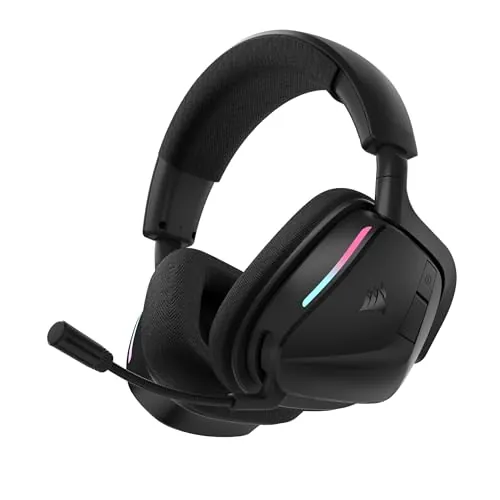
SteelSeries Arctis Nova 5 vs CORSAIR VOID Wireless v2
For Nintendo Switch, the Nova 5 has clearer USB-dongle guidance: SteelSeries lists the Nova 5 family for Switch and Switch 2, with a firmware/USB-audio caveat on Switch 2. CORSAIR's product page shows Switch compatibility, but its support chart does not list the VOID Wireless v2 for Switch. For PC or PlayStation, compare Bluetooth switching and mic controls: the Nova 5 changes between 2.4GHz and Bluetooth; the VOID v2 can take phone calls in RF mode but requires Bluetooth mode for Bluetooth media.
Read comparison
HyperX Cloud III Wired vs Cloud Alpha Wired: Ports, Adapters and Controls
The black HyperX Cloud III Wired (727A8AA) has documented USB-C, USB-A via its included adapter, and 3.5mm connection options, with USB NGENUITY features on supported Windows PCs. The Black-Red Cloud Alpha Wired (4P5L1AA#ABL) is documented around a 3.5mm connection and includes a detachable headset cable, inline controls, and a PC extension cable. Check the port and cable you will actually use before choosing; this guide compares setup features, not sound or comfort results.
Read comparison