
Products compared

SteelSeries
SteelSeries Arctis Nova 5 Wireless Gaming Headset, PC/Black
A wireless headset whose QuickSwitch changes between the USB-C dongle source and Bluetooth instead of playing both at once. SteelSeries lists PC, PlayStation 5/4, Switch, Mac and mobile compatibility for Nova 5, and its guide lists a USB-C dongle and a USB-C-to-USB-A adapter cable in the package. The microphone retracts into the earcup and must be fully extended for use.
Model 61670 / Arctis Nova 5 Wireless
Amazon ASIN B0D2YBQQ1P
Razer
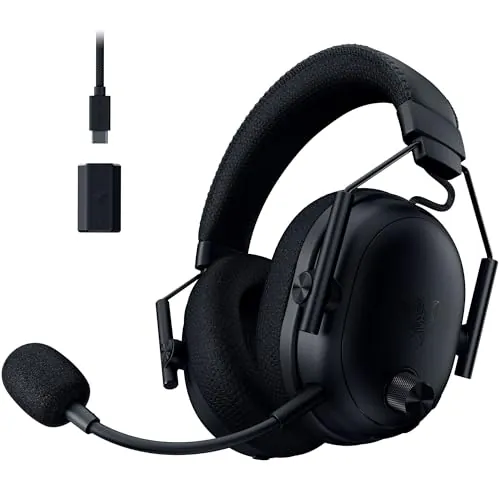
Razer BlackShark V3 Pro Wireless Gaming Headset, PC/Black
The assigned Razer listing is the PC/black selection. Razer's V3 Pro feature page documents listening to 2.4 GHz and Bluetooth together, a detachable microphone, and earcup controls for SmartSwitch, ANC/Ambient/off, game/chat balance and mic monitoring. Razer's storefront lists PC, Xbox-and-PC, and PlayStation-and-PC as separate platform selections; check the exact console edition and seller package before checkout.
Model RZ04-05400100-R3U1
Amazon ASIN B0F3QDLZKG
Differences that matter
What matters most to you?
Choose a priority to see what it changes.
Sources for Game plus phone audio
Sources for Dongles and adapter contents
Sources for Microphone handling and on-headset controls
First decide whether you switch or mix
Nova 5 QuickSwitch toggles between its 2.4 GHz dongle and Bluetooth, with one connection active and the other on standby. It fits a routine where a phone call can replace game audio briefly, then you switch back. Razer documents a simultaneous mode that keeps 2.4 GHz game audio and Bluetooth audio audible together after both sources are connected and SmartSwitch is double-tapped. If a mobile call comes in, Razer says the mic is prioritized for Bluetooth; simultaneous listening does not promise that your voice goes to two chats at once.
Check the exact platform edition before checkout
SteelSeries' Nova 5 guide lists PC, PS5, PS4, Switch, Mac and mobile compatibility and a USB-C wireless dongle. The U.S. product page also shows PC, PlayStation and Xbox as platform selections, so match the selected item to the exact seller listing and system. The Razer product in this comparison is specifically the BlackShark V3 Pro PC/black option, model RZ04-05400100-R3U1. Razer lists Xbox-and-PC and PlayStation-and-PC as distinct platform selections. Do not treat the PC product name as proof of a console-specific bundle; confirm the intended platform selection and port path.
Adapter contents are not equally documented
SteelSeries' Nova 5 guide names a USB-C wireless dongle, USB-C-to-USB-A adapter cable and charging cable in the box. That gives a concrete check for a PC with USB-A ports. Razer's product page lists multiple connection modes, but its reviewed exact PC/black page does not provide a complete in-box list. A connection option is not proof that a converter cable or adapter is included. Check the selected Razer seller's package list if you plan to use USB-A or 3.5 mm, and do not assume the contents of another BlackShark V3 Pro platform edition.
Pick the mic storage and controls you prefer
Nova 5's microphone slides into the headset; SteelSeries says it must be fully extended before speaking. The QuickSwitch button also handles dongle/Bluetooth switching and call actions. Razer's assigned PC/black page identifies a detachable 12 mm boom. Razer's V3 Pro page documents mic mute, a control dial that can be set to game/chat balance or mic monitoring, and a button that cycles ANC, Ambient and Off. These are handling and control choices. They do not establish a difference in microphone clarity, comfort or noise-cancellation effectiveness.
A quick pre-buy check
Before ordering, verify the platform label, connector available on the host, whether you want one wireless source or both at once, and whether the exact box includes the needed adapter. Then decide whether you prefer a retractable mic or one you can detach. If your must-have is a simultaneous game-plus-phone mix with a confirmed console adapter bundle, verify those exact edition and box details on the listing instead of relying on a family-level product name.
Product details
SteelSeries Arctis Nova 5 Wireless Gaming Headset, PC/Black
- Wireless routing
- QuickSwitch toggles between the 2.4 GHz dongle and Bluetooth; the other connection remains on standby rather than playing simultaneously. Source
- Listed compatibility and box contents
- The product guide lists PC, PS5, PS4, mobile, Nintendo Switch and Mac; package contents include a USB-C wireless dongle and 5 ft USB-C-to-USB-A adapter cable. Source
- Microphone handling
- Retractable ClearCast microphone; extend it fully before use. The manual says not to use it while retracted. Source
Razer BlackShark V3 Pro Wireless Gaming Headset, PC/Black
- Exact listing selection
- The U.S. product page displays PC and Black as selected options; Xbox and PC, and PlayStation and PC, are separate platform selections. Source
- Wireless routing and controls
- Razer documents simultaneous 2.4 GHz and Bluetooth listening, selected by double-tapping SmartSwitch after both are connected. Incoming Bluetooth calls receive microphone priority. The dial can control game/chat balance or mic monitoring. Source
- Microphone and listening controls
- The exact PC/black page identifies a detachable 12 mm microphone. The V3 Pro page lists ANC On, Ambient Mode and Off controls; this is a documented control option, not a comparative noise-reduction result. Source
Before you buy
Community discussions
Switching a gaming headset between a PC and a travel phone
SteelSeries Arctis Nova 5 Wireless Gaming Headset, PC/Black
A shopper considering the standard Arctis Nova 5 wanted to play games and listen to music on a computer, then use the same headset with a phone while traveling. The post asks which model fits those uses.
What to check
Decide whether the phone will be a separate listening device or whether you need phone audio while a game is playing. Test the documented wireless modes for that specific scenario.
Common questions
Can Arctis Nova 5 play game audio and Bluetooth phone audio at the same time?
SteelSeries says QuickSwitch activates only one connection at a time; the other remains on standby. It switches between the 2.4 GHz dongle and Bluetooth rather than mixing the two streams.How does Quick Switch on Nova 5 work?
How do I enable simultaneous listening on the PC BlackShark V3 Pro?
Razer's V3 Pro page says to connect both the 2.4 GHz wireless source and Bluetooth, then double-tap SmartSwitch. A white indicator denotes simultaneous mode. When a mobile call arrives, Razer says Bluetooth receives microphone priority.Razer BlackShark V3 Pro — U.S. Features and FAQ
Which headset includes a USB-C-to-USB-A adapter in its documented package?
SteelSeries' Nova 5 product guide lists a USB-C wireless dongle and a 5 ft USB-C-to-USB-A adapter cable. The reviewed Razer exact PC listing did not establish its complete package contents, so confirm the selected seller's box list.Arctis Nova 5 Wireless Product Information GuideRazer BlackShark V3 Pro PC/Black — Exact U.S. Product Selection
Which one is the safer pick for a console?
SteelSeries' Nova 5 guide lists PS5, PS4 and Switch compatibility. The Razer listing assigned here is PC/Black, while Razer presents Xbox-and-PC and PlayStation-and-PC as separate selections. Check the exact platform edition and connector bundle against your console before ordering.Arctis Nova 5 Wireless Product Information GuideRazer BlackShark V3 Pro PC/Black — Exact U.S. Product Selection
Are the two microphone designs operated the same way?
No. Nova 5's mic retracts and SteelSeries says to fully extend it before speaking. Razer identifies a detachable boom and documents a mute toggle and configurable earcup controls. This describes operation, not voice quality.Arctis Nova 5 Wireless Product Information GuideRazer BlackShark V3 Pro — U.S. Features and FAQ
Sources and scope
This guide covers the assigned U.S. listing data products in order: SteelSeries Arctis Nova 5 Wireless, black (product 6848 / ASIN B0D2YBQQ1P; listed model 61670), then Razer BlackShark V3 Pro, PC/black (product 6882 / ASIN B0F3QDLZKG; model RZ04-05400100-R3U1). Razer's PC/black product selection is separate from the store's Xbox-and-PC and PlayStation-and-PC selections; this guide does not promise that the assigned PC SKU includes a console-specific dongle or adapter. Razer's exact PC box contents were not established by the official pages reviewed. The comparison describes documented routing, platform labels, package facts and controls, not sound, microphone quality, comfort, ANC effectiveness, latency or battery performance tests.
Related comparisons
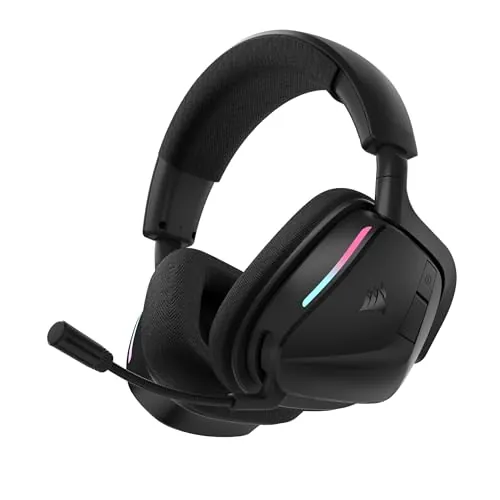
SteelSeries Arctis Nova 5 vs CORSAIR VOID Wireless v2
For Nintendo Switch, the Nova 5 has clearer USB-dongle guidance: SteelSeries lists the Nova 5 family for Switch and Switch 2, with a firmware/USB-audio caveat on Switch 2. CORSAIR's product page shows Switch compatibility, but its support chart does not list the VOID Wireless v2 for Switch. For PC or PlayStation, compare Bluetooth switching and mic controls: the Nova 5 changes between 2.4GHz and Bluetooth; the VOID v2 can take phone calls in RF mode but requires Bluetooth mode for Bluetooth media.
Read comparison
SteelSeries Arctis Nova 5 vs Logitech G522: Console, Audio Switching and Setup
This U.S. comparison is for the black Arctis Nova 5 model 61670 (B0D2YBQQ1P) and Logitech G522 black model 981-001491 (B0FFM5SP6M). Both offer a headset control to switch between gaming wireless and Bluetooth. SteelSeries describes QuickSwitch between the USB-C dongle and Bluetooth; Logitech explicitly says G522 cannot mix LIGHTSPEED and Bluetooth audio. G522 also supports wired USB audio, which disables LIGHTSPEED while connected. Check the console, available USB port, app settings and exact mic preference before buying.
Read comparison