
Products compared
TP-Link
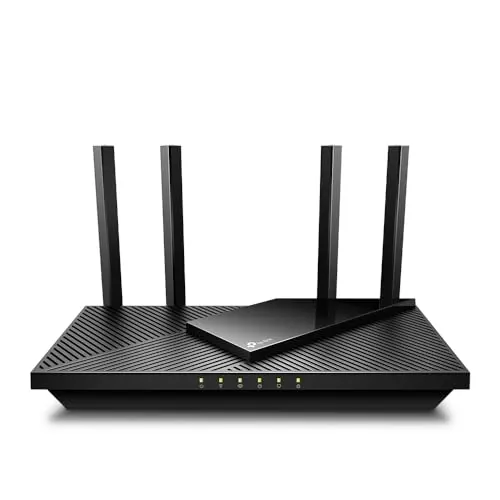
TP-Link Archer AX21 V5
US single-router offer; the listing title identifies the V5 variant. TP-Link's current US support pages list V5.60 and V5.46 hardware versions, so the exact subrevision should be checked on the unit label.
Model Archer AX21 V5
Amazon ASIN B08H8ZLKKK
TP-Link
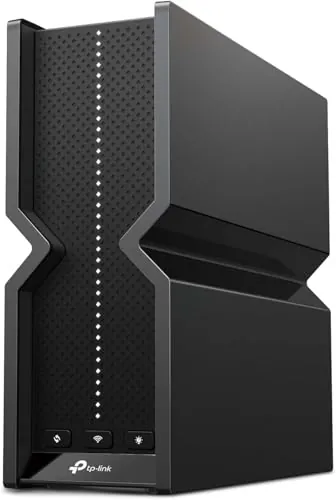
TP-Link Archer BE550
US single-router offer; the exact hardware revision associated with this listing is not established by the listing identity.
Model Archer BE550
Amazon ASIN B0CJSNSVMR
Differences that matter
Sources for Wi-Fi bands and client fit
Sources for Wired port plan
Sources for Storage attached to the router
Start with devices you actually have
Archer AX21 V5 covers 2.4 GHz and 5 GHz. Archer BE550 adds the 6 GHz band, but that changes your day-to-day only for clients whose exact wireless hardware supports 6 GHz. Check the specifications for the laptop, phone or adapter you plan to use; do not use the Wi-Fi generation name alone as proof. TP-Link says clients without 6 GHz can still connect to a Wi-Fi 7 router on 2.4 GHz or 5 GHz.
If none of your planned clients needs 6 GHz, set that feature aside and compare the wired ports and USB requirement. If one specific 6 GHz-capable client is a priority, BE550 has a real feature difference even when the rest of your devices stay on older bands. Availability of 6 GHz also depends on local rules and the client's regional support.
Trace the wired path before choosing 2.5G
AX21 V5 lists one Gigabit WAN port and four Gigabit LAN ports. BE550 lists one 2.5 Gbps WAN port and four 2.5 Gbps LAN ports. On the WAN side, check the modem or ONT and your subscribed service. On the LAN side, check the network adapter on each computer or NAS, plus any switch between it and the router.
A multi-gig router port is useful only where the connected path also supports it. TP-Link cautions that actual network speed may be limited by router ports, the cable, ISP factors and other conditions; these specifications do not predict a measured result in a particular home.
Treat router USB as a separate requirement
The AX21 V5 product page documents Gigabit WAN and LAN ports and does not list USB among its labeled ports. BE550 lists one USB 3.0 port and FTP, media and Samba sharing functions. Choose around where your files live: a drive connected to BE550 can use its listed sharing functions, while a computer or separate NAS can host files independently of the router.
The existence of the USB connector does not say how quickly a specific drive will transfer files or whether it replaces the storage features you need from a dedicated NAS. Check the stated file formats and sharing method against your devices before relying on it.
Check the version printed on the router
The assigned AX21 offer identifies V5, while TP-Link's current US support area separates V5.60 and V5.46. The BE550 support area also lists several hardware versions. The listing identity does not settle which subrevision a particular seller will ship.
If your choice depends on a version-specific firmware feature, ask the seller to confirm the version on the carton or device label. TP-Link's hardware-version guide describes the label check and its download pages warn that firmware must match the router's hardware version.
Product details
TP-Link Archer AX21 V5
Before you buy
Community discussions
Checking download and upload separately on Windows
TP-Link Archer AX21 V5
One user reported very slow Windows downloads with an Archer AX21 US V5.46 on firmware 1.1.2 while uploads remained much faster. They saw it on Wi-Fi and wired Ethernet. The report covers that setup and hardware subrevision.
What to check
Run a wired baseline on the PC you care about before buying for higher port speed. A slow transfer on a single host may call for checking that host’s settings and exact router firmware.
Common questions
Will my existing Wi-Fi devices work with the BE550?
TP-Link says older devices can still connect to a Wi-Fi 7 router over 2.4 GHz or 5 GHz. To use the 6 GHz band, the client itself needs Wi-Fi 6E or Wi-Fi 7 hardware that supports 6 GHz; check the exact device and local availability.TP-Link Wi-Fi 7 Router and Deco FAQsCan't Find or Connect to 6GHz Wi-Fi?
Does BE550's 2.5G port make my internet faster?
Not by itself. It provides a 2.5 Gbps port capability, but the modem or ONT, service plan, cables and connected devices also constrain an end-to-end link. TP-Link notes that actual network speed may be limited by the product's Ethernet ports, cable rate, ISP factors and other conditions.Archer BE550 US product specificationsArcher AX21 V5 US product specifications
How can I tell which hardware revision I am buying?
The model family name does not identify every hardware subrevision. TP-Link's US download pages list separate revisions and direct owners to check the hardware version on the device label; ask the seller if that version is important before ordering.Download for Archer AX21: US hardware versions and support filesDownload for Archer BE550: US hardware versions and support filesHow to find the hardware version on a TP-Link device
Sources and scope
This is a specifications-based fit comparison, not a coverage, throughput, latency, security or reliability test. The assigned AX21 listing identifies V5 and the BE550 listing identifies the model family, but neither listing establishes the exact subrevision shipped; check the unit label when revision-specific support matters.
- Archer AX21 V5 US product specifications
- Download for Archer AX21: US hardware versions and support files
- Archer BE550 US product specifications
- Download for Archer BE550: US hardware versions and support files
- TP-Link Wi-Fi 7 Router and Deco FAQs
- Can't Find or Connect to 6GHz Wi-Fi?
- How to find the hardware version on a TP-Link device
Related comparisons

TP-Link Archer BE400 vs BE550: Will You Use 6 GHz and Four 2.5G LAN Ports?
The assigned US listings are one Archer BE400 (ASIN B0DVBP5L6Y) and one Archer BE550 (ASIN B0CJSNSVMR). TP-Link's US pages describe BE400 as dual-band Wi-Fi 7 on 2.4/5GHz with one 2.5Gbps WAN, one 2.5Gbps LAN and three 1Gbps LAN ports. BE550 is tri-band Wi-Fi 7 with 2.4/5/6GHz, one 2.5Gbps WAN and four 2.5Gbps LAN ports. Choose BE550 if you have clients whose exact specifications support 6GHz or need multiple multi-gig wired endpoints. BE400 can fit a 2.4/5GHz household with at most one 2.5G LAN device. Before ordering BE550, verify the hardware revision and confirm your client supports 6GHz; Wi-Fi 7 alone is not enough. The BE400 listing still has a captured BE400-vs-BE230 box-field mismatch that must be confirmed with its seller.
Read comparison
TP-Link Archer BE230 vs BE550: Plan Your 6 GHz and Wired Devices
The Archer BE230 is a dual-band Wi-Fi 7 router with one 2.5 Gbps WAN, one 2.5 Gbps LAN and three 1 Gbps LAN ports. The Archer BE550 adds a 6 GHz band and four 2.5 Gbps LAN ports behind a separate 2.5 Gbps WAN. Choose with a port-by-port device list, then check which household devices can use 6 GHz.
Read comparison