
Products compared
TP-Link
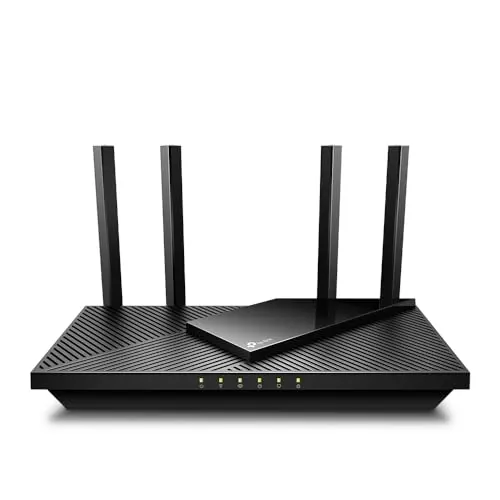
TP-Link Archer AX21 V5 AX1800 Dual-Band Wi-Fi 6 Router
The assigned single-router listing identifies the V5 generation. TP-Link's U.S. product page lists Wi-Fi 6 (802.11ax) and one Gigabit WAN plus four Gigabit LAN ports. The retail identity does not resolve the support-page V5.46 versus V5.60 hardware label.
Model Archer AX21 V5 (hardware subrevision not specified)
Amazon ASIN B08H8ZLKKK
TP-Link
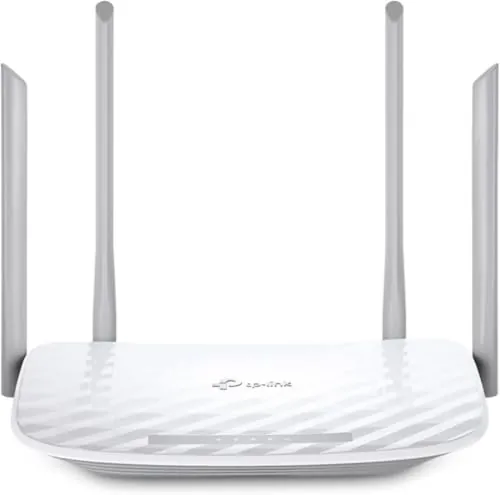
TP-Link Archer A54 AC1200 Dual-Band Wi-Fi Router
The assigned single-router listing is Archer A54, with no hardware-revision label. TP-Link lists Wi-Fi 5 (802.11ac/n/a at 5GHz; 802.11n/b/g at 2.4GHz) and one 10/100 WAN plus four 10/100 LAN ports. EasyMesh appears in the U.S. V1.26 datasheet, but do not assume the exact ASIN's revision from the model name alone.
Model Archer A54 (hardware revision not specified)
Amazon ASIN B09G5Y1HWZ
Differences that matter
Sources for Wi-Fi generation and client fit
Sources for WAN and wired-LAN connections
Sources for Mode and network-path planning
First decide which connections you need
The clearest difference is the Ethernet path: the AX21 V5 page lists Gigabit WAN and LAN ports, while the A54 page lists 10/100 Mbps WAN and LAN ports. If your ISP plan, modem, desktop, console or wired access point needs a Gigabit link, the A54 port class is a practical limitation. Check every link in that path; a faster router does not raise the rate of a slower modem, cable or endpoint.
The AX21 is listed as Wi-Fi 6 / 802.11ax; the A54 is Wi-Fi 5 / 802.11ac on 5GHz. Choose around the standards and features your actual clients support. The manufacturer's combined AX1800/AC1200 labels and band-rate figures are not measured household throughput.
Check mesh by the label on the unit
Mesh claims need more care than the Wi-Fi and port comparison. TP-Link's U.S. AX21 V5.6 datasheet lists EasyMesh, and its support page exposes V5.60 and V5.46 selections. The A54 V1.26 datasheet lists EasyMesh, while its support page exposes V1, V1.26 and V1.60 materials. The exact subrevision of either selected listing is not identified by the listing information.
Also, the AX21 general product page discusses EasyMesh but lists OneMesh in its specification section. Do not assume EasyMesh and OneMesh are interchangeable or that any two versions will form a mesh together. If mesh is essential, check the printed hardware revision, current firmware and TP-Link's compatible-device guidance for both the router and the intended partner before buying.
A short pre-buy network check
Before choosing, note (1) the wired speed of your plan and modem, (2) the Ethernet ports required by your wired endpoints, (3) the Wi-Fi standard of your main clients, and (4) whether you need mesh or simply a router/access point. If any wired link requires Gigabit, the AX21 is the match on the published port specification. If the network genuinely fits Wi-Fi 5 and 10/100 Ethernet, the A54 may cover those requirements without relying on higher AX21 rate labels.
For a mesh expansion, add one more check: read the exact hardware label on both units and confirm their version-specific EasyMesh or OneMesh support and firmware. This avoids selecting by model name alone when the vendor's version menus and product-page labels differ.
Product details
TP-Link Archer AX21 V5 AX1800 Dual-Band Wi-Fi 6 Router
- Wireless standard
- Dual-band Wi-Fi 6 (802.11ax/ac/n/a at 5GHz; 802.11ax/n/b/g at 2.4GHz) Source
- Ethernet ports
- 1 × Gigabit WAN and 4 × Gigabit LAN Source
- Mesh documentation
- TP-Link's U.S. V5.6 datasheet lists EasyMesh as supported; the support selector separately lists V5.60 and V5.46, and the general product page also lists OneMesh in its specifications. Confirm the unit revision, firmware and intended partner before relying on mesh support. Source
TP-Link Archer A54 AC1200 Dual-Band Wi-Fi Router
- Wireless standard
- Dual-band Wi-Fi 5 (802.11ac/n/a at 5GHz; 802.11n/b/g at 2.4GHz) Source
- Ethernet ports
- 1 × 10/100 Mbps WAN and 4 × 10/100 Mbps LAN Source
- Mesh documentation
- TP-Link's U.S. Archer A54 V1.26 datasheet lists EasyMesh, while its support page offers V1, V1.26 and V1.60 materials; the selected listing does not identify which revision is supplied. Source
Before you buy
Community discussions
Checking download and upload separately on Windows
TP-Link Archer AX21 V5 AX1800 Dual-Band Wi-Fi 6 Router
One user reported very slow Windows downloads with an Archer AX21 US V5.46 on firmware 1.1.2 while uploads remained much faster. They saw it on Wi-Fi and wired Ethernet. The report covers that setup and hardware subrevision.
What to check
If a fast Windows desktop is the reason you want gigabit ports, verify the label on the AX21 box and run separate wired download and upload checks on the intended PC.
Common questions
Does the Archer A54 have Gigabit Ethernet?
TP-Link's U.S. specification page lists one 10/100 Mbps WAN port and four 10/100 Mbps LAN ports for Archer A54. If your internet service or wired devices need Gigabit Ethernet, choose a router with Gigabit ports and check the entire modem-to-client path.TP-Link U.S. Archer A54 product page
Will the AX21's Wi-Fi 6 make every device faster?
No guaranteed speed result follows from the standard label. TP-Link says use of 802.11ax features requires compatible clients, and its wireless figures are physical rates. A Wi-Fi 5 or older device does not become a Wi-Fi 6 client by connecting to the AX21.TP-Link U.S. Archer AX21 product page
Can I count on either listing for EasyMesh?
Check the hardware label and version-specific support materials. TP-Link lists multiple hardware revisions for both model families, and its AX21 product page includes both EasyMesh and OneMesh references. The A54 V1.26 datasheet lists EasyMesh, but the supplied revision of the selected listing has not been established here. Check the exact partner model and firmware as well.TP-Link U.S. Archer AX21 product pageTP-Link U.S. Archer AX21 hardware support and downloadsTP-Link U.S. Archer A54 V1.26 datasheetTP-Link U.S. Archer A54 hardware support and downloads
Sources and scope
No controlled speed, coverage, congestion or reliability tests were performed. TP-Link's wireless rate figures are nominal physical rates, not measured home throughput. Actual results depend on the clients, service, Ethernet path, placement, interference and other conditions. The AX21 listing data/listing identifies V5 but not whether the unit is V5.46 or V5.60; the A54 identity does not specify whether the unit is V1, V1.26 or V1.60. Mesh claims are therefore a hardware-version and firmware check, not a guarantee for the exact retail unit or a particular partner router.
Related comparisons

TP-Link Archer AX21 V5 vs Archer BE230: A Wi-Fi and Port Fit Check
The Archer AX21 V5 is a dual-band Wi-Fi 6 router with gigabit Ethernet; the Archer BE230 adds dual-band Wi-Fi 7 features and a 2.5GbE WAN plus 2.5GbE LAN port. The useful choice depends on which of those capabilities your own clients, internet service and wired devices can use.
Read comparison
TP-Link Archer AX55 vs Archer A54: Match Wi-Fi, Ethernet and Setup Needs
The TP-Link Archer AX55 is the spec match for Wi-Fi 6 clients, a broadband or local wired path that should not be capped by 100 Mbps ports, or a USB drive connected to the router. The Archer A54 is a simpler fit when Wi-Fi 5 is enough, all wired links can use 10/100 Mbps, and you do not need router-hosted USB storage. Both require a compatible internet connection and may need a separate modem. TP-Link lists multiple hardware revisions for both families; confirm the label on the exact unit and match its U.S. documentation before relying on revision-specific features or firmware.
Read comparison