
Products compared
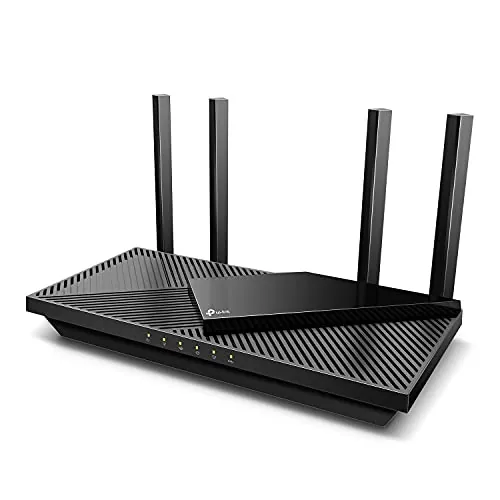
TP-Link
TP-Link Archer AX55 AX3000 Dual-Band Wi-Fi 6 Router
The U.S. Archer AX55 product page lists Wi-Fi 6, one Gigabit WAN port, four Gigabit LAN ports and one USB 3.0 port. TP-Link's AX55 V4 datasheet describes USB-drive sharing. The revision in the assigned marketplace offer is not established.
Model Archer AX55
Amazon ASIN B09G5W9R6R
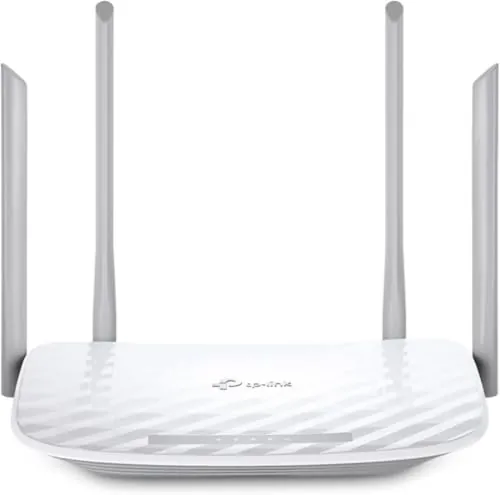
TP-Link
TP-Link Archer A54 AC1200 Dual-Band Wi-Fi Router
The U.S. Archer A54 product page lists Wi-Fi 5, one 10/100 Mbps WAN port and four 10/100 Mbps LAN ports. Its U.S. V1 datasheet identifies router, access-point and range-extender modes and shows a rear panel with Ethernet, power and buttons. The revision in the assigned marketplace offer is not established.
Model Archer A54
Amazon ASIN B09G5Y1HWZ
Differences that matter
What matters most to you?
Choose a priority to see what it changes.
Sources for Wi-Fi generation and client support
Sources for WAN/LAN port ratings and wired-device check
Sources for Internet service, modes and setup dependencies
Sources for Placement and hardware revision
Start with the service entering WAN and the devices on LAN
The clearest hard limit in this pair is wired: TP-Link lists Gigabit WAN and LAN interfaces on AX55, versus 10/100 Mbps WAN and LAN interfaces on A54. Before buying, check the plan you pay for and the Ethernet rate on computers, TVs, game consoles, switches or storage you connect. If either the service path or a local wired workflow needs a port rated above 100 Mbps, the A54's listed interface ceiling does not fit that requirement. This does not predict the internet or transfer speed you will see; the modem, service, cable, other equipment, client and conditions also matter.
Both pages say a modem may be needed for internet service. If your provider supplied a gateway that already routes, identify whether the new unit will replace that router or run in access-point mode, and check the provider's connection requirements before ordering.
Match wireless generation to the clients you own
AX55's U.S. page lists Wi-Fi 6/802.11ax, while A54 is a Wi-Fi 5/802.11ac router. If you have Wi-Fi 6 clients and want the router side to support 802.11ax, AX55 is the direct feature match. TP-Link notes that its Wi-Fi 6 features require client support; wireless rates shown in specification tables are not measured household throughput. If every device you care about is Wi-Fi 5 and the wired requirements fit 100 Mbps, the generation label alone does not prove that AX55 would improve your actual use.
Do not pick between them from the combined AX3000 or AC1200 class label alone. Check your access devices and any service or local-network limits, then choose the features you will use.
Decide whether the router itself needs to host a drive
AX55's U.S. specifications list a USB 3.0 port, and its V4 datasheet describes sharing files and media from an external drive. The A54 U.S. page and V1 rear-panel layout show Ethernet and power connections but no USB socket. If your desired setup is specifically a drive plugged into the router, AX55 is the documented option in this comparison. If the drive is already attached to a computer or separate network storage, this distinction may not matter.
Check the manual for the exact revision and the drive's format/requirements before replacing another storage setup. A port and sharing feature do not establish transfer speed, support for every drive or suitability for a particular workload.
Check placement, operating role and hardware revision
The listed footprints are 10.2 × 5.3 inches for AX55 and 9.1 × 5.7 inches for A54. Measure a shelf or table and include cable reach to the modem, outlet and wired devices. TP-Link's general placement guidance recommends a central, elevated, open location; it does not guarantee coverage for a specific house. The model pages use a three-bedroom range label but also disclaim guaranteed coverage and throughput, so treat the room label as a broad product description rather than a fit result.
TP-Link lists multiple U.S. hardware revisions for both families. Its support guidance says the hardware version appears on the device label and firmware must match the hardware version and purchase region. The ASIN and listed model name used here do not establish which revision a particular seller will ship. Check the bottom label and use the matching regional support/manual page; this guide does not compare firmware versions, security status or revision-specific feature changes beyond the cited documents.
Product details
TP-Link Archer AX55 AX3000 Dual-Band Wi-Fi 6 Router
- Wireless standard
- Wi-Fi 6; 802.11ax/ac/n/a on 5 GHz and 802.11ax/n/b/g on 2.4 GHz Source
- Wired ports
- One Gigabit WAN and four Gigabit LAN ports Source
- USB and supported roles
- One USB 3.0 port; router and access-point modes on the U.S. product specifications. AX55 V4 datasheet documents external-drive file/media sharing. Source
- Placement footprint
- 10.2 × 5.3 in (W × D) on the current U.S. product page; the page lists 10.2 × 5.3 × 1.5 in overall. Source
TP-Link Archer A54 AC1200 Dual-Band Wi-Fi Router
- Wireless standard
- Wi-Fi 5; 802.11ac/n/a on 5 GHz and 802.11n/b/g on 2.4 GHz Source
- Wired ports
- One 10/100 Mbps WAN and four 10/100 Mbps LAN ports Source
- Documented working modes
- Router, access point and range extender modes on the U.S. V1 datasheet; verify the documentation matching the actual hardware revision. Source
- Placement footprint
- 9.1 × 5.7 in (W × D) on the current U.S. product page. Source
Before you buy
Community discussions
When a gigabit WAN link negotiates at 100 Mbps
TP-Link Archer AX55 AX3000 Dual-Band Wi-Fi 6 Router
An AX55 user reported that the Ethernet link from their fiber terminal negotiated at 100 Mbps. Forcing 1 Gbps made the router report the WAN cable as unplugged. They did not establish a cause.
What to check
If your service is faster than 100 Mbps, confirm the negotiated WAN rate with the ISP gateway so you can distinguish the listing’s port rating from your own link speed.
Trying USB media sharing with a TV and laptop
TP-Link Archer AX55 AX3000 Dual-Band Wi-Fi 6 Router
An Archer AX55 owner could play files from a USB drive on their smart TV. On their laptop, the files were read-only and had to be copied before playing. They also reported Wi-Fi interruptions that stopped after the drive was removed.
What to check
If you are choosing AX55 partly for USB sharing, try your own TV and laptop and check whether you need read-only media access or a writable network drive.
Common questions
Is Archer AX55 guaranteed to deliver faster Wi-Fi than Archer A54?
No. AX55 supports Wi-Fi 6/802.11ax, while A54 supports Wi-Fi 5/802.11ac, but TP-Link says the advertised wireless rates are standards-derived physical rates and that actual throughput and coverage vary with client capability, network conditions, building materials, obstacles, traffic and location. Match the standard to your devices; do not treat the model labels as measured results.TP-Link Archer AX55: U.S. product specificationsTP-Link Archer A54: U.S. product specifications
Which one has Gigabit Ethernet ports?
TP-Link lists one Gigabit WAN and four Gigabit LAN ports for AX55. A54's U.S. page lists one 10/100 Mbps WAN and four 10/100 Mbps LAN ports. These are port ratings; actual internet speed also depends on the plan, modem, cable, connected device and network conditions.TP-Link Archer AX55: U.S. product specificationsTP-Link Archer A54: U.S. product specifications
Can I share a USB drive from either router?
TP-Link lists a USB 3.0 port on AX55, and the AX55 V4 datasheet describes external-drive file/media sharing. The reviewed A54 U.S. specifications and V1 rear-panel diagram do not list a USB connection. Confirm drive requirements for the exact hardware revision; no transfer-speed or workload result is established here.TP-Link Archer AX55: U.S. product specificationsTP-Link Archer AX55 V4 U.S. datasheetTP-Link Archer A54: U.S. product specificationsTP-Link Archer A54 V1 U.S. datasheet
Will either router cover my whole home?
The pages do not establish coverage in your home. TP-Link's current pages label both for three-bedroom houses, but the manufacturer also says actual wireless coverage varies with building materials, obstacles, traffic, client limits and location. Check the intended placement and floor plan; do not treat a room label as a guarantee.TP-Link Archer AX55: U.S. product specificationsTP-Link Archer A54: U.S. product specifications
How do I know which firmware applies to the router I receive?
Check the hardware version printed on the router label, then use TP-Link's U.S. support page for that model, revision and purchase region. TP-Link lists multiple AX55 and A54 hardware branches and warns that firmware must match the hardware version. This comparison does not review current security advisories or firmware feature parity.TP-Link Archer AX55 U.S. support and hardware-version downloadsTP-Link Archer A54 U.S. support and hardware-version downloadsTP-Link: Find the hardware and firmware version of a device
Sources and scope
This is a specification and setup-fit comparison, not a throughput, coverage, stability, security or USB-transfer test. TP-Link lists multiple U.S. hardware revisions for both product families, while the selected listing records do not establish the revision of the retail units behind these ASINs. Several detailed documents reviewed are for AX55 V4 and A54 V1; confirm the exact unit's bottom-label hardware version and use the matching U.S. support page. Manufacturer wireless rates and room labels are not guarantees of actual service, coverage or client performance. Firmware features and support are outside the comparison.
- TP-Link Archer AX55: U.S. product specifications
- TP-Link Archer A54: U.S. product specifications
- TP-Link Archer AX55 V4 U.S. datasheet
- TP-Link Archer A54 V1 U.S. datasheet
- TP-Link Archer AX55 U.S. support and hardware-version downloads
- TP-Link Archer A54 U.S. support and hardware-version downloads
- TP-Link: Find the hardware and firmware version of a device
- TP-Link: Where to place your Wi-Fi router
Related comparisons

Deco X55 3-Pack vs Archer AX55: Do You Need Three Wi-Fi Nodes?
The assigned Deco X55 is a three-unit Wi-Fi 6 mesh kit; the Archer AX55 offer is one Wi-Fi 6 router. That difference changes where Wi-Fi and Ethernet connections are available. X55 gives you three units to place in separate locations, optional Ethernet backhaul, and three Gigabit ports per unit. AX55 concentrates one Gigabit WAN, four Gigabit LAN ports, and a USB 3.0 port at the router. Before buying, map the modem, rooms that need another node, power outlets, wall Ethernet runs, and wired devices. Both support router and access-point operation, but Archer expansion uses a compatible OneMesh or EasyMesh path and cannot merge with Deco mesh; check the exact AX55 hardware version and firmware if expansion matters.
Read comparison
TP-Link Archer BE400 vs AX55: Do You Need 2.5-Gigabit Links?
These are two single-router US listings: Archer BE400 ASIN B0DVBP5L6Y and Archer AX55 ASIN B09G5W9R6R. TP-Link lists BE400 as a dual-band BE6500 Wi-Fi 7 router with one 2.5Gbps WAN, one 2.5Gbps LAN and three 1Gbps LAN ports. AX55 is a dual-band AX3000 Wi-Fi 6 router with one Gigabit WAN and four Gigabit LAN ports. Both have four LAN jacks, but one BE400 LAN jack is multi-gig. If your modem, plan and a wired endpoint can use over 1Gbps, BE400 offers a path AX55 does not; if your network and clients are Gigabit/Wi-Fi 6, the AX55 feature set may already match. Before buying, map modem-to-WAN, then assign the fastest wired endpoint and count remaining LAN clients. The BE400 Amazon listing also has a model/box-field conflict that needs seller confirmation. Neither ASIN page identifies the router's hardware revision.
Read comparison