
Products compared
TP-Link
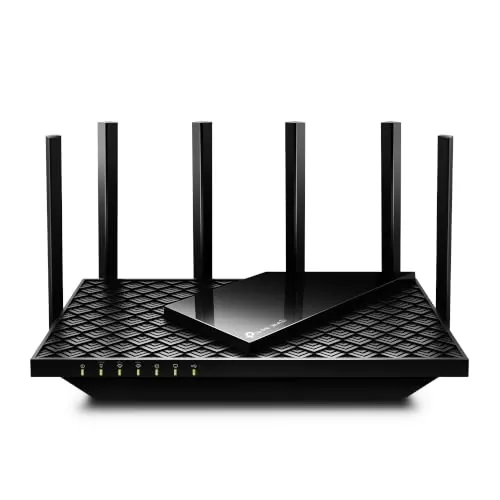
TP-Link Archer AXE75 Wi-Fi 6E Router
U.S. Archer AXE75 listing; its hardware revision is not identified. TP-Link lists separate U.S. V1 and V2 configurations.
Model Archer AXE75
Amazon ASIN B0B3SQK74L
ASUS
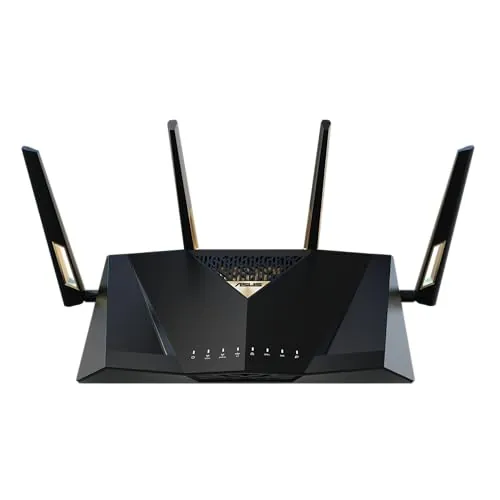
ASUS RT-BE88U Dual-Band Wi-Fi 7 Router
Exact U.S. listed model RT-BE88U; the manufacturer documents 2.4/5 GHz wireless operation and a mixed Ethernet/SFP+ port layout.
Model RT-BE88U
Amazon ASIN B0D55SWRSM
Differences that matter
What matters most to you?
Choose a priority to see what it changes.
Sources for Wireless bands and client requirement
Sources for AXE75 revision changes its wired layout
Sources for Allocate WAN before counting LAN ports
Sources for Example: 2.5G WAN plus two 2.5G wired endpoints
Start with the clients that will use the wireless network
Archer AXE75 U.S. V1 and V2 both list 2.4, 5, and 6 GHz. TP-Link says Wi-Fi 6E use requires client support for the corresponding features. Check the exact wireless adapter in the devices that matter to you before paying for a 6 GHz band.
The ASUS RT-BE88U is a dual-band Wi-Fi 7 router, and its U.S. specification lists 2.4 and 5 GHz. If your devices need a router-side 6 GHz band, that requirement points to AXE75 in this pair; if they use 2.4/5 GHz and your main need is wired connections, compare the ASUS port layout next. These are documented feature differences, not a measured wireless-performance result.
Draw a physical port map before choosing a wired plan
Write down the modem or ONT connection first, then list each wired computer, NAS, or switch. On AXE75 V1, the listed WAN and four LAN ports are Gigabit. V2 has a single 2.5G WAN/LAN socket plus one 1G WAN/LAN and three 1G LAN ports. On V2, assigning the 2.5G socket to WAN leaves no 2.5G LAN socket; assigning 1G WAN/LAN to WAN leaves that one 2.5G socket for one wired endpoint.
RT-BE88U's manual lists one 2.5G WAN/LAN1 and three separate 2.5G LAN sockets. For a 2.5G WAN, desktop and NAS example, assign the WAN/LAN1 socket to WAN and two LAN sockets to the endpoints. The router also has a 10G Ethernet WAN/LAN connection and a distinct SFP+ socket, so count them by the physical connector and the link you actually plan to make.
Verify which Archer AXE75 revision the offer supplies
TP-Link publishes different U.S. V1 and V2 port lists for the same AXE75 model family. The Amazon listing does not identify the offered hardware revision. TP-Link’s help page says the physical product label identifies hardware version, typically on the bottom or back of the unit. If that single V2 2.5G port is material to your plan, ask the seller to confirm the version or choose an offer that names it before ordering.
Do not decide from a model title or speed total alone. Check the actual interface on the WAN equipment and endpoint, reserve the WAN socket, and only then count remaining compatible LAN sockets. Link rates on a router do not establish the throughput you will see from a service or device.
Product details
TP-Link Archer AXE75 Wi-Fi 6E Router
Before you buy
Community discussions
Checking which everyday devices can use 6 GHz
TP-Link Archer AXE75 Wi-Fi 6E Router
A shopper in Canada comparing the Archer AXE75 with other routers asked whether their Wi-Fi 6E laptop made the 6 GHz band useful to them.
What to check
List the devices you use most often and check their supported bands. Match the router and its region to the bands those devices can use.
Measuring the space for a replacement router
ASUS RT-BE88U Dual-Band Wi-Fi 7 Router
A buyer shortlisted the RT-BE88U and found its width too large for the old router’s location without changing the setup.
What to check
Measure the shelf width and leave space for antennas, connected cables and ventilation.
Planning a router next to a wired-home switch
ASUS RT-BE88U Dual-Band Wi-Fi 7 Router
An Australian shopper considering the RT-BE88U described Ethernet wall jacks that already ran to a switch in a closet.
What to check
Sketch the path from the internet connection to the router, switch and wall jacks. Check which physical ports each part of that setup needs.
Common questions
Does every Archer AXE75 have a 2.5G port?
No. TP-Link’s U.S. V1 page lists one Gigabit WAN and four Gigabit LAN ports. Its U.S. V2 page lists one 2.5G WAN/LAN port, one 1G WAN/LAN port, and three 1G LAN ports. The retail listing does not identify which hardware revision it contains, so verify the offer’s version before relying on that port.Archer AXE75 V1 — U.S. product specificationsArcher AXE75 V2 — U.S. product specificationsHow to Find the Hardware Version on Your TP-Link Device
Can a 6 GHz phone or laptop connect to the RT-BE88U's 6 GHz band?
The ASUS U.S. RT-BE88U specification lists 2.4 and 5 GHz operation, not a 6 GHz band. Choose it for its documented wired layout only if those bands meet your client requirements.RT-BE88U — U.S. Tech Specs
Can I use the ASUS 10G SFP+ socket like a regular Ethernet jack?
No. The RT-BE88U manual labels one 10G Ethernet WAN/LAN port separately from the 10G SFP+ port. Count the SFP+ connection only when your planned link uses that physical interface; the separate 2.5G RJ45 LAN ports support a simpler endpoint plan when 2.5G is sufficient.RT-BE88U User Guide E23805
Which model works for both 6 GHz Wi-Fi and multiple multi-gig wired endpoints?
Neither documented configuration meets both conditions. Archer AXE75 has 6 GHz on V1 and V2 but V1 is all Gigabit and V2 has one 2.5G WAN/LAN socket. RT-BE88U has multiple multi-gig wired ports but its U.S. specification lists 2.4/5 GHz only. Look for a router whose exact revision documentation confirms both needs.Archer AXE75 V1 — U.S. product specificationsArcher AXE75 V2 — U.S. product specificationsRT-BE88U — U.S. Tech SpecsRT-BE88U User Guide E23805
Sources and scope
Check which AXE75 revision the seller offers if your setup needs a 2.5G port. Also check the bands and port speeds on the devices you will connect, since those determine which router connections you can use.
Related comparisons

ASUS RT-BE88U vs TP-Link Archer BE400: Plan Your Wired Network First
The RT-BE88U is the fit to investigate for a 10G WAN, SFP+ link or several multi-gig wired devices. The Archer BE400 covers a simpler 2.5G WAN, one 2.5G LAN device and three gigabit clients. Both are dual-band Wi-Fi 7 routers, so neither adds a 6GHz band.
Read comparison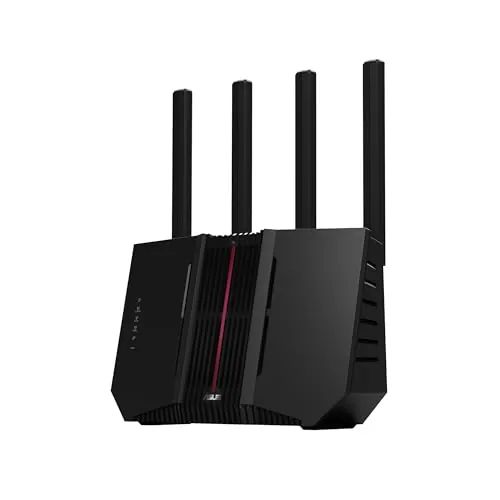
ASUS RT-BE9700 vs RT-BE88U: 6GHz Wi-Fi or a Wired-First Setup?
Both are ASUS Wi-Fi 7 routers with AiMesh and a 10Gbps WAN/LAN interface. The RT-BE9700 adds a 6GHz radio and lists up to 320MHz channels there; the dual-band RT-BE88U has no listed 6GHz radio but adds a 10Gbps SFP+ port and four 1Gbps LAN ports. Match the router to the Wi-Fi bands, WAN handoff, wired endpoints and SFP+ equipment in your actual plan. ASUS's RT-BE9700 U.S. product page and technical-spec page differ on the role of its four 2.5Gbps ports, so verify port assignment before finalizing a LAN map.
Read comparison