
Products compared
TP-Link
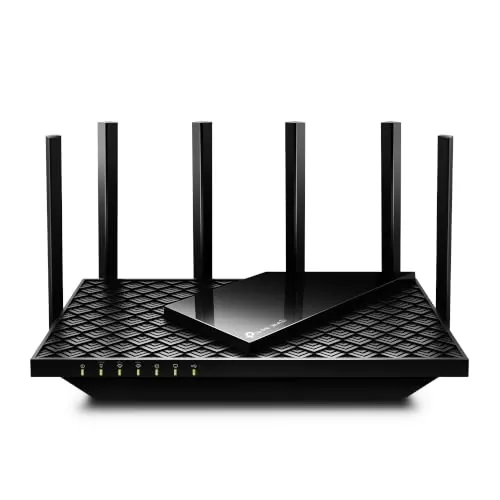
TP-Link Archer AXE75 Tri-Band Wi-Fi 6E Router
Selected U.S. listing is the Archer AXE75 Wi-Fi 6E router. Its hardware revision is not identified in the listing information, and TP-Link publishes revision-specific port and mesh details.
Model Archer AXE75; hardware revision not established for the selected ASIN
Amazon ASIN B0B3SQK74L
TP-Link
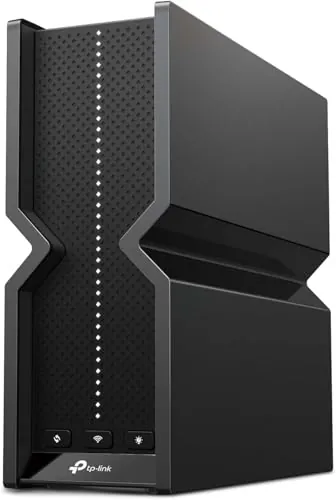
TP-Link Archer BE550 BE9300 Tri-Band Wi-Fi 7 Router
Selected U.S. listing is the Archer BE550 Wi-Fi 7 router. The product record does not state its hardware revision; confirm the label and corresponding support page for revision-specific setup or firmware.
Model Archer BE550; hardware revision not established for the selected ASIN
Amazon ASIN B0CJSNSVMR
Differences that matter
Sources for Do your clients use the wireless feature you want?
Sources for Count WAN and LAN ports against your actual wiring
Sources for Check the setup path and internet equipment
Sources for Interpret advertised wireless rates carefully
Start with clients, not the Wi-Fi generation number
The AXE75 family is Wi-Fi 6E and includes 6 GHz. The BE550 is Wi-Fi 7 and adds options such as MLO, 320 MHz and 4K-QAM. Those names do not tell you what a particular phone or laptop can use: TP-Link says corresponding client support is required, and 320 MHz on 6 GHz can be restricted by region.
Before replacing the router, open the specifications for the devices you actually use and identify the feature you want them to use. If the client does not support it, the BE550's Wi-Fi 7 capability may not resolve your stated need. This is a feature-matching check, not a promise about speed or room coverage.
Trace the WAN and LAN cables before deciding on ports
Separate the modem/ISP connection from the devices inside the home. The BE550 product page lists one 2.5 Gbps WAN port plus four 2.5 Gbps LAN ports. AXE75 is revision-sensitive: the U.S. V1 page lists one Gigabit WAN plus four Gigabit LAN ports, while the currently shown V2 page lists a different combination of 2.5 Gbps and 1 Gbps WAN/LAN ports. The selected AXE75 ASIN does not identify which revision is in the box.
TP-Link's AXE75 support page lists several hardware versions and links an instruction for finding the version on the device. For either model, check the label and regional support page before selecting firmware or counting exact ports. If a 2.5 Gbps internet link is the reason to upgrade, check the service plan and modem/ONT as well; if the use is local wired networking, check the LAN device ports.
Treat mesh and setup as exact-version checks
TP-Link's AXE75 V1 page describes OneMesh, while its current V2 page describes EasyMesh. The BE550 page lists EasyMesh. These product-family labels do not confirm that your current extender or satellite will pair as expected with the exact hardware and firmware you own, so check the router and node versions together.
The AXE75 setup page describes connecting to a modem, powering on both devices, opening the Tether app and following its steps. Before swapping routers, note whether your ISP has a separate modem or a gateway, and check which WAN type your service uses. Follow the manual for your exact hardware revision.
Product details
TP-Link Archer AXE75 Tri-Band Wi-Fi 6E Router
- Wireless family
- Wi-Fi 6E tri-band with 6 GHz, 5 GHz and 2.4 GHz; matching client support is required for corresponding features. Source
- Revision-sensitive ports and mesh
- TP-Link's AXE75 V1 page lists one Gigabit WAN and four Gigabit LAN ports with OneMesh; its current V2 page lists one 2.5 Gbps WAN/LAN, one 1 Gbps WAN/LAN and three 1 Gbps LAN ports with EasyMesh. The selected ASIN's revision is unknown. Source
TP-Link Archer BE550 BE9300 Tri-Band Wi-Fi 7 Router
- Wireless family
- Wi-Fi 7 tri-band with MLO, 320 MHz and 4K-QAM listed; corresponding client support is required, and 320 MHz is on 6 GHz with regional restrictions. Source
- Published Ethernet layout
- The U.S. product page lists one 2.5 Gbps WAN port and four 2.5 Gbps LAN ports; verify the exact unit's hardware label before building a revision-specific network plan. Source
Before you buy
Community discussions
Checking whether a mesh extender uses Ethernet
TP-Link Archer BE550 BE9300 Tri-Band Wi-Fi 7 Router
A BE550 owner paired it wirelessly with an RE505X V2. After running an Ethernet cable to the extender, the owner still saw it using Wi-Fi for the mesh link.
What to check
Check wired-backhaul support for the exact extender and revision. Use the mesh status screen to confirm the connection after setup.
Common questions
Will an Archer BE550 improve Wi-Fi for devices that only support Wi-Fi 6E?
A Wi-Fi 6E device cannot use Wi-Fi 7-only functions unless it supports them. TP-Link says Wi-Fi 7 features such as MLO and 320 MHz require corresponding client support. Verify the exact client feature before deciding that Wi-Fi 7 is a reason to replace an AXE75.Archer AXE75 — TP-Link U.S. product page (currently V2)Archer BE550 — TP-Link U.S. product page
How do I know whether my AXE75 has four Gigabit LAN ports or a 2.5 Gbps port?
Check the hardware-version label on the router, then choose that version on TP-Link's U.S. AXE75 support page. The V1 product page lists one Gigabit WAN and four Gigabit LAN ports; the current V2 page lists a different WAN/LAN arrangement. The cataloged ASIN alone does not identify the revision.Archer AXE75 V1 — TP-Link U.S. product pageArcher AXE75 — TP-Link U.S. product page (currently V2)Download for Archer AXE75 — TP-Link U.S. Support
Can I assume my existing TP-Link mesh devices will pair with either router?
No exact pairing is established by the family names alone. AXE75 mesh support differs by documented hardware revision, and BE550 is listed as EasyMesh compatible. Check the router and node labels plus TP-Link's regional compatibility and firmware notes for those exact versions.Archer AXE75 V1 — TP-Link U.S. product pageArcher AXE75 — TP-Link U.S. product page (currently V2)Archer BE550 — TP-Link U.S. product pageDownload for Archer AXE75 — TP-Link U.S. SupportDownload for Archer BE550 — TP-Link U.S. Support
Sources and scope
This guide compares TP-Link's documented feature families and setup checks; it does not establish the hardware revision of Amazon ASIN B0B3SQK74L or B0CJSNSVMR. AXE75 V1 and V2 pages list different Ethernet and mesh configurations, and TP-Link lists multiple hardware revisions for both product lines. Check each router's underside label and the U.S. support page for that revision before relying on port counts, mesh family or firmware. No measured throughput, range, latency, reliability or security-outcome comparison was conducted.
Related comparisons

TP-Link Archer BE400 vs BE550: Will You Use 6 GHz and Four 2.5G LAN Ports?
The assigned US listings are one Archer BE400 (ASIN B0DVBP5L6Y) and one Archer BE550 (ASIN B0CJSNSVMR). TP-Link's US pages describe BE400 as dual-band Wi-Fi 7 on 2.4/5GHz with one 2.5Gbps WAN, one 2.5Gbps LAN and three 1Gbps LAN ports. BE550 is tri-band Wi-Fi 7 with 2.4/5/6GHz, one 2.5Gbps WAN and four 2.5Gbps LAN ports. Choose BE550 if you have clients whose exact specifications support 6GHz or need multiple multi-gig wired endpoints. BE400 can fit a 2.4/5GHz household with at most one 2.5G LAN device. Before ordering BE550, verify the hardware revision and confirm your client supports 6GHz; Wi-Fi 7 alone is not enough. The BE400 listing still has a captured BE400-vs-BE230 box-field mismatch that must be confirmed with its seller.
Read comparison
TP-Link Archer BE230 vs BE550: Plan Your 6 GHz and Wired Devices
The Archer BE230 is a dual-band Wi-Fi 7 router with one 2.5 Gbps WAN, one 2.5 Gbps LAN and three 1 Gbps LAN ports. The Archer BE550 adds a 6 GHz band and four 2.5 Gbps LAN ports behind a separate 2.5 Gbps WAN. Choose with a port-by-port device list, then check which household devices can use 6 GHz.
Read comparison