
Products compared
TP-Link
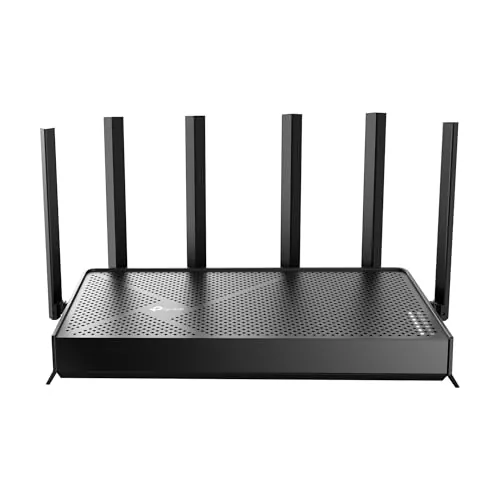
TP-Link Archer BE600 BE9700 Tri-Band Wi-Fi 7 Router
US black Archer BE600 / BE9700 router listing. Confirm the unit’s hardware version on arrival for version-specific downloads or features.
Model Archer BE600
Amazon ASIN B0F76PQ2T8
ASUS
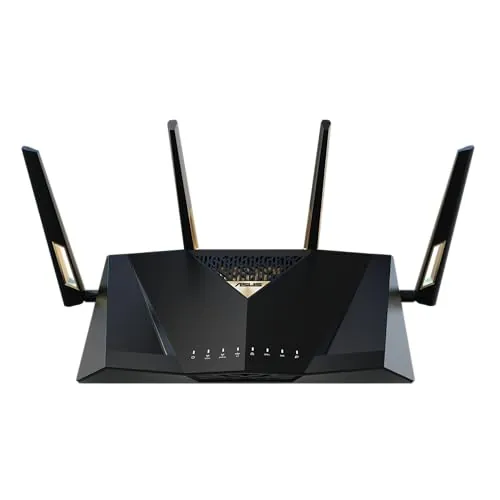
ASUS RT-BE88U Dual-Band Wi-Fi 7 Router
US black RT-BE88U router listing. ASUS documents 2.4/5 GHz, AiMesh, SFP+, multi-gig Ethernet, and four 1 Gbps LAN sockets.
Model RT-BE88U
Amazon ASIN B0D55SWRSM
Differences that matter
What matters most to you?
Choose a priority to see what it changes.
Sources for Wireless bands and client match
Sources for WAN and wired-device port map
Sources for Mesh family and node pairing
Sources for Wired backhaul and revision check
Check whether your clients can use the BE600’s extra band
TP-Link’s US Archer BE600 page lists 2.4, 5, and 6 GHz. ASUS’s RT-BE88U technical specification lists operating frequencies of 2.4 and 5 GHz. For a buyer whose target is 6 GHz, BE600 has the documented radio fit; first check the exact phone, laptop, or other client’s official specification for 6 GHz support and confirm the applicable region and configuration.
The router’s Wi-Fi 7 name or its advertised aggregate figure does not tell you which band an existing client can use. Make a short list of the devices that will benefit from 6 GHz before paying for that difference. This comparison does not measure speed, coverage, latency, or stability.
Map the ports to your real wired equipment
The BE600 lists one 10 Gbps WAN/LAN, one 2.5 Gbps WAN/LAN, and three 2.5 Gbps LAN sockets. RT-BE88U lists a 10 Gbps WAN/LAN port, a separate 10 Gbps SFP+ port, a 2.5 Gbps WAN/LAN port, three 2.5 Gbps LAN ports, and four 1 Gbps LAN ports. The port lists matter only when they match your actual modem/ONT, switch, NAS, access point, or fixed client.
Before checkout, draw the path from internet handoff to router to wired devices. Label the connector, required link class, and intended WAN/LAN role at each step. If the ASUS SFP+ socket is the reason you prefer it, verify the exact module or cable and peer-device requirements in the manual; the product specification alone does not certify a particular SFP+ setup.
Treat EasyMesh and AiMesh as separate buying checks
TP-Link identifies the BE600 as EasyMesh-compatible and includes Archer BE600 in its current compatible-device list. Its EasyMesh guidance says cross-vendor features and compatibility can vary. ASUS identifies RT-BE88U as an AiMesh router/node, and ASUS’s support answer says AiMesh cannot be built with routers from other brands. The official material reviewed here does not validate these two exact routers as one managed mesh pair.
If expanding an existing system, identify its main router and candidate node models first. Prefer a combination that appears on the vendor’s current compatibility documentation. For a wired satellite, TP-Link says both EasyMesh endpoints must support Ethernet backhaul; ASUS separately documents wired backhaul for AiMesh. Do not infer that a BE600 version and an RT-BE88U can share either branded mesh configuration because both have Ethernet ports.
Confirm the BE600 hardware revision and the complete link path
TP-Link’s US support page presents V1 and V1.60 support choices and says model and hardware-version availability varies by region. Its datasheet is explicitly for US V1.6. Check the revision printed on the router you receive and use the matching purchase-region support materials before depending on a version-specific feature or firmware file.
Finally, check the entire link rather than a single port label: ISP plan and modem/ONT port, Ethernet cable category and length, receiving switch/NAS/AP interface, and the role assigned to any WAN/LAN socket. Published link rates are port and specification descriptions; this guide does not predict the resulting throughput.
Product details
TP-Link Archer BE600 BE9700 Tri-Band Wi-Fi 7 Router
- Documented bands
- The US product page lists 2.4 GHz, 5 GHz, and 6 GHz. Source
- Ethernet ports
- 1 × 10 Gbps WAN/LAN, 1 × 2.5 Gbps WAN/LAN, and 3 × 2.5 Gbps LAN are listed. Source
- Mesh label
- TP-Link identifies the Archer BE600 as EasyMesh-compatible; check the current model/revision list and backhaul support for any satellite. Source
ASUS RT-BE88U Dual-Band Wi-Fi 7 Router
- Documented bands
- ASUS lists 2.4 GHz and 5 GHz operating frequencies; the US specification does not list 6 GHz. Source
- Ethernet ports
- 1 × 10 Gbps WAN/LAN, 1 × 10 Gbps SFP+, 1 × 2.5 Gbps WAN/LAN, 3 × 2.5 Gbps LAN, and 4 × 1 Gbps LAN are listed. Source
- Mesh label
- ASUS lists AiMesh router/node modes; its support page says ASUS AiMesh cannot be built with another router brand. Source
Before you buy
Community discussions
Making use of jacks on both floors
ASUS RT-BE88U Dual-Band Wi-Fi 7 Router
One owner connected a second RT-BE88U over Ethernet as an AiMesh node and attached a TV and PC to the unit closest to each device.
What to check
Count the wired ports you need on each floor and check the node’s backhaul role. Use the compatibility list for the options you plan to keep.
Common questions
Does the Archer BE600 have 6 GHz while the RT-BE88U does not?
TP-Link lists 2.4, 5, and 6 GHz for the Archer BE600. ASUS’s US RT-BE88U tech specs list 2.4 and 5 GHz. Verify your own device’s official band support and region before treating 6 GHz as a useful difference for your setup.Archer BE600 | BE9700 Tri-Band Wi-Fi 7 Router — TP-Link USRT-BE88U Tech Specs — ASUS USA
Which router has an SFP+ port?
ASUS lists a 10 Gbps SFP+ port on the RT-BE88U; TP-Link’s listed BE600 Ethernet ports are RJ45 WAN/LAN and LAN ports. If SFP+ is essential, verify that your exact transceiver or cable, peer device, and intended port role are supported before buying.RT-BE88U Tech Specs — ASUS USART-BE88U User Manual — port descriptionsArcher BE600 | BE9700 Tri-Band Wi-Fi 7 Router — TP-Link US
Can these two routers form one mesh system together?
The reviewed sources do not validate this exact pair as one managed mesh. TP-Link calls the BE600 EasyMesh-compatible and says cross-vendor compatibility can vary. ASUS says routers from other brands cannot build AiMesh with an ASUS router. If a single managed mesh is required, verify a specific supported node pairing with the vendors before buying.Archer BE600 | BE9700 Tri-Band Wi-Fi 7 Router — TP-Link USTP-Link EasyMesh Devices — compatibility listGeneral Questions About EasyMesh — TP-Link USCan I build an AiMesh system with another brand of router with an ASUS router? — ASUS Support
Can I use Ethernet backhaul with either model?
ASUS documents Ethernet backhaul for AiMesh nodes. TP-Link says EasyMesh wired backhaul requires both the main router and satellite to support it. Verify the exact satellite, router hardware revision, firmware, and port roles; the BE600 listing and family page do not establish that its selected listing supports every backhaul configuration.Can I set up wired connection between AiMesh routers (Ethernet backhaul)? — ASUS USA SupportTP-Link EasyMesh Devices — compatibility listGeneral Questions About EasyMesh — TP-Link US
Sources and scope
This guide compares the manufacturers’ published radio bands, port inventories, and mesh-system documentation. It does not test throughput, coverage, latency, stability, interoperability, or SFP+ module compatibility. The assigned retail ASINs do not establish physical hardware revisions. TP-Link’s 1.6 datasheet is revision-specific; check the exact unit label and support page before relying on revision-dependent features. The sources reviewed do not validate the BE600 and RT-BE88U as one cross-brand mesh pair.
- Archer BE600 | BE9700 Tri-Band Wi-Fi 7 Router — TP-Link US
- Archer BE600 (US) V1.6 Datasheet — TP-Link
- TP-Link EasyMesh Devices — compatibility list
- General Questions About EasyMesh — TP-Link US
- Download for Archer BE600 — hardware versions by region
- RT-BE88U — ASUS USA product page
- RT-BE88U Tech Specs — ASUS USA
- RT-BE88U User Manual — port descriptions
- Can I build an AiMesh system with another brand of router with an ASUS router? — ASUS Support
- Can I set up wired connection between AiMesh routers (Ethernet backhaul)? — ASUS USA Support
Related comparisons

ASUS RT-BE88U vs TP-Link Archer BE400: Plan Your Wired Network First
The RT-BE88U is the fit to investigate for a 10G WAN, SFP+ link or several multi-gig wired devices. The Archer BE400 covers a simpler 2.5G WAN, one 2.5G LAN device and three gigabit clients. Both are dual-band Wi-Fi 7 routers, so neither adds a 6GHz band.
Read comparison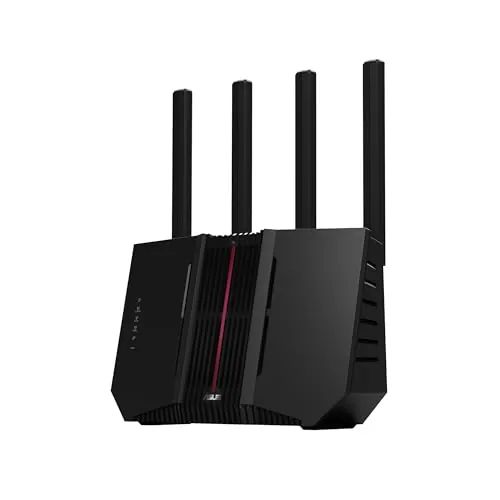
ASUS RT-BE9700 vs RT-BE88U: 6GHz Wi-Fi or a Wired-First Setup?
Both are ASUS Wi-Fi 7 routers with AiMesh and a 10Gbps WAN/LAN interface. The RT-BE9700 adds a 6GHz radio and lists up to 320MHz channels there; the dual-band RT-BE88U has no listed 6GHz radio but adds a 10Gbps SFP+ port and four 1Gbps LAN ports. Match the router to the Wi-Fi bands, WAN handoff, wired endpoints and SFP+ equipment in your actual plan. ASUS's RT-BE9700 U.S. product page and technical-spec page differ on the role of its four 2.5Gbps ports, so verify port assignment before finalizing a LAN map.
Read comparison