
Products compared
TP-Link
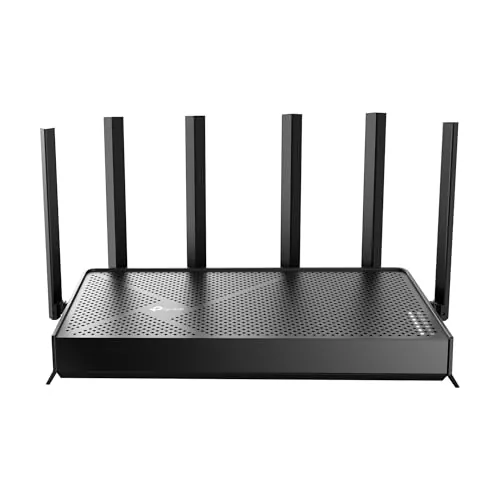
TP-Link Archer BE600 Wi-Fi 7 Router
Black US-market listing; exact shipped hardware revision is not established by the listing identity.
Model Archer BE600
Amazon ASIN B0F76PQ2T8
TP-Link
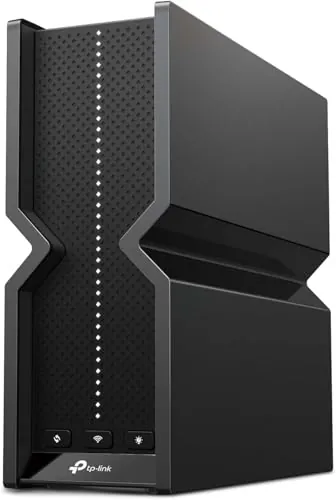
TP-Link Archer BE550 Wi-Fi 7 Router
Black US-market listing; exact shipped hardware revision is not established by the listing identity.
Model Archer BE550
Amazon ASIN B0CJSNSVMR
Differences that matter
What matters most to you?
Choose a priority to see what it changes.
Sources for Highest Ethernet port speed and role
Sources for WAN/LAN port layout
Sources for If the internet handoff is 2.5Gbps or slower
Sources for Hardware revision certainty
The useful distinction is the port map
The BE600 and BE550 are both Wi-Fi 7 routers, but the wired side is the clearer way to choose between these exact listings. TP-Link documents the BE600 with one 10Gbps WAN/LAN combo port, one 2.5Gbps WAN/LAN combo port, and three 2.5Gbps LAN ports. The BE550 has one 2.5Gbps WAN port and four 2.5Gbps LAN ports.
That means the BE600 is worth considering when a 10Gbps handoff or wired device is part of your actual plan. If not, compare the port roles: BE550's WAN is separate, while BE600 uses one of its combo ports for WAN and can assign the other to LAN. In a one-WAN setup, each layout can leave four LAN connections; the distinction is how those connections are provided.
Do this wired-device check before buying
List the modem or ONT, then list the devices you plan to wire: for example, a desktop, NAS, access point, or switch. For each link, note whether it is 10Gbps or 2.5Gbps. The BE600's 10Gbps port is useful only where the connected equipment and service path can use it; the port rating alone does not guarantee a faster connection.
If all required links are 2.5Gbps or below and four LAN connections are enough, the BE550's one dedicated WAN plus four dedicated LAN ports give a simple map. If you choose the BE600, annotate which combo port carries WAN and whether the other combo port will be a LAN link. TP-Link's BE550 setup guide shows the modem connected to its dedicated 2.5Gbps WAN port.
Check the exact hardware version for version-specific details
TP-Link's US support pages show more than one hardware version for both model families, and note that version availability can vary by region. The assigned ASINs identify the model listing, not the revision that will arrive. Check the label on the router and use the matching TP-Link page for firmware and revision-specific documentation.
This guide does not treat theoretical wireless rates as real-world speed or range results. If your decision depends on a specific wireless band feature or client compatibility, verify it for the exact hardware version and your client devices before purchase.
Product details
TP-Link Archer BE600 Wi-Fi 7 Router
The BE600 is the option to examine when your modem/ONT handoff or a wired endpoint needs a 10Gbps Ethernet port. Its two WAN/LAN combo ports make the wiring map more flexible, but their roles should be planned before installation.
TP-Link Archer BE550 Wi-Fi 7 Router
The BE550 suits a wiring plan that needs a separate 2.5Gbps WAN connection and four dedicated 2.5Gbps LAN ports, with no requirement for a 10Gbps Ethernet connection.
Before you buy
Community discussions
Mixing brands on a wired mesh connection
TP-Link Archer BE550 Wi-Fi 7 Router
A BE550 owner with an Ethernet wall jack in the office asked whether a Mercusys EasyMesh extender would work there.
What to check
If you plan to reuse a wired drop, check exact cross-brand compatibility and whether the extender supports the wired role you need.
Common questions
Do both routers provide four LAN connections when used with a normal internet uplink?
Their documented port layouts can leave four LAN ports when one WAN uplink is in use. BE550 has four dedicated LAN ports. BE600 has three dedicated 2.5Gbps LAN ports plus one unused WAN/LAN combo port that can be assigned as LAN; check its setup instructions for your topology.TP-Link Archer BE600 product specifications (US)TP-Link Archer BE550 product specifications (US)
Will the BE600 make my internet faster than the BE550?
Not by itself. The BE600's 10Gbps port matters only when the connected modem/ONT, service, Ethernet path, and endpoint support the needed link. These specifications do not establish measured internet speed, Wi-Fi coverage, or performance in a particular home.TP-Link Archer BE600 product specifications (US)TP-Link Archer BE550 product specifications (US)
Can I tell the hardware revision from these Amazon model listings?
The listing identity confirms the BE600 and BE550 model families, but it does not identify the revision shipped. TP-Link's support pages list multiple hardware versions for these models. Check the unit label and choose the matching regional support page before downloading firmware or relying on revision-specific details.TP-Link Archer BE600 downloads and hardware versions (US)TP-Link Archer BE550 V1 downloads and hardware versions (US)
Sources and scope
This is a specification and wiring-fit comparison, not a speed, coverage, latency, or reliability test. TP-Link notes that hardware versions vary by region; the assigned Amazon listings do not establish the unit revision a buyer will receive. Confirm the exact version and regional support page before relying on revision-specific wireless details.
Related comparisons

TP-Link Archer BE400 vs BE550: Will You Use 6 GHz and Four 2.5G LAN Ports?
The assigned US listings are one Archer BE400 (ASIN B0DVBP5L6Y) and one Archer BE550 (ASIN B0CJSNSVMR). TP-Link's US pages describe BE400 as dual-band Wi-Fi 7 on 2.4/5GHz with one 2.5Gbps WAN, one 2.5Gbps LAN and three 1Gbps LAN ports. BE550 is tri-band Wi-Fi 7 with 2.4/5/6GHz, one 2.5Gbps WAN and four 2.5Gbps LAN ports. Choose BE550 if you have clients whose exact specifications support 6GHz or need multiple multi-gig wired endpoints. BE400 can fit a 2.4/5GHz household with at most one 2.5G LAN device. Before ordering BE550, verify the hardware revision and confirm your client supports 6GHz; Wi-Fi 7 alone is not enough. The BE400 listing still has a captured BE400-vs-BE230 box-field mismatch that must be confirmed with its seller.
Read comparison
TP-Link Archer BE230 vs BE550: Plan Your 6 GHz and Wired Devices
The Archer BE230 is a dual-band Wi-Fi 7 router with one 2.5 Gbps WAN, one 2.5 Gbps LAN and three 1 Gbps LAN ports. The Archer BE550 adds a 6 GHz band and four 2.5 Gbps LAN ports behind a separate 2.5 Gbps WAN. Choose with a port-by-port device list, then check which household devices can use 6 GHz.
Read comparison