
Products compared
TP-Link
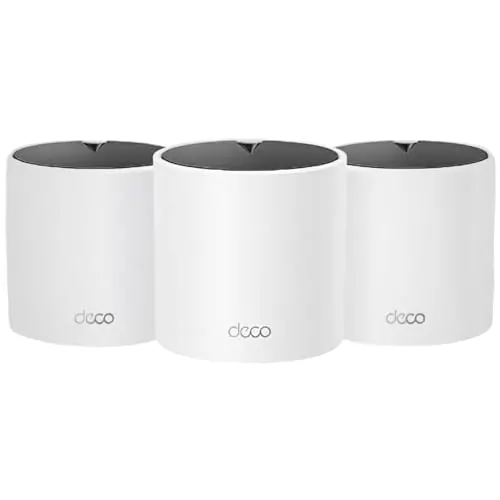
TP-Link Deco X15 AX1500 Wi-Fi 6 Mesh System (3-Pack)
White three-pack with three power adapters and one Ethernet cable. TP-Link lists the X15 as dual-band Wi-Fi 6 AX1500, with two auto-sensing Gigabit ports per node and optional Ethernet backhaul.
Model Deco X15 (3-Pack)
Amazon ASIN B0D7MKJ56S
TP-Link
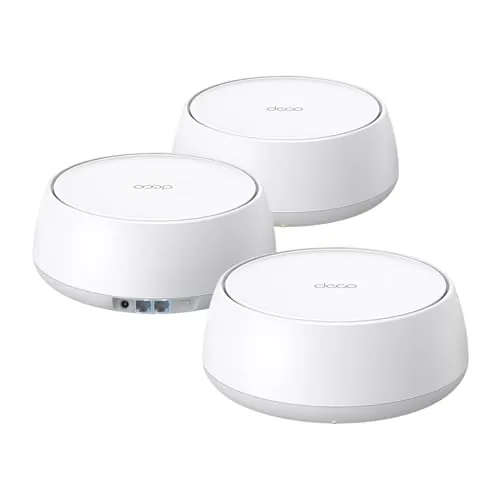
TP-Link Deco BE25 Deco 7 BE5000 Wi-Fi 7 Mesh System (3-Pack)
White three-pack with three power adapters and one Ethernet cable. TP-Link lists the BE25 as dual-band Wi-Fi 7 on 2.4 and 5 GHz, with two auto-sensing 2.5 Gbps ports per node and support for combined wired and wireless backhaul.
Model Deco BE25 (3-Pack)
Amazon ASIN B0DKVDZXSN
Differences that matter
What matters most to you?
Choose a priority to see what it changes.
Sources for Wi-Fi generation and client feature support
Sources for Per-node Ethernet port class
Sources for Node links, setup and exact three-pack contents
Sources for Mixing existing Deco units and MLO requirements
Check what your wireless clients can use
Both compared kits include three Deco units: X15 (ASIN B0D7MKJ56S) and BE25 (ASIN B0DKVDZXSN). TP-Link's US X15 page identifies a dual-band Wi-Fi 6 AX1500 system. Its US BE25 datasheet identifies a dual-band Wi-Fi 7 system and lists 2.4 and 5 GHz, not 6 GHz. Wi-Fi 7 branding does not tell you which features your phone, laptop or game console supports.
Make a short list of the wireless clients you plan to keep and verify each exact device's supported Wi-Fi features. For MLO, check TP-Link's requirements below and the client maker's specifications. None of the published rates here is a real-home speed result.
Trace the wired path before paying for multi-gig ports
The X15 datasheet lists two Gigabit WAN/LAN auto-sensing ports per unit. The BE25 datasheet lists two 2.5 Gbps WAN/LAN auto-sensing ports per unit, with only one WAN port active at a time. A BE25 multi-gig path depends on the connected modem or ONT, service plan, cable, switch and endpoint also supporting the desired link. If one segment stays at Gigabit, the higher port rating elsewhere does not prove a faster end-to-end connection.
On paper, the BE25 supports wired and wireless backhaul simultaneously; the X15 datasheet describes optional Ethernet backhaul. For your three nodes, draw where the modem sits, which rooms have Ethernet, where an external switch is needed and whether a node has a nearby outlet. Both datasheets list the same three-pack counts of units, power adapters and one Ethernet cable.
Treat Deco mixing and MLO as separate checks
TP-Link says Deco models can work together. Its Wi-Fi 7 FAQ also explains the limit: MLO is available only on Wi-Fi 7 Deco models because Wi-Fi 6/6E models lack MLO capability. Compatible firmware is required across the network, and the client must support MLO. Thus an X15 may coexist in a mixed Deco network, but it cannot become an MLO node by joining a BE25 system or receiving firmware.
Before buying into an existing Deco setup, note each node's model and hardware version, then check TP-Link's current support information for firmware and feature availability. The US datasheets reviewed list X15 V1.6 and BE25 V1.0, but do not establish which revisions are in these retail three-packs. Verify the version of the exact units before relying on revision-specific firmware support.
Product details
TP-Link Deco X15 AX1500 Wi-Fi 6 Mesh System (3-Pack)
- Wireless standard and bands
- US datasheet: Wi-Fi 6 (802.11ax), dual-band 2.4 GHz and 5 GHz. Source
- Ethernet ports per Deco unit
- Two Gigabit WAN/LAN auto-sensing Ethernet ports per unit. Source
- Three-pack contents and backhaul
- US datasheet lists three X15 units, one RJ45 Ethernet cable, three power adapters and a quick installation guide; optional Ethernet backhaul is supported. Source
TP-Link Deco BE25 Deco 7 BE5000 Wi-Fi 7 Mesh System (3-Pack)
- Wireless standard and bands
- US datasheet: dual-band Wi-Fi 7 (802.11be), 2.4 GHz and 5 GHz; it does not list a 6 GHz band. Source
- Ethernet ports per Deco unit
- Two 2.5 Gbps WAN/LAN auto-sensing Ethernet ports per unit; only one port can be WAN at a time. Source
- Three-pack contents and backhaul
- US datasheet lists three BE25 units, one RJ45 Ethernet cable, three power adapters and a quick installation guide; both wired and wireless backhaul are supported. Source
Before you buy
Community discussions
Planning three nodes around a desk, TV and bedroom
TP-Link Deco X15 AX1500 Wi-Fi 6 Mesh System (3-Pack)
An X15 three-pack buyer planned one node by the modem and desktop, a second by the living-room TV and a third in the bedroom.
What to check
List the wired devices by room, then check where each node can sit and how many Ethernet ports you need at that location.
Weighing node count for a three-level home
TP-Link Deco BE25 Deco 7 BE5000 Wi-Fi 7 Mesh System (3-Pack)
A buyer who ordered three BE25 units for a three-level home was weighing that layout against a two-unit option.
What to check
Plan a spot for each node at home, then compare the kit count with your available outlets and Ethernet connections.
Common questions
Does this Deco BE25 3-pack have a 6 GHz radio?
The TP-Link US BE25 datasheet lists 2.4 GHz and 5 GHz only. Do not treat the Wi-Fi 7 name on this particular model as proof of a 6 GHz band.TP-Link BE5000 Whole Home Mesh Wi-Fi 7 System Deco BE25 (US) V1.0 Datasheet
Can I add an X15 to a Deco BE25 network and still use MLO?
TP-Link says Deco models can work together, but its Wi-Fi 7 FAQ says MLO networking is available only on Wi-Fi 7 Deco models; Wi-Fi 6 and Wi-Fi 6E Deco models lack MLO capability. An X15 can be part of a mixed Deco network but will not act as an MLO node. For MLO, TP-Link calls for Wi-Fi 7 Deco nodes, compatible firmware throughout the network and an MLO-capable client.Deco X15 | AX1500 Whole Home Mesh Wi-Fi 6 SystemTP-Link Wi-Fi 7 Router and Deco: Frequently Asked Questions
Will the BE25 make my internet faster because it has 2.5 Gbps ports?
Not by itself. TP-Link's BE25 datasheet says 2.5 Gbps internet speeds require compatible service plans and equipment, and the network cable and other parts of the route also matter. The listed port rate is not a measurement of your home's internet or Wi-Fi performance.TP-Link BE5000 Whole Home Mesh Wi-Fi 7 System Deco BE25 (US) V1.0 Datasheet
Sources and scope
Check the hardware version on your package if a revision-specific feature matters. The listed specs cover X15 version 1.6 and BE25 version 1.0. For Multi-Link Operation, check that your Deco nodes, firmware and client meet TP-Link’s requirements.
- Deco X15 | AX1500 Whole Home Mesh Wi-Fi 6 System
- TP-Link AX1500 Whole Home Mesh Wi-Fi 6 System Deco X15 (US) V1.6 Datasheet
- Deco BE25 | Deco 7 BE5000 Whole Home Mesh Wi-Fi 7 System
- TP-Link BE5000 Whole Home Mesh Wi-Fi 7 System Deco BE25 (US) V1.0 Datasheet
- TP-Link Wi-Fi 7 Router and Deco: Frequently Asked Questions
Related comparisons
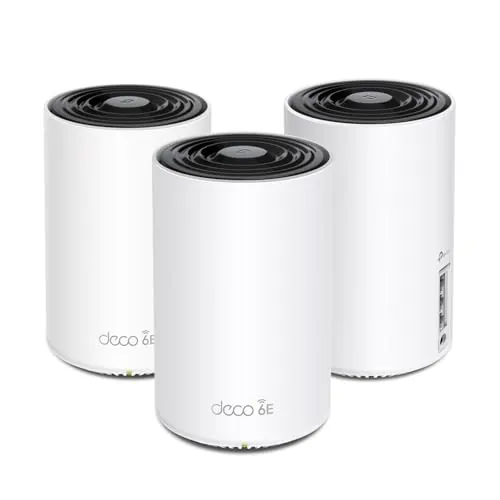
TP-Link Deco XE75 vs X15 3-Pack: Do You Need 6 GHz and Another Port?
Both assigned products are three-node TP-Link Deco kits with optional Ethernet backhaul. The XE75 is tri-band Wi-Fi 6E with a 6 GHz band and three Gigabit ports per unit; the X15 is dual-band Wi-Fi 6 with two Gigabit ports per unit. Pick the XE75 when its extra band or third port solves a specific need. If your devices use 2.4/5 GHz and two ports at each node are enough, the X15 covers those documented needs. Before buying, map the main Deco and two satellite positions, count wired devices at each, and mark any Ethernet cable route. The XE75's older Rev 2 guide describes a 6 GHz dedicated-backhaul setting, but the selected ASIN is not mapped to a hardware revision; verify current hardware and app behavior before relying on that setting. Published rates and coverage figures are not measured results for your home.
Read comparison
TP-Link Deco X15 vs X55 3-Pack: How Many Ethernet Ports Do You Need?
Both assigned TP-Link Deco bundles are three-packs of dual-band Wi-Fi 6 mesh units and both model pages list optional Ethernet backhaul. The X15 has two Gigabit Ethernet ports per unit; the X55 has three, so the X55 adds one physical port at each of the three nodes. For a useful pre-buy check, sketch your modem, main Deco and two satellite locations, then draw each wired backhaul and wired device connection. A node that needs three separate Ethernet connections can exceed the X15's two-port count; the X55 offers a third port, while a compatible switch is another possible layout choice. TP-Link's X55 page also lists an HE160 5 GHz mode, but the selected ASIN is not tied to a hardware revision here. Treat product-page wireless rates as specifications, not a measured speed comparison.
Read comparison