
Products compared
TP-Link
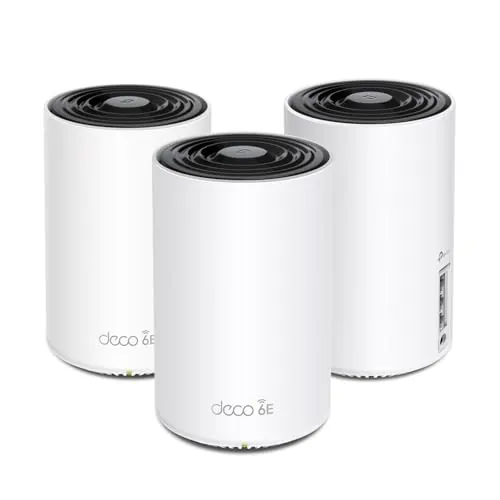
TP-Link Deco XE75 AXE5400 Tri-Band Wi-Fi 6E Mesh System (3-Pack)
The selected listing identifies a Deco XE75 three-pack. TP-Link's US model page lists 3-pack configuration; the page does not map this ASIN to a color or hardware revision.
Model Deco XE75
Amazon ASIN B0B88T5RDY
TP-Link
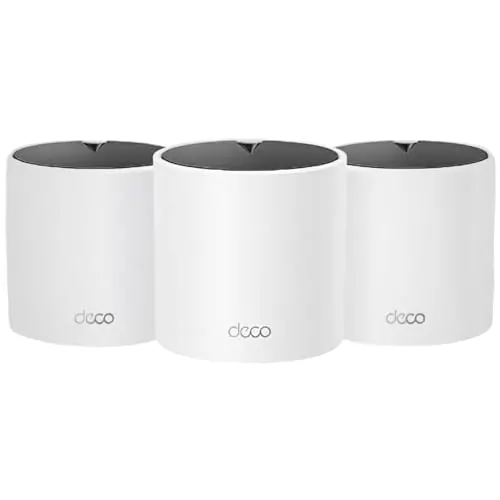
TP-Link Deco X15 Dual-Band AX1500 Wi-Fi 6 Mesh System (3-Pack)
The selected listing identifies a Deco X15 three-pack. TP-Link's US model page lists a 3-pack configuration; the support page identifies an X15 V1.60 hardware family but does not map the selected ASIN to that revision.
Model Deco X15
Amazon ASIN B0D7MKJ56S
Differences that matter
What matters most to you?
Choose a priority to see what it changes.
Sources for Wireless bands and client compatibility
Sources for Wired devices at each node
Sources for Can Ethernet reach the satellite locations?
Sources for What the listed three-packs include
A practical answer: start with your layout
The choice turns on two countable things: which of your devices can use 6 GHz, and how many wired devices need a port at each Deco location. Draw the main node and two satellites, then label the planned Ethernet links and devices. That makes the XE75's third port and extra radio concrete instead of assuming newer specifications will improve every home.
If all devices you care about use 2.4 or 5 GHz and the X15's two ports per node fit your wiring list, its documented feature set covers that plan. If you need a third port at one or more nodes or have 6E clients for a 6 GHz network, the XE75 adds features that may match your setup. Neither conclusion predicts measured speed or coverage.
Wired backhaul can change what matters
Both TP-Link model pages list optional Ethernet backhaul. If cable can reach the two satellite positions, mark that plan before weighing wireless bands. For an XE75 purchase driven by wireless 6 GHz backhaul, inspect the exact hardware revision and current Deco app/manual: the older Rev 2 guide documents a dedicated-backhaul default, while TP-Link's US support page also lists newer XE75 hardware documentation. The selected ASIN is not mapped to a revision, and a documentation difference is not proof that a feature is absent.
Compare only what the sources establish
TP-Link's pages list three nodes, one cable and three power adapters for each model's 3-pack, and the listed node ports are Gigabit Ethernet. This guide does not reproduce aggregate Wi-Fi rates or model-page coverage estimates as comparative results. TP-Link says actual throughput and coverage vary with network, clients and environment; a floor-plan test would be needed to establish which system performs better in a particular home.
Product details
TP-Link Deco XE75 AXE5400 Tri-Band Wi-Fi 6E Mesh System (3-Pack)
The XE75 adds a 6 GHz band and one Gigabit port per node compared with the X15. The extra radio is relevant if compatible Wi-Fi 6E clients need 6 GHz access or if the current hardware/software supports the backhaul arrangement you want. The older guide is revision-specific, so check before treating that setting as a feature of every current bundle.
- Wireless bands
- Tri-band Wi-Fi 6E: 2.4 GHz, 5 GHz and 6 GHz. Source
- Ethernet ports
- Three Gigabit ports per Deco unit; TP-Link lists WAN/LAN auto-sensing. Source
- Node backhaul
- Optional Ethernet backhaul. An older Rev 2 XE75 guide describes 6 GHz dedicated backhaul by default and a 6 GHz client-network option; confirm applicability to the unit's current revision and software. Source
- Listed 3-pack contents
- TP-Link lists three XE75 units, one RJ45 cable, three power adapters and a Quick Installation Guide. Source
TP-Link Deco X15 Dual-Band AX1500 Wi-Fi 6 Mesh System (3-Pack)
The X15 covers the documented dual-band Wi-Fi 6 setup and offers two Gigabit ports per node. It can use optional Ethernet backhaul, so a buyer with cable runs between Deco locations does not need to choose a three-band kit solely to get the documented wired-node option.
- Wireless bands
- Dual-band Wi-Fi 6: 2.4 GHz and 5 GHz. Source
- Ethernet ports
- Two Gigabit ports per Deco unit, with WAN/LAN auto-sensing. Source
- Node backhaul
- Optional Ethernet backhaul is listed for linking Deco units. Source
- Listed 3-pack contents
- TP-Link lists three X15 units, one RJ45 cable, three power adapters and a Quick Installation Guide. Source
Before you buy
Community discussions
Planning which mesh unit stays wired to the modem
TP-Link Deco XE75 AXE5400 Tri-Band Wi-Fi 6E Mesh System (3-Pack)
A Deco XE75 user moved the unit that was connected by Ethernet to their modem into a bedroom. After disconnecting the Ethernet cable, the unit indicated that it could no longer connect.
What to check
Mark the cable from the modem and which node will stay there. List the rooms where you need a satellite and whether those satellites can use Ethernet.
Comparing a mesh satellite’s wireless and wired clients
TP-Link Deco XE75 AXE5400 Tri-Band Wi-Fi 6E Mesh System (3-Pack)
An owner of a three-unit non-Pro Deco XE75 system reported repeating interruptions on wireless clients near two satellites. Ethernet-connected devices stayed online in the same setup. They had not isolated the cause.
What to check
Try the normal wireless clients and one wired client at a satellite location. Check the device connections separately from which wireless band you plan to use.
Common questions
What is the main difference between the Deco XE75 and X15?
The XE75 is tri-band Wi-Fi 6E and adds 6 GHz plus one extra Gigabit port per node. The X15 is dual-band Wi-Fi 6 with two Gigabit ports per node. Neither difference alone proves a faster or better-covered home network.Deco XE75 | AXE5400 Tri-Band Mesh Wi-Fi 6E SystemDeco X15 | AX1500 Whole Home Mesh Wi-Fi 6 System
Do both three-packs support wired Ethernet backhaul?
TP-Link lists optional Ethernet backhaul for both the XE75 and X15. Confirm the cable route and intended node layout for your home.Deco XE75 | AXE5400 Tri-Band Mesh Wi-Fi 6E SystemDeco X15 | AX1500 Whole Home Mesh Wi-Fi 6 System
Can any device use the XE75's 6 GHz client network?
No. TP-Link's XE75 Rev 2 guide says only Wi-Fi 6E-capable devices can join its 6 GHz client network. The guide is revision-specific, so check the exact unit's current instructions.Deco XE75 User Guide, revision 2.0Download for Deco XE75
Does the XE75 guarantee more coverage or faster Wi-Fi than the X15?
No head-to-head result is established here. TP-Link cautions that actual throughput and coverage vary with network, client and environmental conditions; use the published maximums as model-page estimates, not a promise for your layout.Deco XE75 | AXE5400 Tri-Band Mesh Wi-Fi 6E SystemDeco X15 | AX1500 Whole Home Mesh Wi-Fi 6 System
Sources and scope
This is a feature-fit comparison of the assigned TP-Link US three-pack model families, not a controlled test of throughput, coverage, latency, roaming or reliability. Manufacturer maximum rates and coverage estimates are not comparable measured outcomes for a specific home. The XE75 Rev 2 guide documents a 6 GHz dedicated-backhaul default and a client-network option, but the assigned B0B88T5RDY record is not mapped to a hardware revision; current behavior should be checked on the exact unit and firmware. Neither manufacturer page identifies the exact bundle contents or color for the selected ASIN; verify the exact retailer SKU and box before ordering.
Related comparisons

TP-Link Deco X55 vs XE75 (3-Pack): Wired Backhaul or Wi-Fi 6E?
Both assigned packages are three-unit Deco systems with optional Ethernet backhaul and three Gigabit ports on each node. The X55 is dual-band Wi-Fi 6; the XE75 adds a 6 GHz band and tri-band Wi-Fi 6E. If you can wire the satellite nodes and your important devices do not support Wi-Fi 6E, start by asking whether you need the XE75’s extra client band. If nodes must link wirelessly, verify the XE75’s exact hardware and current app behavior first: TP-Link’s Rev 2 guide describes 6 GHz dedicated-backhaul and client-network choices, while its current support page lists a newer guide that does not document the same setting. Published radio and coverage figures are not a head-to-head real-home speed result.
Read comparisonTP-Link Deco X15 vs X55 3-Pack: How Many Ethernet Ports Do You Need?
Both assigned TP-Link Deco bundles are three-packs of dual-band Wi-Fi 6 mesh units and both model pages list optional Ethernet backhaul. The X15 has two Gigabit Ethernet ports per unit; the X55 has three, so the X55 adds one physical port at each of the three nodes. For a useful pre-buy check, sketch your modem, main Deco and two satellite locations, then draw each wired backhaul and wired device connection. A node that needs three separate Ethernet connections can exceed the X15's two-port count; the X55 offers a third port, while a compatible switch is another possible layout choice. TP-Link's X55 page also lists an HE160 5 GHz mode, but the selected ASIN is not tied to a hardware revision here. Treat product-page wireless rates as specifications, not a measured speed comparison.
Read comparison