
Products compared
TP-Link
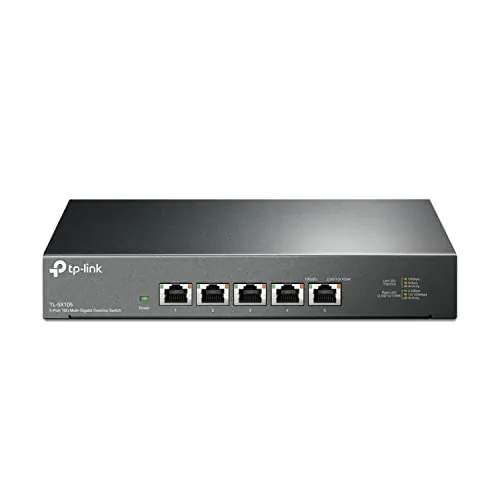
TP-Link TL-SX105 5-Port 10G Desktop Switch
Five unmanaged RJ-45 ports each list 100 Mbps, 1, 2.5, 5, and 10 Gbps auto-negotiation. TP-Link describes plug-and-play setup and desktop or wall mounting. The selected offer does not state the switch’s hardware version.
Model TL-SX105; hardware revision not identified for selected offer
Amazon ASIN B09CYNHL4S
TP-Link
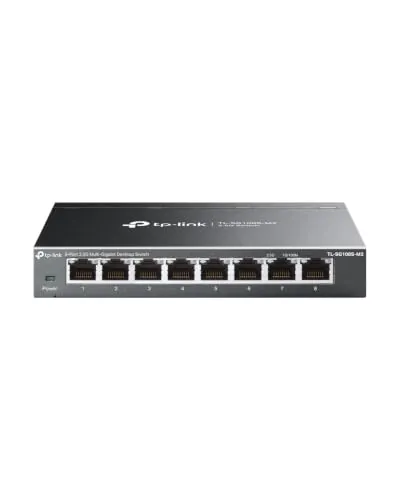
TP-Link TL-SG108S-M2 8-Port 2.5G Multi-Gigabit Desktop Switch
Eight unmanaged RJ-45 ports list 100 Mbps, 1, and 2.5 Gbps auto-negotiation. TP-Link’s U.S. V1 and V2 pages agree on these link modes, Cat5e-or-better cabling guidance, and listed body size. The selected offer’s revision is unknown; revision-specific extras are not compared.
Model TL-SG108S-M2; hardware revision not identified for selected offer
Amazon ASIN B0CMFX748Y
Differences that matter
What matters most to you?
Choose a priority to see what it changes.
Sources for Negotiated port link modes
Sources for Socket plan with one router connection
Sources for Body footprint and revision check
Count the whole wired layout first
Both models are unmanaged plug-and-play switches, but socket count is the first constraint to resolve. TP-Link lists five ports on TL-SX105 and eight on TL-SG108S-M2. If one port on each is used for the router or upstream switch, you have four versus seven device connections. That allocation is arithmetic for a common home-office setup, not a reserved uplink or a separate port type.
Write down every cable that must terminate at this switch: router, NAS, desktop, access point, TV, console and any downstream device. Six total cables cannot all plug directly into TL-SX105; they fit the eight-port model's count. A further connection to another switch uses another socket, so include it before deciding.
Buy a faster port only for a link that can use it
TL-SX105's listed ports negotiate at 100 Mbps or 1, 2.5, 5 or 10 Gbps. TL-SG108S-M2's listed ports negotiate at 100 Mbps, 1 or 2.5 Gbps. If a specific NAS-to-workstation path needs the higher link mode, the five-port model offers it; the eight-port model does not. If all endpoints need at most 2.5 Gbps, the extra TL-SX105 modes may not answer a real requirement.
A port's negotiated rate is not the file copy or internet speed a user will see. The router/uplink, each endpoint network interface, the server/storage, cable run and active network all form the path. A 10 Gbps switch port cannot make a 1 Gbps router connection or endpoint into a 10 Gbps path.
Check cables and the existing router before expecting multi-gig links
TP-Link specifies Cat6a or higher for TL-SX105 10 Gbps connections up to 100 meters. For TL-SG108S-M2, the manufacturer says Cat5e or better can support its listed 2.5 Gbps operation. These are guidance from TP-Link, not a qualification result for a cable installed in a wall or routed beside other equipment.
For each intended fast path, inspect both endpoint port specifications, the router or next-switch port, the cable category and the run length. If an uplink or endpoint is slower, that segment constrains the path even when the new switch supports a higher port mode. No throughput comparison is established by these specifications.
Confirm hardware revision and placement
The selected offers name the base models but not their hardware revisions. TP-Link’s U.S. support selector lists multiple versions of both switches and notes that availability can vary by region. Its TL-SG108S-M2 V1 and V2 product pages agree on core port modes, cable guidance, and body dimensions; V2 lists loop prevention, so this guide does not assume a base-model offer includes a revision-only feature.
Measure the placement spot using the body dimensions (226 × 131 × 35 mm for TL-SX105; 158 × 101 × 25.4 mm for TL-SG108S-M2), then add clearance for the adapter, connector bodies and cable routing. Both product families list desktop/wall mounting. If a particular revision matters, check the physical label and its matching TP-Link U.S. support page before choosing the offer.
Product details
TP-Link TL-SX105 5-Port 10G Desktop Switch
Choose this five-port layout if an actual endpoint-to-endpoint link needs a 5 or 10 Gbps negotiation mode and the router plus every wired device still fit in five sockets. It cannot provide more physical connections just because its top port mode is higher.
- Port modes
- 5 × 100 Mbps / 1 / 2.5 / 5 / 10 Gbps RJ-45 ports with auto-negotiation and Auto-MDI/MDIX Source
- 10 Gbps cabling note
- TP-Link specifies Cat6a or higher-rated cable for 10G connections up to 100 meters; verify the endpoint and full cable run too. Source
- Body and placement
- 226 × 131 × 35 mm (W × D × H); desktop or wall mounting listed. Leave space for power and attached cables beyond the body dimensions. Source
TP-Link TL-SG108S-M2 8-Port 2.5G Multi-Gigabit Desktop Switch
Choose this eight-port layout when the complete wired plan needs more sockets and every required connection negotiates at 2.5 Gbps or below. With one switch port used for a router connection, seven remain for devices; there is no dedicated uplink socket in the listed port interface.
- Port modes
- 8 × 100 Mbps / 1 / 2.5 Gbps RJ-45 ports with auto-negotiation and Auto-MDI/MDIX; consistent across TP-Link U.S. V1 and V2 pages Source
- Cabling note
- TP-Link states Cat5e or better cable can be used for the listed 2.5 Gbps operation; this is not certification of an existing cable run. Source
- Body and placement
- 158 × 101 × 25.4 mm (W × D × H); desktop or wall mounting listed on both U.S. hardware-version pages. Source
Before you buy
Community discussions
Counting ports for a wired mesh layout
TP-Link TL-SG108S-M2 8-Port 2.5G Multi-Gigabit Desktop Switch
A buyer planning wired connections to several Deco units was looking for an eight-port switch. A reply suggested the TL-SG108S-M2.
What to check
Count the wired runs to your access points, plus the link back to the router and any wired clients. Then compare the remaining ports and the link speeds your devices need.
Checking which switch the listing actually names
TP-Link TL-SG108S-M2 8-Port 2.5G Multi-Gigabit Desktop Switch
A shopper in Europe considered the TL-SG108S-M2 and a different switch with a similar model name.
What to check
Check the exact switch label before ordering. Compare the number and speed of its ports with your devices and leave room for a future connection.
Common questions
Does TL-SX105 make my NAS transfers run at 10 Gbps?
It provides ports that can negotiate up to 10 Gbps, but that does not establish a transfer rate. Both endpoints, every link in the path, cabling, NAS/storage, host performance and network conditions matter. This guide compares port modes and does not report a transfer test.TP-Link TL-SX105 U.S. product page — specifications, cabling and setupTP-Link TL-SG108S-M2 V1 U.S. product page
How many devices can I wire after connecting the switch to a router?
Using one switch port for the router connection leaves four ports on TL-SX105 and seven on TL-SG108S-M2. These are ordinary ports, so subtract every other upstream connection your actual layout needs too.TP-Link TL-SX105 U.S. product page — specifications, cabling and setupTP-Link TL-SG108S-M2 V1 U.S. product page
Should I select the TL-SG108S-M2 V1 or V2 page?
The TL-SG108S-M2 model name does not identify its hardware revision. TP-Link’s U.S. V1 and V2 pages agree on the eight 100 Mbps/1/2.5 Gbps ports, Cat5e-or-better cable guidance, and body size, while V2 lists an additional loop-prevention feature. Check the version printed on the exact unit and its matching regional support page before relying on revision-specific functions; this guide does not assume the offer is V1 or V2.TP-Link TL-SG108S-M2 V1 U.S. product pageTP-Link TL-SG108S-M2 V2 U.S. product pageTP-Link TL-SG108S-M2 U.S. support and hardware-version selector
Sources and scope
Port link rates are negotiated connection modes, not measured file-transfer speeds. An endpoint NIC, its cable, the switch port, router or next switch, server/storage, and network traffic all affect the result. The selected offers identify the base switch models but do not establish their hardware revisions. TP-Link’s U.S. V1 and V2 TL-SG108S-M2 pages agree on core port modes, cable guidance, and body dimensions; revision-specific functions are omitted. Confirm the physical hardware-version label and regional support page before relying on revision-specific details.
Related comparisons
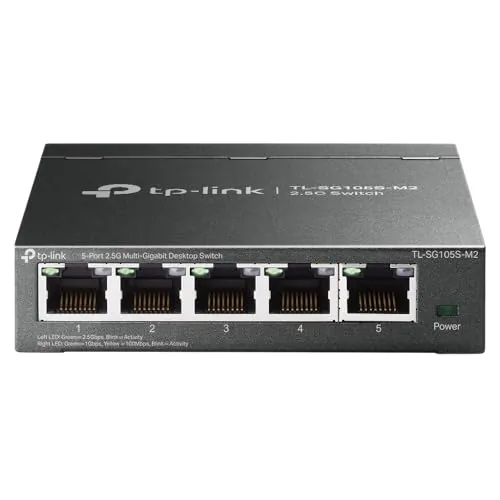
TP-Link TL-SG105S-M2 vs TL-SX105: Choose by Endpoint Speed and Setup
Both are five-port, fanless desktop/wall-mount switches, but their port ranges serve different links: TL-SG105S-M2 negotiates up to 2.5Gbps, while TL-SX105 also lists 5Gbps and 10Gbps. Before buying, check each endpoint's NIC, the cable run, the path to the router/NAS, and the switch's actual installation footprint. TP-Link's U.S. pages also list different dimensions and power-package wording; verify the hardware revision and box for the exact offer. Port ratings are not measured file-transfer or internet speeds.
Read comparisonTP-Link TL-SG105S-M2 vs TL-SG108S-M2: Count the Ports You Will Actually Use
The five-port TL-SG105S-M2 leaves four jacks for devices after one router uplink. The eight-port TL-SG108S-M2 leaves seven and is about 58 mm wider and 3 mm deeper. Both are fanless unmanaged 2.5G switches. Count every uplink and leave room for cabling. Check the router, client and cable path for the link rate you want.
Read comparison