
Products compared
UGREEN
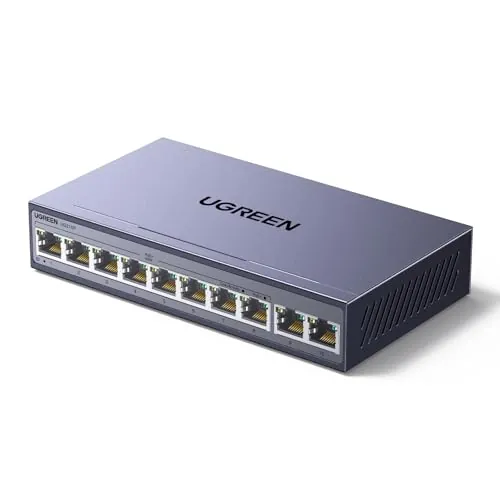
UGREEN Ethernet Switch 35372US, 10-Port PoE+ Gigabit Switch
The current UGREEN U.S. product page identifies SKU 35372US and lists 10 ports: eight 802.3af/at PoE+ Gigabit ports and two Gigabit uplinks. Its listed PoE budget is 60W total, with up to 30W on an individual port. The page also lists Standard, VLAN and Extend mode options. Count and budget the actual endpoints before choosing it.
Model 35372US
Amazon ASIN B0FHK6N2H4
TP-Link
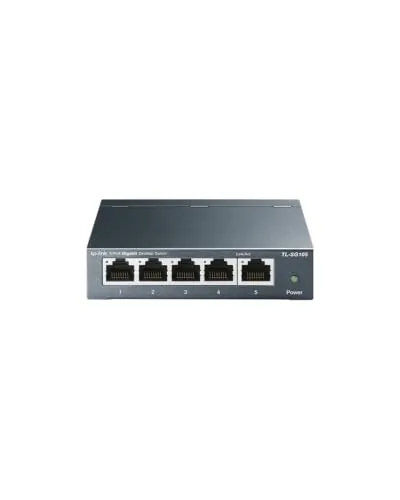
TP-Link TL-SG105 5-Port Gigabit Unmanaged Switch
TP-Link's U.S. product page for revision V6 lists five 10/100/1000 Mbps ports, plug-and-play setup and desktop or wall mounting. The retail offer does not identify which revision it ships, and TP-Link's support page lists multiple versions with regional availability differences. Verify the hardware revision with the seller or on the unit before relying on version-specific dimensions, adapter details or support.
Model TL-SG105 (hardware revision not shown in selected listing)
Amazon ASIN B00A128S24
Differences that matter
Sources for Port count after the router connection
Sources for Port rate and endpoint requirements
Sources for Setup modes and how much configuration you want
Sources for Placement and exact hardware revision
Count ports with the router connected
Draw the network before shopping. Label the port that connects back to the router, then list each device you plan to connect. TP-Link says an unmanaged TL-SG105 can use any port as the upstream connection, so a five-port switch leaves four other ports in that layout. UGREEN 35372US has eight PoE+ ports and two separate ports labeled Gigabit uplink; its larger port map is relevant only if you need those extra connections.
The two models list Gigabit Ethernet ports. A 1GbE specification does not show the speed you will see through your internet service, other network gear or endpoint; this guide does not test transfer speed.
Separate data-port needs from PoE power needs
Only UGREEN's product page in this pair describes switch-supplied PoE. It lists eight 802.3af/at ports, up to 30W on one port and 60W total across the switch. Build a list of powered devices and check their own specification labels; the combined demand must fit the shared budget. If a device does not need PoE, UGREEN says the ports can carry data to non-PoE devices.
TP-Link's U.S. support guidance says a model with P in its name supports PoE. TL-SG105 has no P and is documented as a five-port unmanaged Gigabit model. Plan to power its endpoints separately or with a different compatible PoE source. This is a feature distinction, not a claim that one switch is safer or faster.
Choose a setup and mounting approach
TP-Link describes its TL-SG105 as plug-and-play and unmanaged, requiring no configuration; the support FAQ says the upstream device can use any port. UGREEN lists Standard, VLAN and Extend selector modes. That mode selector is a different setup option, but the product page does not establish a managed web-interface workflow or security guarantee. If you require a specific managed VLAN arrangement, compare that requirement against a supported network design and exact manual rather than relying on the label alone.
Both U.S. model pages list desktop and wall mounting. Measure the intended spot and check outlet access; ask the seller which TL-SG105 revision is included before relying on version-specific dimensions or adapter details.
Pre-buy checklist
1. Count the upstream connection and all wired endpoints. 2. Mark each endpoint that must receive PoE, verify its 802.3af/at requirement and add its expected draw. 3. Choose the port map: a TL-SG105 leaves four non-upstream ports in a basic five-port setup; UGREEN 35372US lists eight PoE+ client-side ports and two uplink-labeled ports. 4. Check desktop/wall placement and outlet access. 5. Confirm the TL-SG105 hardware revision and exact package if those details affect your installation.
If the count and power worksheet shows five total links or fewer, no PoE requirement, and a simple unmanaged setup, the TP-Link may fit. If the layout needs the UGREEN's extra labeled ports or PoE and the power worksheet is within 60W, UGREEN is the documented match. If you need a managed VLAN, multi-Gig link or measured throughput comparison, keep looking.
Product details
UGREEN Ethernet Switch 35372US, 10-Port PoE+ Gigabit Switch
- Ports and roles
- 10 Gigabit RJ45 ports: eight PoE+ ports and two labeled Gigabit uplinks. Source
- PoE budget
- IEEE 802.3af/at; up to 30W on one PoE port and 60W shared across the switch. Source
- Selectable modes and placement
- UGREEN lists Standard, VLAN and Extend modes, and desktop or wall mounting. The product page does not establish a managed VLAN configuration workflow or security guarantee. Source
TP-Link TL-SG105 5-Port Gigabit Unmanaged Switch
- Ports
- Five 10/100/1000 Mbps auto-negotiation RJ45 ports with Auto-MDI/MDIX are listed on TP-Link's U.S. TL-SG105 V6 product page; the retail offer does not identify which hardware revision it ships. Source
- Upstream connection
- TP-Link says an unmanaged switch can use any port for the upstream router or switch; a five-port layout with one upstream connection leaves four other ports. Source
- PoE and revision check
- TP-Link says switch models containing P support PoE; TL-SG105 is a non-PoE model. The U.S. support/download page lists hardware revisions V1 through V9.60 and notes availability varies by region. Source
Before you buy
Community discussions
A five-port switch buyer asks about the existing power cord
TP-Link TL-SG105 5-Port Gigabit Unmanaged Switch
A shopper who ordered a TL-SG105 to replace an existing five-port switch asks whether they can reuse the current power cord.
What to check
Check the power supply included with the exact switch revision, the space next to your Ethernet cables, and which devices will need their own power.
Common questions
How many client devices can the TL-SG105 connect if one port goes to the router?
TP-Link says an unmanaged switch can use any port for the upstream router or switch. With five total ports and one upstream link, four other ports remain in that basic layout.Frequently Asked Questions About Unmanaged Switches — TP-Link Systems U.S. supportTL-SG105 V6 — TP-Link U.S. product page
Can the UGREEN 35372US supply 30W to all eight PoE ports at once?
No. UGREEN lists up to 30W per individual PoE+ port but a 60W total budget shared across the switch. Confirm each powered endpoint's standard and expected draw and keep their combined demand within that total.UGREEN Ethernet Switch, SKU 35372US — UGREEN U.S.
Does TL-SG105 support PoE?
TP-Link's model naming guidance says switches with P in the model name support PoE. The TL-SG105 name has no P and TP-Link describes the product as a five-port unmanaged Gigabit switch; treat it as non-PoE and use endpoint power or another suitable PoE source.Frequently Asked Questions About Unmanaged Switches — TP-Link Systems U.S. supportTL-SG105 V6 — TP-Link U.S. product page
Which TP-Link TL-SG105 hardware version is this Amazon offer?
TP-Link's U.S. support page lists multiple TL-SG105 versions and says availability varies by region. Check the seller's exact offer or the label on the delivered unit before using revision-specific instructions or specifications.Download and hardware-version selection for TL-SG105 — TP-Link U.S. support
Sources and scope
The 60 W rating is the UGREEN switch’s shared PoE budget. Add the requirements of the devices you plan to connect. Check the TL-SG105 hardware revision before using TP-Link’s revision-specific dimensions or adapter information.
- UGREEN Ethernet Switch, SKU 35372US — UGREEN U.S.
- TL-SG105 V6 — TP-Link U.S. product page
- Frequently Asked Questions About Unmanaged Switches — TP-Link Systems U.S. support
- 2024 TP-Link Switches Flyer Product Guide listing data
- Download and hardware-version selection for TL-SG105 — TP-Link U.S. support
Related comparisons
TP-Link TL-SG108E vs TL-SG105: Port Count, Easy Smart Controls and Hardware Revisions
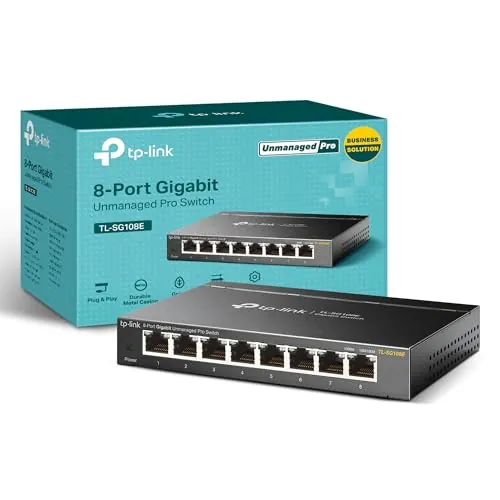
Both plain TP-Link switches provide 10/100/1000 Mbps RJ45 ports, a metal enclosure, and plug-and-play setup. With one port used for the uplink, the eight-port TL-SG108E leaves seven direct device ports; the five-port TL-SG105 leaves four. The SG108E adds optional web or utility management, while the unmanaged SG105 still lists automatic QoS and IGMP Snooping. Both are desktop or wall-mountable; their published footprints and package lists differ. TP-Link supports multiple hardware revisions for both models, so check the label on the exact unit before relying on revision-specific features or firmware status.
Read comparison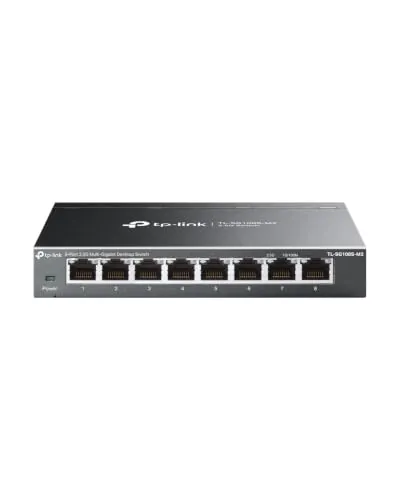
TP-Link TL-SG108S-M2 vs TL-SG105: Map Your Ports Before Upgrading
Both are unmanaged, plug-and-play desktop switches, but the port plan is different: TL-SG108S-M2 lists eight 100 Mbps/1 Gbps/2.5 Gbps ports, while TL-SG105 lists five 10/100/1000 Mbps ports. Before paying for multi-gig, count the switch's router/uplink connection as well as endpoints and check that the devices and the upstream path you want to accelerate also support more than 1 Gbps. TL-SG105 has the smaller manufacturer-listed chassis; verify the exact hardware version and measure the shelf before ordering.
Read comparison