
Products compared
UGREEN
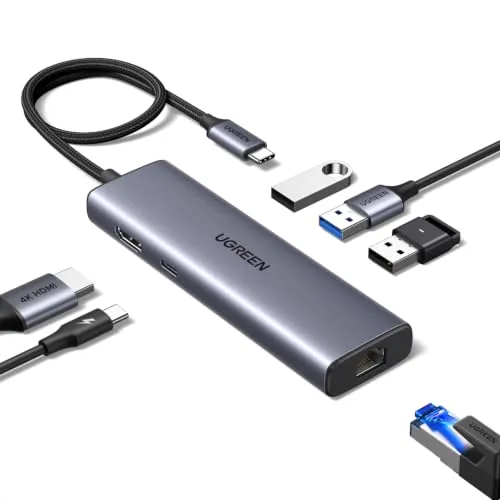
UGREEN Revodok 6-in-1 USB-C Hub with Gigabit Ethernet
The selected offer is listed as one gray UGREEN Revodok 15598 hub. UGREEN identifies SKU 15598; check the seller's page for the exact package.
Model 15598
Amazon ASIN B0BW2TLQ8S
UGREEN
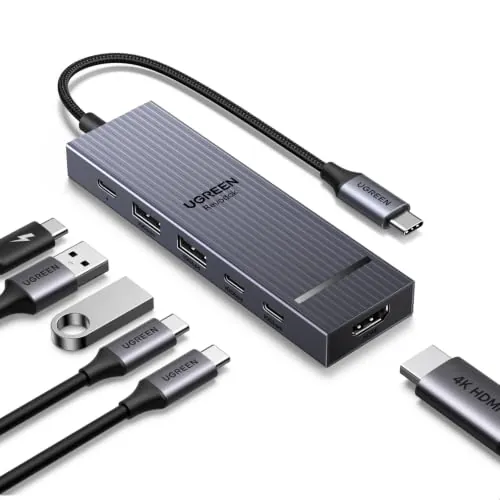
UGREEN Revodok Pro 106 6-in-1 USB-C Hub
UGREEN's U.S. documentation identifies the Revodok Pro 106 as SKU 45363. The selected offer is also labeled AMUH12H, but the sources do not confirm how that label maps to the SKU; check the seller's model and port layout.
Model 45363 (listed model AMUH12H)
Amazon ASIN B0D1XLNWP2
Differences that matter
What matters most to you?
Choose a priority to see what it changes.
Sources for Monitor mode and host video support
Sources for Laptop charging through the hub
Sources for A practical desk hookup check
Start with your actual desk requirements
These are both six-port hubs, but the useful question is not which sounds more premium. It is whether you need a network jack or USB-C data sockets, and whether your monitor has to run at 4K60. The 15598 lists RJ45, three USB-A data ports and HDMI up to 4K30; its USB-C socket is charging-only. The Pro 106 / 45363 lists USB-C data ports and HDMI up to 4K60 with a DP 1.4-capable host, but no built-in Ethernet.
A quick inventory prevents a port-count mistake: list each cable end that must connect directly, the monitor's required resolution and refresh rate, and the laptop's charging requirement. If a dock or separate adapter is acceptable for one missing function, include that in your setup plan; if both wired Ethernet and 4K60 must come from this one hub, neither is documented as a complete match.
Verify the laptop video path before choosing 4K60
For the Pro 45363, UGREEN makes the 4K60 mode conditional on the host video signal supporting DP 1.4. Check the exact laptop model and port in its manufacturer documentation, then make sure the display and HDMI cable also support the requested mode. A USB-C connector only describes the plug; it does not establish that the port carries video or the required DisplayPort version.
The 15598 is listed for HDMI up to 4K30. The reviewed sources do not provide a complete host-by-host compatibility matrix for either hub, so a compatible-looking port is not a substitute for checking the computer's published video-output limits.
Treat PD input and laptop power as different numbers
Both models list up to 100W PD input. UGREEN confirms up to 85W to the host for 45363 in the U.S. FAQ. The exact 15598 Australia page lists up to 95W host output; the U.S. 15598 product page no longer exposes its details. Verify that figure for the selected U.S. model rather than assuming the regional rating carries over.
If charging matters, check the laptop's required USB-C PD profile and the charger's output, then connect power to the labeled PD input. Confirm the exact Amazon package for included accessories: the available sources do not establish that either selected listing includes a charger.
Product details
UGREEN Revodok 6-in-1 USB-C Hub with Gigabit Ethernet
- Listed port layout
- HDMI, Gigabit RJ45 Ethernet, three USB-A 3.0 data ports and one USB-C PD charging input; the USB-C port is charging-only, with no data or video output. Source
- Listed HDMI mode
- Up to 4K at 30 Hz. Source
- PD pass-through
- Listed 100W PD input. The exact Australia page lists up to 95W to the host; the current U.S. listing’s host-output limit remains unverified. Source
UGREEN Revodok Pro 106 6-in-1 USB-C Hub
- Listed port functions
- Two USB-C data ports, two USB-A data ports, HDMI and a separate USB-C PD input; UGREEN says the downstream USB-C ports do not carry video or PD charging. Source
- Listed HDMI mode
- Up to 4K at 60 Hz with a host video signal supporting DisplayPort 1.4. Source
- PD pass-through
- 100W PD input port; UGREEN lists up to 85W delivered to the host. Source
Before you buy
Community discussions
A buyer lists the USB-C devices and monitor before choosing a hub
UGREEN Revodok Pro 106 6-in-1 USB-C Hub
A shopper considering a Revodok Pro 106 wanted HDMI for a monitor and two USB-C connections for desk accessories.
What to check
Count the accessories that need USB-C data. Compare the port roles on the exact offers, including which ports are intended for power.
Common questions
Can I use the extra USB-C ports as monitor outputs?
No such use is documented. UGREEN describes the 15598 USB-C socket as charging-only. For the 45363, UGREEN says the downstream USB-C data ports do not support display; use its HDMI output for a monitor.UGREEN Australia, Revodok 1061 product specifications (exact SKU 15598)UGREEN U.S., USB-C hub compatibility and charging FAQ (SKU 45363)
Will the Pro 45363 give every USB-C laptop 4K at 60 Hz?
UGREEN lists up to 4K60 but specifies a host video signal supporting DP 1.4. Check the exact computer port and your monitor/cable mode; these sources do not establish compatibility for every USB-C host.UGREEN U.S., USB-C hub compatibility and charging FAQ (SKU 45363)
Which one should I choose if I need wired networking and 4K60?
Neither reviewed model documents both needs: the 15598 has RJ45 but lists 4K30, while the 45363 lists conditional 4K60 but has no built-in RJ45. Look for another exact hub model that documents both requirements.UGREEN Australia, Revodok 1061 product specifications (exact SKU 15598)UGREEN U.S., USB-C hub compatibility and charging FAQ (SKU 45363)
Does a 100W PD rating mean the hub sends 100W to my laptop?
A PD input rating describes incoming power. UGREEN's U.S. FAQ lists up to 85W host output for 45363. The Australian exact 15598 page lists up to 95W to the host; confirm the U.S. unit’s rating and the charger before buying.UGREEN Australia, Revodok 1061 product specifications (exact SKU 15598)UGREEN U.S., USB-C hub compatibility and charging FAQ (SKU 45363)
Sources and scope
This comparison uses UGREEN's Australia product page for the 15598 port layout and HDMI mode, plus its U.S. FAQ and U.K. 45363 page for the Pro 106. The Australia 15598 page lists up to 95W to the host; older U.S. evidence listed 85W, and the current U.S. 15598 page redirects, so check the rating for the unit sold in the U.S. For the Pro 106, UGREEN identifies SKU 45363, while the selected U.S. offer is also labeled AMUH12H; the sources do not confirm how that label maps to the SKU, so verify the exact model and port layout. Charger inclusion, actual transfer speed, and compatibility with a particular laptop have not been established.
Related comparisons
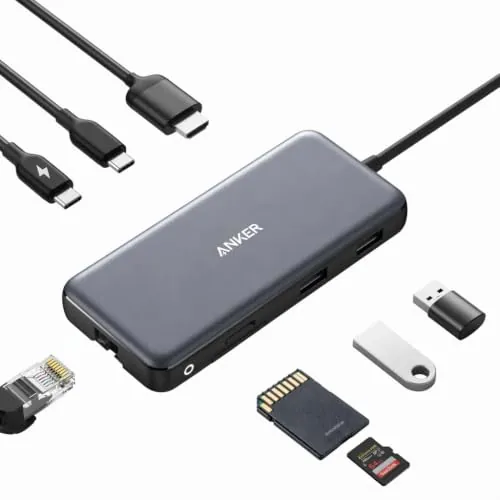
UGREEN Revodok Pro 106 vs Anker 555 A8383: Which Ports Fit Your Desk?
For a desk built around USB-C accessories, the UGREEN Revodok Pro 106 (SKU 45363) gives you two downstream USB-C data ports plus two USB-A ports. The Anker 555 (A8383) has one USB-C and two USB-A data ports, then adds Gigabit Ethernet and UHS-I SD and microSD readers. Both list HDMI up to 4K at 60Hz and up to 85W of laptop power from a 100W PD input. Check the laptop's exact USB-C video support and power needs before choosing; connector shape alone does not confirm either feature.
Read comparison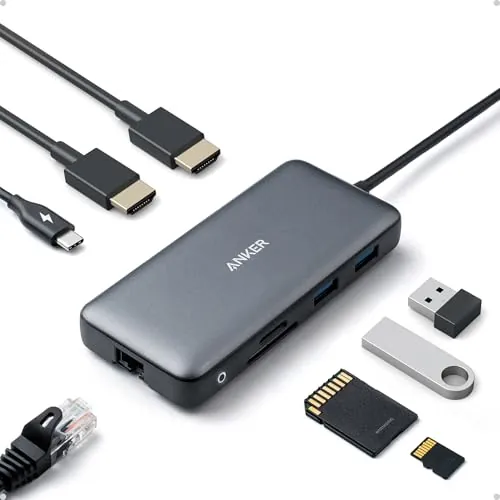
Anker 553 A8380 vs UGREEN Revodok 15598: Pick by Screens and Ports
Both hubs add HDMI, USB-A, Ethernet and USB-C power input, but the exact port mix is different. Anker's 553 A8380 has two HDMI outputs, two USB-A data ports and SD/microSD readers; Anker lists display modes by host DisplayPort version and says its HDMI displays mirror on Mac. UGREEN's Revodok 15598 has one HDMI output rated up to 4K at 30 Hz, three USB-A data ports and Gigabit Ethernet. Before buying, check the laptop's USB-C video support and simultaneous-display limit, then count the ports and card formats your desk actually uses.
Read comparison