
Products compared
UGREEN
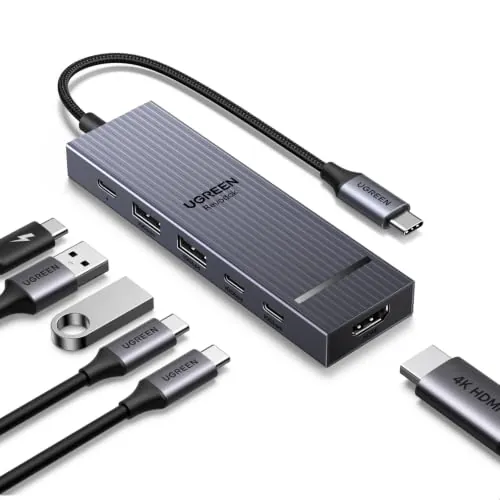
UGREEN Revodok Pro 106 6-in-1 USB-C Hub
UGREEN's U.S. support page identifies the Revodok Pro 106 as SKU 45363. The selected offer is also labeled AMUH12H, but the sources do not confirm whether that label refers to the same configuration. Check the seller's listing for the model and port layout.
Model SKU 45363
Amazon ASIN B0D1XLNWP2
Anker
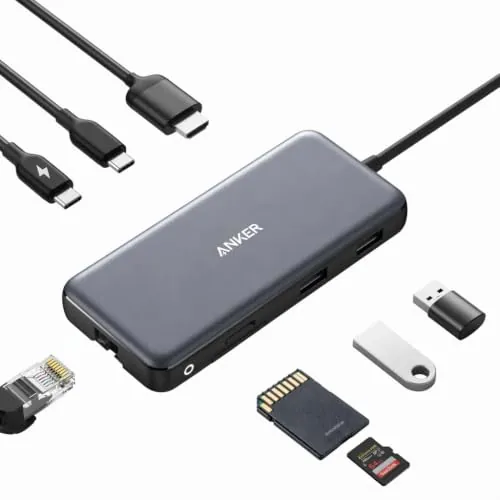
Anker 555 USB-C Hub (8-in-1)
Anker's official pages identify the Anker 555 as model A8383. The selected offer is labeled A83830A1/Gray, while Anker's current product page shows a Black configuration; the sources do not confirm that these labels describe the same retail package. Verify the color and included items with the seller.
Model A8383 (listing data suffix A83830A1)
Amazon ASIN B087QZVQJX
Differences that matter
What matters most to you?
Choose a priority to see what it changes.
Sources for USB data ports and built-in desk connections
Sources for HDMI display path and host eligibility
Sources for Charging budget through the hub
Sources for USB-C connector roles and setup checks
Start with the devices on your desk
Write down the plugs you need before comparing the hub labels. The UGREEN Revodok Pro 106 SKU 45363 has two USB-C data ports and two USB-A data ports. The Anker 555 A8383 has one USB-C data port and two USB-A ports, then adds Ethernet and SD/microSD readers. If your camera workflow uses cards or your work setup has a wired network cable, Anker may remove those adapters. If you have two USB-C data devices, UGREEN has the extra socket.
Both pages advertise 10Gbps USB data ports. That is a maximum rating, not proof that every connected device will sustain 10Gbps at once. This guide does not compare transfer speeds or test shared-load behavior.
Check the laptop before counting on an external display
Both hubs provide one HDMI output rated up to 4K at 60Hz, but the host USB-C port must send video. Anker's A8383 troubleshooting page specifically says DP Alt Mode is required; UGREEN also calls for a video-capable host. For 4K60, each manufacturer specifies DP 1.4 for its respective hub. Look up the exact laptop model and port, then confirm its video mode and the monitor/cable combination. A USB-C socket that only carries data or charging is not enough.
Do not plan to turn the hub's downstream USB-C data port into another display output. UGREEN identifies both downstream USB-C ports as data-only, and Anker says the A8383 USB-C data port cannot output video. The listed comparison is about one HDMI display path per hub; it makes no dual-display claim.
Treat power input and laptop output as different numbers
Both product families list up to 85W to the laptop even though the PD input rating is 100W. If the laptop needs more than 85W through the hub, neither is the documented fit. Anker says that 85W requires a 100W PD wall charger and USB-C cable; its page says the charger is not included. UGREEN's cited U.S. FAQ confirms 100W input and up to 85W host output, but it does not establish whether the exact retail box includes a charger.
Anker's USB-C data port is not the PD input; the hub has separate ports for those roles. UGREEN likewise separates its downstream data ports, HDMI output and USB-C PD input. Label your laptop cable, monitor cable and charger by function before plugging in, and check the exact listing and laptop's charging requirements.
A practical pre-buy checklist
1. Write down every accessory and mark whether it uses USB-C data, USB-A data, Ethernet, SD, microSD or HDMI. Pick the UGREEN's second USB-C data connection or Anker's network/card ports only if you will use it.
2. Check the laptop maker's page for USB-C video output and, if you require 4K60, DP 1.4. Then check the monitor input and cable. Neither hub certifies a particular laptop combination in this comparison.
3. Compare the hub's 85W host-output ceiling with the laptop's power requirement. For Anker's 85W condition, verify you have a 100W PD wall charger and cable; for either model, confirm what the exact seller package includes.
4. Match the product at checkout. UGREEN's U.S. FAQ names SKU 45363, while the selected offer is also labeled AMUH12H; the sources do not reconcile those labels. The selected Anker offer is labeled A83830A1/Gray, while the current Anker page identifies the A8383 hub family and shows a Black configuration. Confirm the exact listing if its model label, color, or box contents matter.
Product details
UGREEN Revodok Pro 106 6-in-1 USB-C Hub
- Manufacturer model identifier
- UGREEN identifies the Revodok Pro 106 as SKU 45363; the selected offer is also labeled AMUH12H, and the sources do not confirm how the labels relate. Source
- Ports and data rating
- Two downstream USB-C data ports and two USB-A data ports, each rated up to 10Gbps; one HDMI port and a separate USB-C PD input. Source
- HDMI and host requirement
- Up to 4K at 60Hz; the host needs video output such as DP Alt Mode or Thunderbolt, and UGREEN specifies DP 1.4 for 4K at 60Hz on SKU 45363. Source
- Power input and laptop pass-through
- The hub's 100W PD input rating corresponds to up to 85W delivered to the laptop. Source
- Port roles and shared-bandwidth note
- Downstream USB-C ports are data-only, not video or PD charging; video uses HDMI and power input uses the separate PD port. UGREEN says 10Gbps is a link maximum, not a dedicated simultaneous rate per device. Source
Anker 555 USB-C Hub (8-in-1)
- Manufacturer model identifier
- Anker's official product and support pages identify the Anker 555 as model A8383; they do not confirm the selected offer's A83830A1 suffix or Gray color. Source
- Ports and data rating
- One USB-C and two USB-A data ports rated up to 10Gbps, HDMI, Gigabit Ethernet, UHS-I SD and UHS-I microSD slots, and a separate USB-C PD input. Source
- HDMI and host requirement
- HDMI supports up to 4K at 60Hz; the host USB-C port must support DP Alt Mode, and Anker specifies DP 1.4 for 4K at 60Hz. The hub's USB-C data port does not output video. Source
- Power input and laptop pass-through
- Up to 85W to the laptop; Anker says to use a 100W PD wall charger and USB-C cable for 85W, with 15W reserved for hub operation. Source
Before you buy
Community discussions
A buyer counts USB-C devices before selecting a compact hub
UGREEN Revodok Pro 106 6-in-1 USB-C Hub
A buyer considering a Revodok Pro 106 wanted to connect USB-C accessories and a monitor through the same hub.
What to check
Check whether your laptop’s port carries video and whether you can connect your display and peripherals at the same time.
An A8383 owner checks whether the attached cable reaches the planned desk position
Anker 555 USB-C Hub (8-in-1)
An Anker 555 A8383 owner found the attached cable too short to return the hub to their preferred spot.
What to check
Measure the route from your laptop’s port to the place you want the hub. Include any cable turns or desk edges.
Common questions
Will either hub make HDMI work on any USB-C laptop?
No. Anker says its A8383 needs a host USB-C port that supports DP Alt Mode. UGREEN likewise says the host must support video output. For 4K at 60Hz, both makers specify DP 1.4 for these exact hub models. Check the laptop's own port documentation.UGREEN U.S. USB-C Hubs FAQ: Revodok Pro 106 SKU 45363Anker U.K. Anker 555 USB-C Hub (8-in-1), model A8383: DP, PD and port-role FAQsAnker Support: Display troubleshooting for hub A8383
Can I use one of the downstream USB-C data ports for a second monitor?
The manufacturer sources do not support that assumption. UGREEN says its downstream USB-C ports are data-only, and Anker says the A8383 USB-C data port cannot output video. Use their HDMI ports for display output and verify the host/display setup.UGREEN U.S. USB-C Hubs FAQ: Revodok Pro 106 SKU 45363Anker U.K. Anker 555 USB-C Hub (8-in-1), model A8383: DP, PD and port-role FAQs
Does a 100W PD input mean 100W reaches my laptop?
No. Both makers state up to 85W to the laptop. Anker says its 85W condition uses a 100W PD wall charger and USB-C cable, with 15W reserved for hub operation. Compare the output ceiling with your laptop's requirements.UGREEN U.S. USB-C Hubs FAQ: Revodok Pro 106 SKU 45363Anker U.K. Anker 555 USB-C Hub (8-in-1), model A8383: DP, PD and port-role FAQs
Which hub is the better choice for a card-based photo workflow?
The Anker 555 A8383 lists UHS-I SD and microSD slots, so it can avoid a separate card-reader adapter for those card formats. UGREEN's listed six-port layout instead gives you a second downstream USB-C data port. Choose from your actual peripherals, and confirm the selected Anker listing matches the documented A8383 hardware family.Anker U.S. Anker 555 USB-C Hub (8-in-1), model A8383UGREEN U.S. USB-C Hubs FAQ: Revodok Pro 106 SKU 45363
Sources and scope
This comparison uses manufacturer specifications and compatibility checks; it includes no measured transfer-speed, display-stability, heat, or reliability test. UGREEN's U.S. page identifies the Revodok Pro 106 as SKU 45363, while the selected offer is also labeled AMUH12H; the sources do not establish how those labels relate. The selected Anker offer is labeled A83830A1/Gray, while Anker's current page identifies the A8383 hub family and displays a Black configuration. The comparison therefore keeps hardware claims at the documented A8383 family level and does not assert color or retail-package equivalence. Confirm the exact seller listing and host-port requirements before purchase. Prices are omitted.
Related comparisons
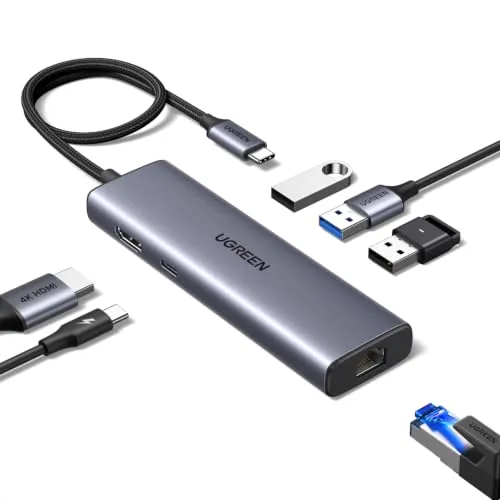
UGREEN Revodok 15598 vs Revodok Pro 45363: Ports, HDMI and Charging
The Revodok 15598 gives you built-in Gigabit Ethernet and three USB-A data ports, but its HDMI output is listed up to 4K at 30 Hz and its extra USB-C socket is for charging only. The Revodok Pro 106 (SKU 45363) replaces Ethernet with USB-C data ports and lists HDMI up to 4K at 60 Hz when the host supports DP 1.4. Both list up to 100W PD input. UGREEN’s U.S. FAQ lists up to 85W to the host for 45363; confirm the 15598 U.S. offer’s host-output rating separately.
Read comparison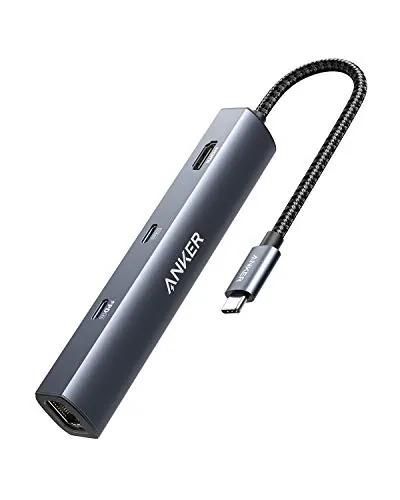
Anker 543 A8365 vs Anker 555 A8383: Check Laptop Power and Display Needs
The Anker 543 A8365 is the simpler fit when HDMI up to 4K at 30 Hz and up to 53 W laptop power are enough. The Anker 555 A8383 adds an HDMI mode up to 4K at 60 Hz and up to 85 W laptop power, but 60 Hz requires a DP 1.4-capable host and the full power figure requires a 100 W PD charger and cable. Before choosing, check your computer's USB-C video support, the monitor mode you intend to use, and the laptop's charging requirement. These are manufacturer-rated limits, not a test of either hub.
Read comparison